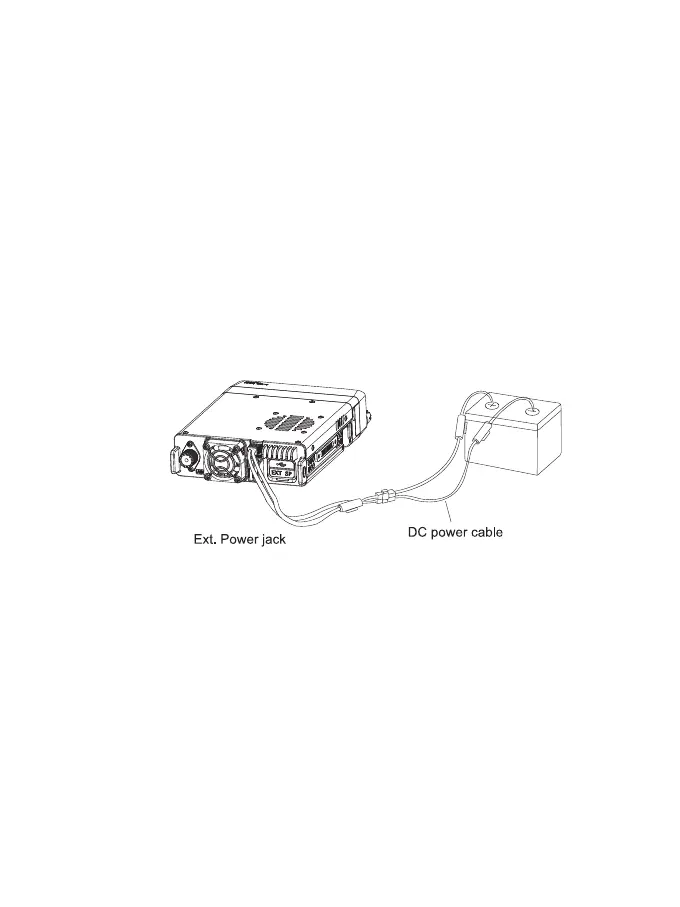
DC Power Cable Connection
Note: Locate the power input connector as close to the transceiver as possible.The vehicle
batte must have a nominal rating of 12V. Never connect the transceiver to a 24V batte.
Be sure to use a vehicle batte that has sucient current capacity. If the current to the
transceiver is insucient the display may darken during transmission or transmitting output
power may drop excessively.
1. Route the DC power cable supplied with the transceiver directly to the vehicle's batte
terminals using the shoest path from the transceiver. We suggest you do not use the
cigarette lighter socket as some cigarette lighter sockets introduce an unacceptable voltage
drop, The entire length of the cable must be dressed so that it is isolated from heat, moisture
and the engine seconda (high voltage) ignition system/cables.
2. After installing the cable, in order to avoid the risk of damp, please use heat-resistant tape
to tie together with the fuse box. Do not forget to reinforce the whole cable.
3. Conrm the correct polarity of the connections, then attach the power cable to the batte
terminals: Red connects to the positive (+)terminal and black connects to the negative (-)
terminal.
4.Reconnect any wiring removed from the negative terminal.
5. Connect the DC power cable to the transceiver's power supply connector. Press the
connectors rmly together until the locking tab clicks.
Fixed Station Operation
In order to use this transceiver for xed station operation you will need a separate 13.8V DC
power supply (not included).Please contact your local dealer about it.
The recommended current capacity of your power supply is 12A.
1. Connect the DC power cable to the regulated DC power supply and ensure that the
polarities are correct. (Red: positive; Black: Negative).
Do not connect the transceiver directly to an AC outlet.
Use the supplied DC power cable to connect the transceiver to a regulated power supply.
Do not substitute a cable with smaller gauge wires.
Connect the transceiver's DC power connector to the connector on the DC power cable.
3. Press the connectors rmly together until the locking tab clicks.
Note:
Before connecting the DC power to the transceiver be sure to switch the transceiver and the
DC power supply OFF, Do not plug the DC power supply into an AC outlet until you have
made all connections.
3



 To Next Page