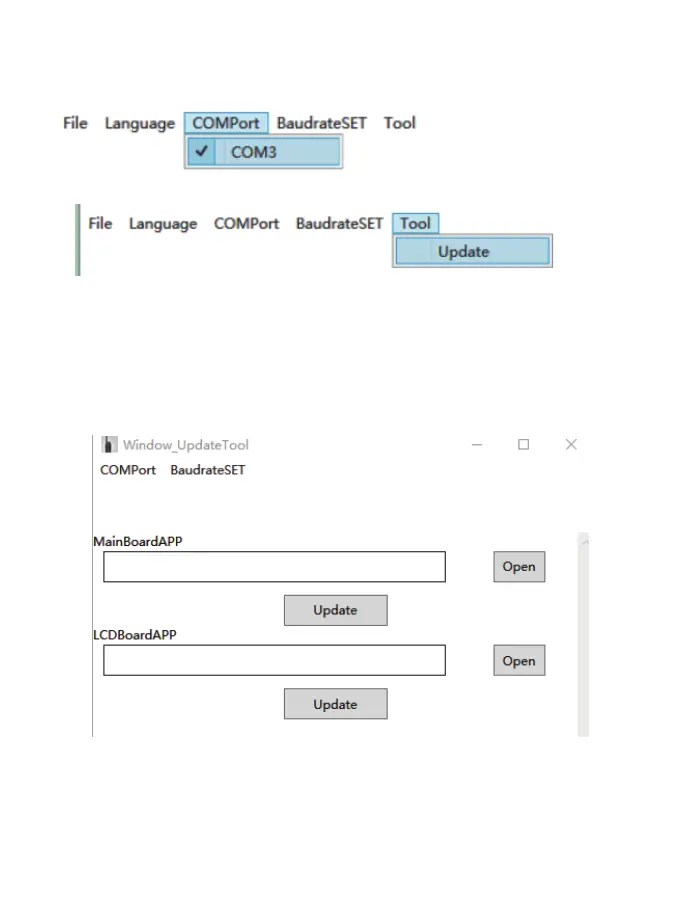
The radio front panel and main board need to be separately updated.
1)Open the rmware upgrade tool.
2)Connect the USB cable to your PC.
3)Choose the com po rst.
4)Open the update tool.
5)Open the MainBoardAPP le, then Press the Band+Power key and turn on the radio to enter
the main board DFU mode. Then click Update to enter the upgrading progress. The screen will
display MAIN UPDATE. It will display SUCCED after the upgrading operation is successful.
6)Next, open the LCDBoardAPP le, press the CTRL+Power key, and power on the radio to
enter the LCD board DFU mode. Then click Update to enter the upgrading progress. The
screen will display PANEL UPDATE. It will display SUCCED after the upgrading operation is
successful.
20



 To Next Page