If you have the keypad lock enabled on your radio, you can still send a 1750Hz tone the regular way without
having to unlock your radio.
6. WORKING THE MENU SYSTEM
6.1 Basic use
Using the menu with arrow keys
1> Press the [MENU] key to enter the menu.
2> Use the [+UP] and [-DOWN] keys to navigate between menu items.
3>Once you find the desired menu item, press [MENU] again to select that menu item.
4>Use the [+UP] and [-DOWN] keys to select the desired parameter.
5>When you've selected the parameter you want to set for a given menu item;
a). To confirm your selection, press [MENU] and it will save your setting and bring you back to the main menu.
b). To cancel your changes, press [A/B] and it will reset that menu item and bring you out of the menu entirely.
6> To exit out of the menu at any time, press the [A/B] key.
6.2 Shortcut Menu operations
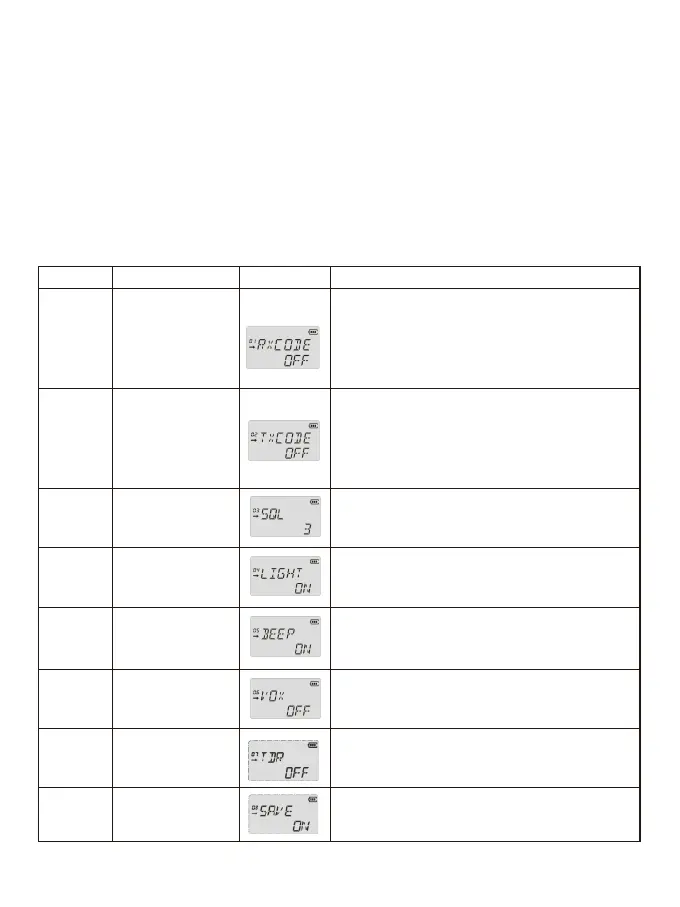
MENU No. Name(Full Name) LCD display Selectable
RXCODE
-Receiver
Privacy Codes
TXCODE
-Transmitter
Privacy Codes
SQL
- Squelch Level
LIGHT
-Back Light
BEEP
- Keypad Beep
VOX - VOX
TDR – Dual Watch
Operation
SAVE
- Battery Saving
OFF;67.0…D754N
The Privacy Codes is off, and the display is OFF. When
the display is OFF, press +key to select CTCSS with
priority; When the display is OFF, press - key to select
DCS with priority.
OFF;67.0…D754N
The Privacy Codes is off, and the display is OFF. When
the display is OFF, press +key to select CTCSS with
priority; When the display is OFF, press - key to select
DCS with priority.
.0-9 Levels
.0:Lowest
.9:Highest
.OFF
.ON
.KEY
.OFF
.ON
*Allows audible confirmation of a key press.
.OFF will turn off VOX function.
.1:Lowest Sensitivity
.5:Highest Sensitivity
OFF ON
*Monitor [A] and [B] at the same time. Activate the dual
watch, and the screen will display the ‘S’ icon.
OFF:
ON:
1
2
3
4
5
6
7
8
8


 To Next Page