Scan function
In the standby state of the radio mode, press the ◎ key 6 times, and "SC" will be
displayed on the screen.
Press ˂ or ˃ key to select on and off
Press【PTT】key to save the current settings and exit the menu to start
The scanning function of the radio scans the effective signal channels, which can
easily scan 16 channels
Note: When the scan menu setting is selected as OF, the scan function will be
invalid when you press the [Power Switch/Scan] key.
Start scanning:
1) In the radio standby mode, press the [Power Switch/Scan] key to enter the
scan mode, the channel number will be displayed in upward increments, and the
SCAN icon will be displayed on the LCD.
2) When an active channel is detected, the intercom will automatically suspend
receiving signals on this channel until the signal disappears.
Lost. After the signal disappears and wait for 5 seconds, the intercom will
continue to scan.
3) Press the [PTT] key during scanning, and the intercom will stop transmitting
on the channel that started scanning. in the case of
When a valid signal is detected and the reception is stopped, press the [PTT]
key, and the intercom will transmit on the current channel. release
Wait 5 seconds after 【PTT】key, the intercom will continue to scan
4) Press the [Power Switch/Scan] key again to exit the scan and return to the
radio standby mode.
Roger beep
1) In the standby state of the radio mode, press the ◎ key 7 times, the setting
interface of the current call end tone will display "rb".
2) Press ˂ or ˃ key to select on and off,
3) Press【PTT】key to save the current setting and exit the menu or press ◎
key to end the setting.
Note: When the call end tone is turned on, press PTT after the call ends, the
machine will give a prompt tone, and the receiver will also receive a prompt tone.
Button control
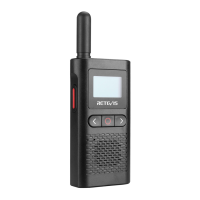
1) [Power switch/scan] key: long press this key to turn on or off the radio; short
press this key to turn on or off the scan.
2)【˂ 】key: long press this key to switch between radios and monitor modes;
short press this key to increase the volume.
3) 【˃ 】key: long press this key to emit the calling tone; short press this key to
decrease the volume.
4) 【◎ 】key: long press this key to operate the lock or unlock function; short
press this key to enter or exit the menu.
5) 【PTT】key can be set: transmit or save settings (in menu mode).
Lock key
The keyboard lock function is to prevent users from misoperation when they don't
want to change the settings of the radio
5


 To Next Page