08
each zone has 16 channels, Zone can be
selected by pre-programmed key.
Transmit
When going to transmit, press PTT
key, keep microphone away from
your mouth about 3-4cm, and speak
in your usual tone.
Receiving
Release the PTT key to receive.
Adjust the suitable volume to get the
best receiving result.
Function Specification
LED indicator
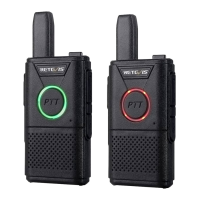
LED indicator shows transceiver's working status.Red light
indicates the transceiver is transmitting.
Green light indicates the transceiver is on process of power on
or is receiving non-encrypted signal or data, or is detecting air
activity.
Call (PTT) key
Each channel in this transceiver can be set into a digital channel.
When in transmitting, press PTT key continuous will transmit
signals to other transceivers continuously.
Press PTT to transmit and release PTT to receive. The micro-
phone will be activated by pressing PTT
Receive and Transmit Call
Zone Selection
The zone is a group of channels.The transceiver supports at
most eight zones, and each zone is not more than 16 channels
1. Press the key pre-programmed.
2.You will hear a notification sound , then radio will exchange
from Zone 1 to Zone 8.


 To Next Page