18
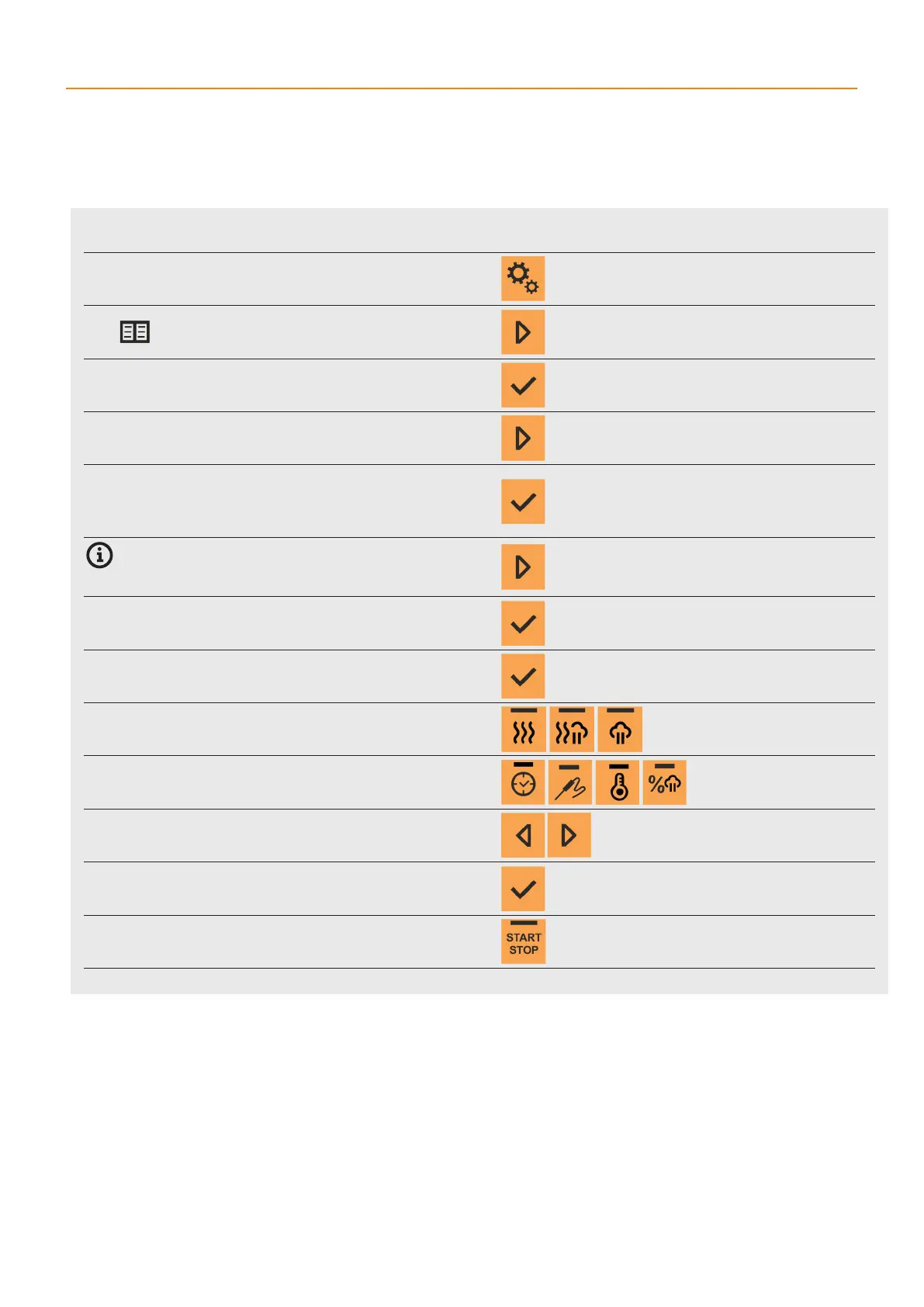
Adding aprogram step
1 PRESS
2 SELECT PROGRAMS
3 PRESS
4 SELECT THE DESIRED PROGRAM
5 ENTER THE PROGRAM
Press and hold the button for more than 2 seconds. The program
number appears with the number of program steps (e.g. 13 - 1/2,
where 13 is the program number, 1 is the order of the currently
displayed step, and 2 is the total steps in the program).
If you want to add anew step to a program that has more than
one step, after choosing the program, use the navigation arrow to
select the step after which you want to add anew step. Otherwise,
the new step will be added as Step 1.
6 OPEN THE PROGRAM ACTIVITY MENU
ADD will appear.
7 CONFIRM THE SELECTION
The new step number will appear and all the mode buttons will
start flashing.
8 SELECT ACOOKING MODE
9 SELECT ACOOKING PARAMETER
The current value of the selected parameter will start flashing.
10 EDIT THE PARAMETER VALUE
In the same way, modify the other parameters.
11 CONFIRM THE SETTING
12 START THE COOKING PROCESS
User’smanual | Orange Vision Combi Ovens | 04 COOKING



 To Next Page