Revv Owner’s Manual - 8
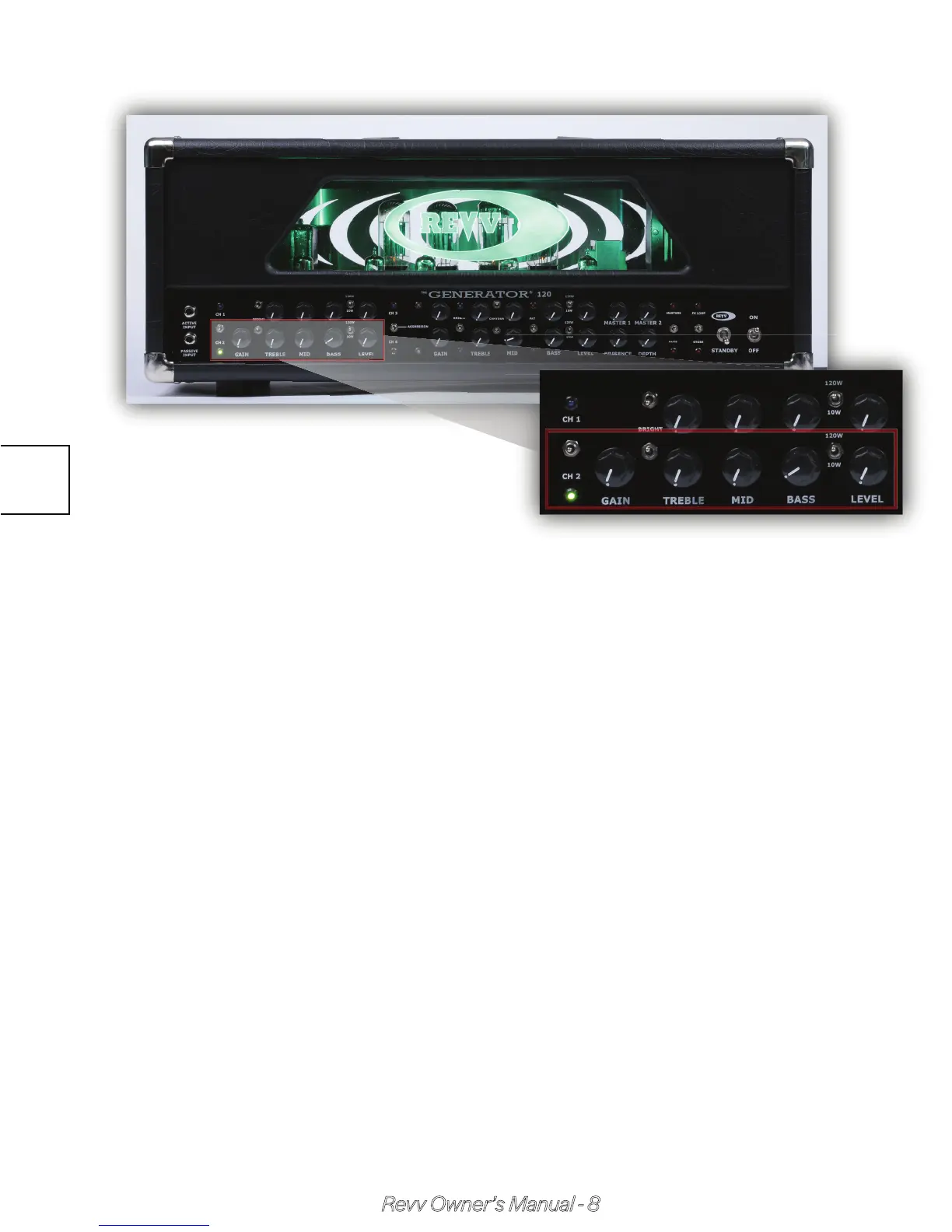
Channel Two (Crunch)
Selected by: 1) pushing the designated front panel momentary toggle
switch down, 2) footswitch button #2 or a footswitch preset mode set-
ting, 3) MIDI & CC commands.
Passive treble, middle, & bass controls with a wide range. Small turns =
large tonal change!
Crunch Bright allows you to tailor the sound to your preferences by
shifting the high end response of this channel. It makes quite a large
difference, so don’t be afraid to turn it on if you like a much more bitey
tone! Pairing this on/off position with dialing of the treble knob can yield
very powerful results.
Crunch Gain allows you to go from an almost totally clean tone to quite a
bit of gain! Most people do not use this past noon or so - but if you go
above 3 O’Clock you will experience some cool fuzz-like tones you may
find useful!
The Output Power Switch operates separately of all other channels & is
useful to decrease power to 10 watts for a saggier sound & feel or
simply a large volume decrease.
2.3



 To Next Page