3.2.1 Configuration Webpage
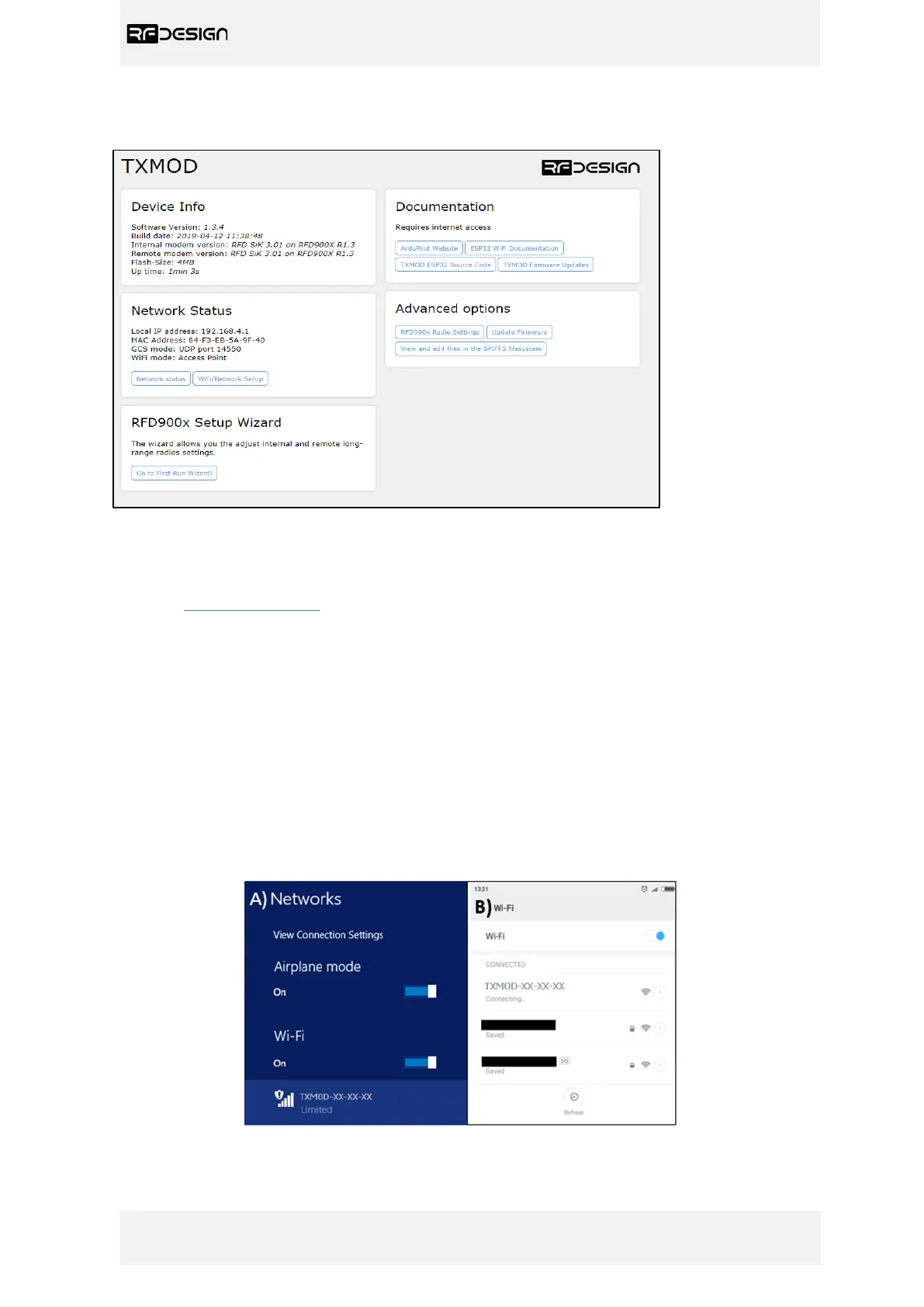
Figure 6 - Configuration home page
The configuration home page provides basic information on the RF Design TXMOD, such as the
software versions, MAC and IP addresses and links to the various configuration pages. The default
address is http://192.168.4.1/ . This interface allows the user to configure both the Wi-Fi and the
long-range communication settings. Follow the steps described in the following section.
3.2.2 Wi-Fi Configuration
An active Wi-Fi connection is needed to configure the TXMOD. On first power up, the TXMOD will
default to access point mode, with SSID of the format ‘TXMOD-XX-XX-XX’, where the XX are unique
hexadecimal characters relating to the unit MAC address.
a) Connect to TXMOD Access Point
- Use your computer or smart device to search for and connect to the access point Wi-Fi network
generated by the TXMOD (use ‘TXMOD123’ as default password). Note: It may be necessary to
disable mobile data, on tablets and phones, to force the browser to use the TXMOD network.
Figure 7 - Network settings. A) Windows 8.1. B) Android.


 To Next Page