– Version 1.2 – Status – Issued for use
Document Number – PRJ-TXM-MAN-001
- Change the desired settings and press save.
- Finalise the changes by power cycling the TXMOD. Note: Changes to the network settings may
require a change to the Wi-Fi connection that you use in order to connect, e.g. selecting the new Wi-
Fi name, or forcing the system to forget an old network password.
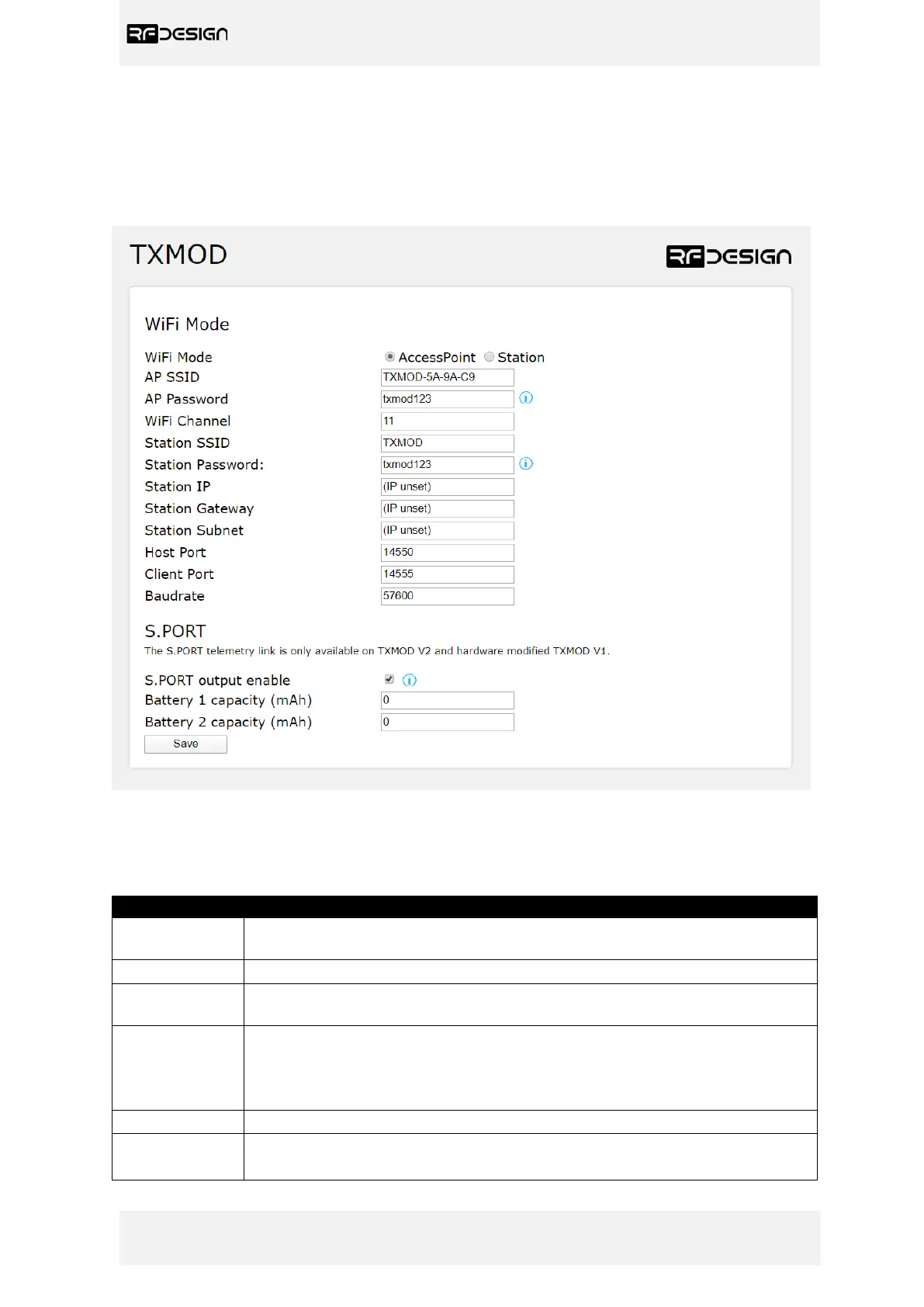
Figure 9 -WiFi settings configuration page on firmware version 1.4. Some of the options will not be available on older
firmware versions.
Table 2 – WiFi Settings/General settings parameters description
This sets the module to act as an access point (default) or as a station on an
existing access point, such as a home network.
Is the SSID used for creating the Access Point (AP).
This is the password that will be used for the access point. It must be a
minimum of 8 character long
Allows the user to set the channel as per the Wi-Fi 802.11 standard definitions
this can be used as needed to prevent interference or meet the requirements of
the network that the module is joining. The default is channel 11. The most
commonly used channel set is 1, 6 and 11.
The SSID of the network that the TXMOD should attempt to join.
The password of the network that the TXMOD should attempt to join.


 To Next Page