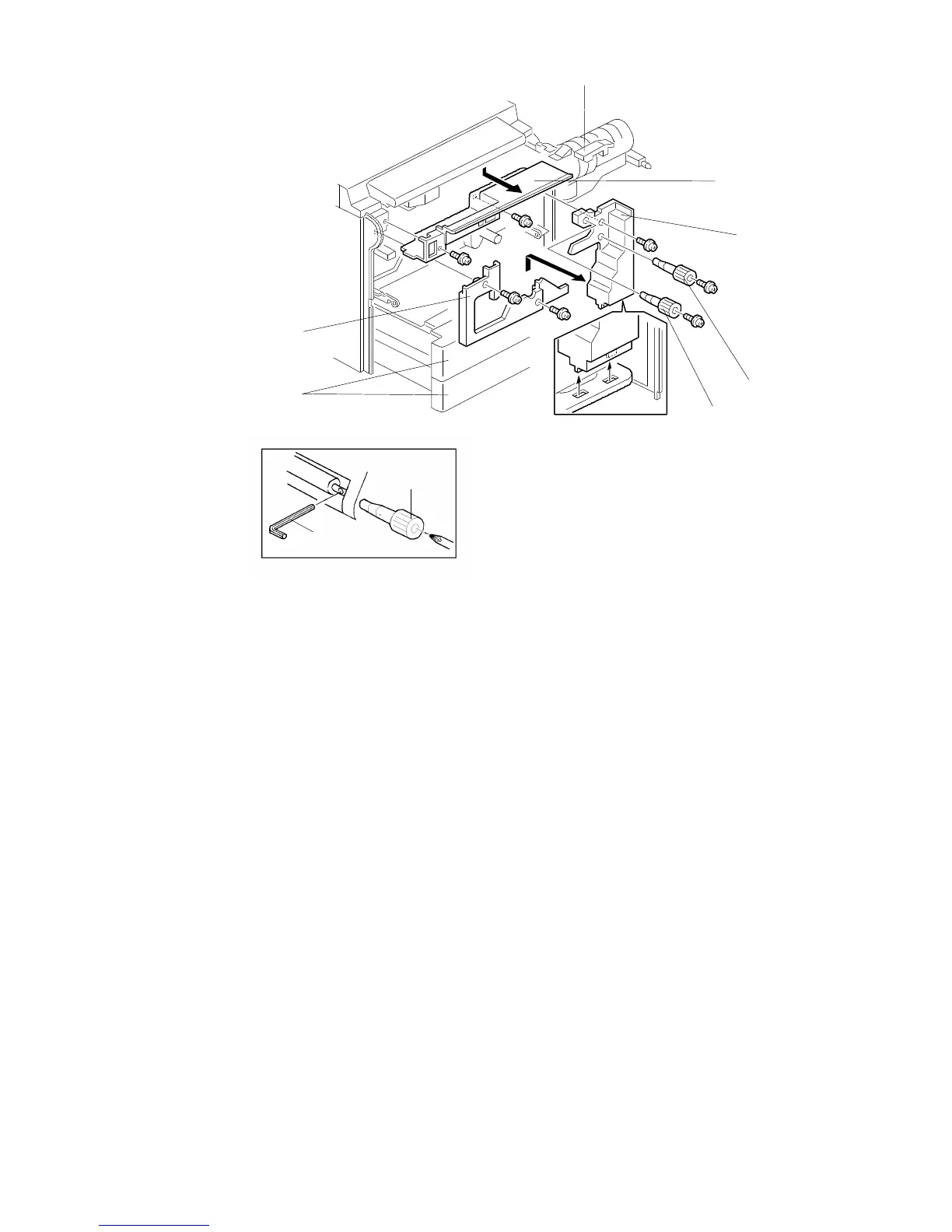
1.2 INNER COVER REMOVAL
1.2.1 Upper Inner Cover
1. Open the front cover and slide out the toner bottle holder assembly [A]
(1 screw and 1 knob screw).
2. Remove the upper inner cover [B] (2 screws).
1.2.2 Lower Right Inner Cover
1. Remove the front cover and open the tray units [C].
2. Remove the two knobs [D and E] (1 screw each).
NOTE: 1. Knob [D] is not installed in A157/A159/A160 copiers.
2. When removing the knob [E], insert an allen key [F] into the hole in
the registration roller shaft as shown in the illustration.
3. Remove the lower right inner cover [G] (1 screw).
1.2.3 Lower Left Inner Cover
1. Remove the front cover and open the tray units.
2. Remove the lower left inner cover [H] (2 screws).
[E]
[F]
[H]
[C]
[B]
[G]
[D]
[E]
FSM 5-3 FT5535/4527/4522













 To Next Page