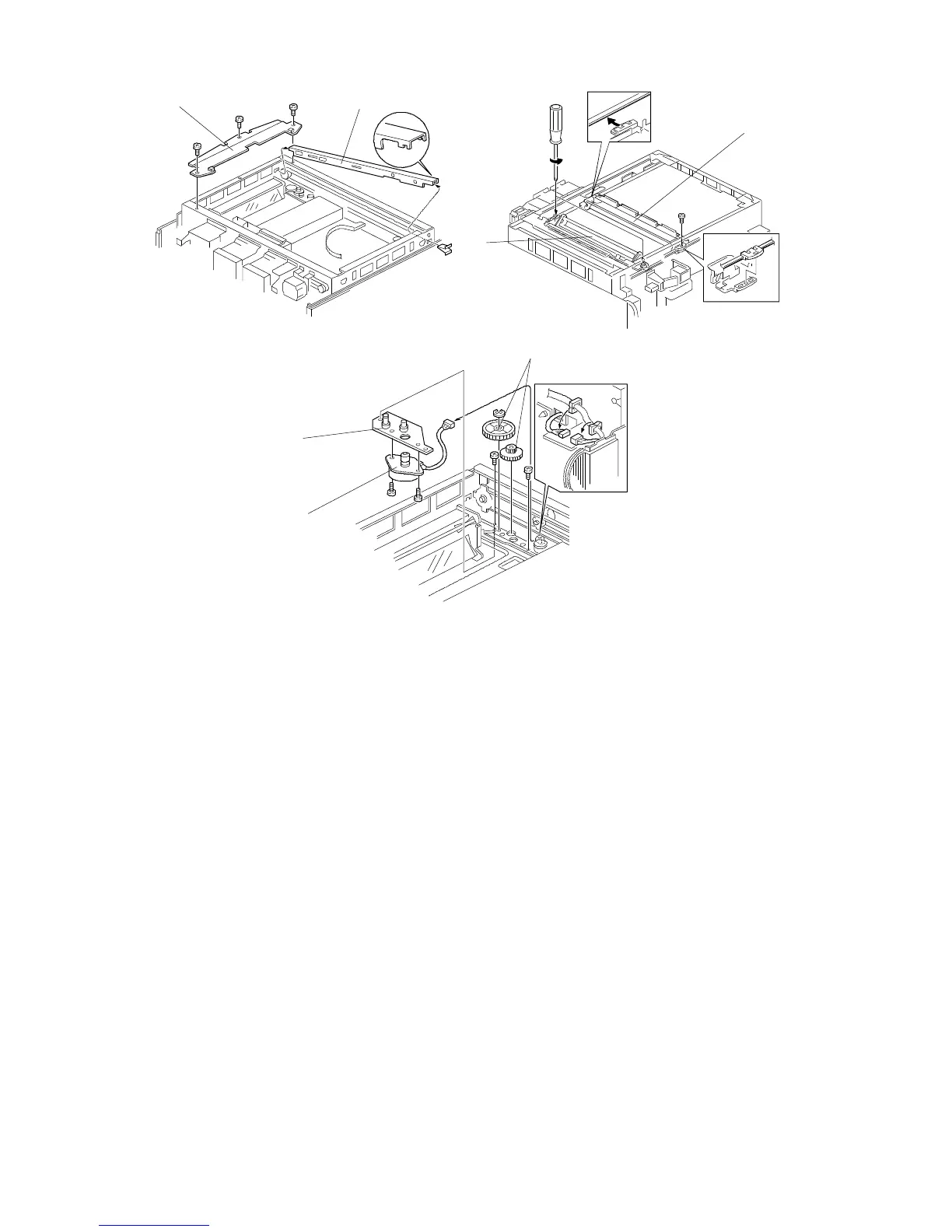
2.5 3RD SCANNER MOTOR REPLACEMENT
1. Remove the following parts:
2. Remove the upper right frame [A] (3 screws).
3. Remove the 1st scanner [B] from the scanner drive belt (1 screw).
4. Remove the 2nd scanner [C] from the scanner drive belt by loosening the 2
screws as shown.
5. Remove the front scanner guide rail [D] (1 spring plate).
6. Remove the 2 idle gears [E] (1 E-ring).
7. Remove the 3rd scanner motor bracket [F] (2 screws and 1 connector).
8. Replace the 3rd scanner motor [G] (2 screws).
[A]
[D]
[E]
[F]
[G]
[B]
[C]
• Platen cover or DF
• Left scale
• Exposure glass
• Top cover
• Rear scale
• Lens cover
• Operation panel
• Left scale bracket
• Scanner HP. sensor bracket
FT5535/4527/4522 5-10 FSM













 To Next Page