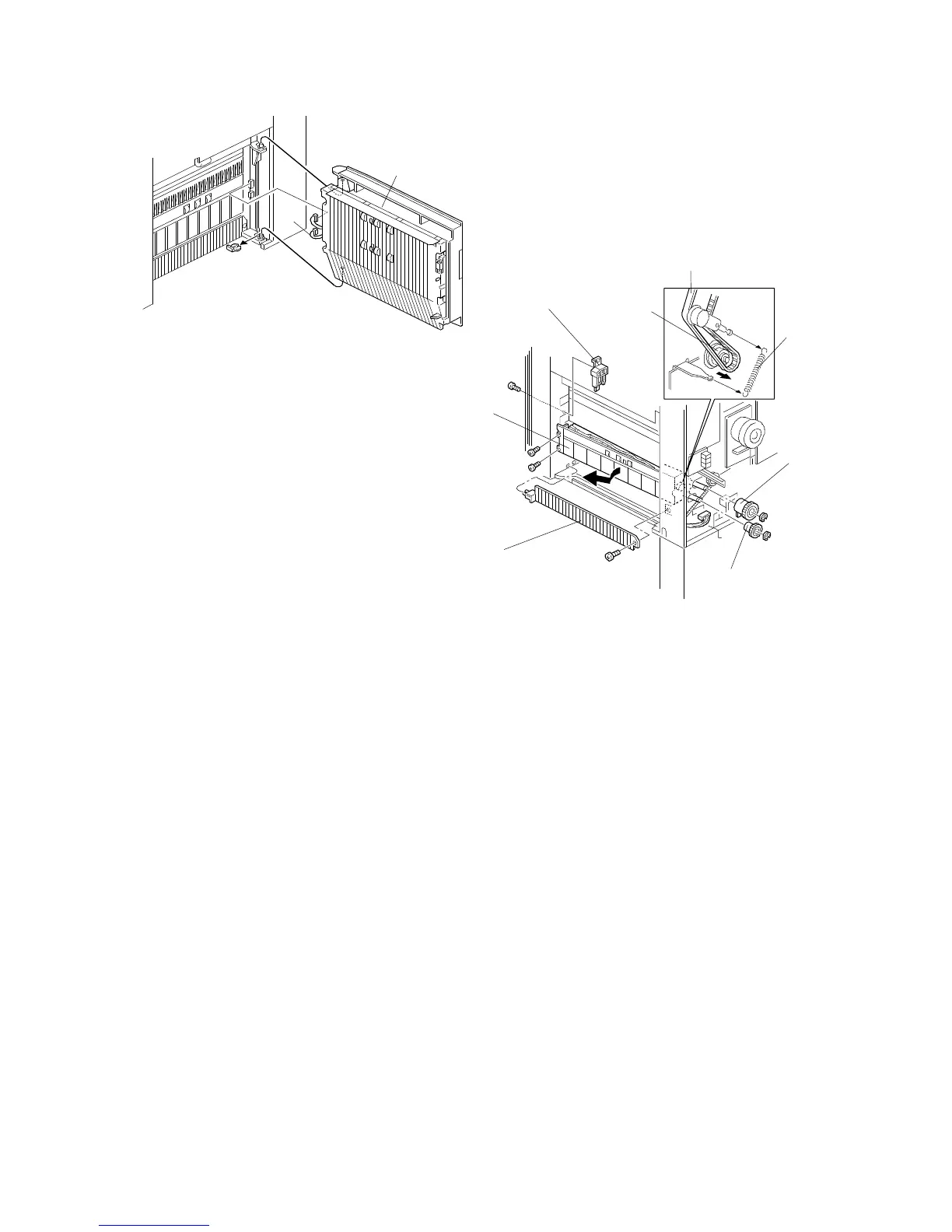
6.3 LOWER PAPER FEED UNIT REPLACEMENT
(A153/A155/A156)
1. Remove the rear cover (see "Outer Cover Removal").
2. Remove the right door [A] (2 connectors, 1 clip) or the LCT unit (see "LCT
Unit Removal").
Steps 3 through 5 are required for machines with an LCT.
3. Remove the front cover (see "Outer Cover Removal").
4. Remove the right inner cover (see "Inner Cover Removal").
5. Remove the LCT set block [B] (1 screw).
6. Remove the lower paper feed clutch [C] (1 E-ring).
7. Remove the separation roller gear [D] (1 E-ring).
8. Remove the spring [E] and remove the timing belt [F] from the relay roller
pulley [G].
9. Remove the vertical transport guide plate [H] (1 screw).
10. Remove the paper feed unit [I] (2 screws, 1 connector).
[A]
[H]
[D]
[C]
[E]
[F]
[B]
[G]
[I]
FT5535/4527/4522 5-34 FSM













 To Next Page