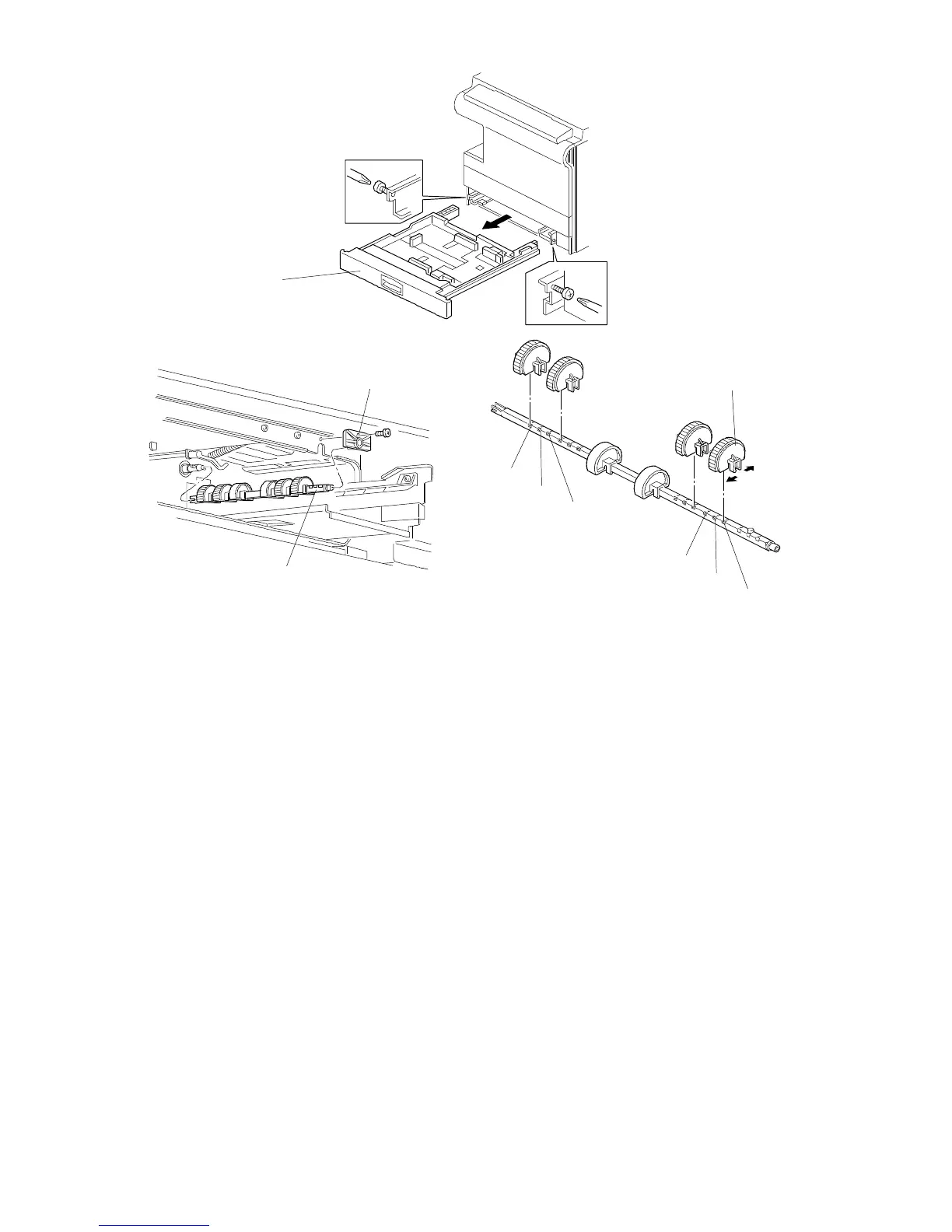
6.5 PAPER FEED ROLLER REPLACEMENT (A157/A159/A160)
1. A157/A159 copiers only: Remove the front cover (see "Outer Cover
Removal").
2. Remove the paper feed tray [A] (2 screws).
3. Remove the stopper bracket [B] (1 screw).
4. Remove the feed roller assembly [C].
5. Remove the feed roller [D].
NOTE: 1) When installing the feed roller assembly, the flat side of the roller
should be facing down.
2) The two rollers without rubber should be at the center of the shaft.
3) The factory-set roller position is [a].
4) Roller position [b] is only used in Japanese models.
4) Roller position [c] is especially useful for B size paper. When paper
jam or non-feed occurs often with B size paper, change the feed roller
position to [c].
[B]
[C]
[A]
[D]
[a]
[b]
[a]
FT5535/4527/4522 5-36 FSM













 To Next Page