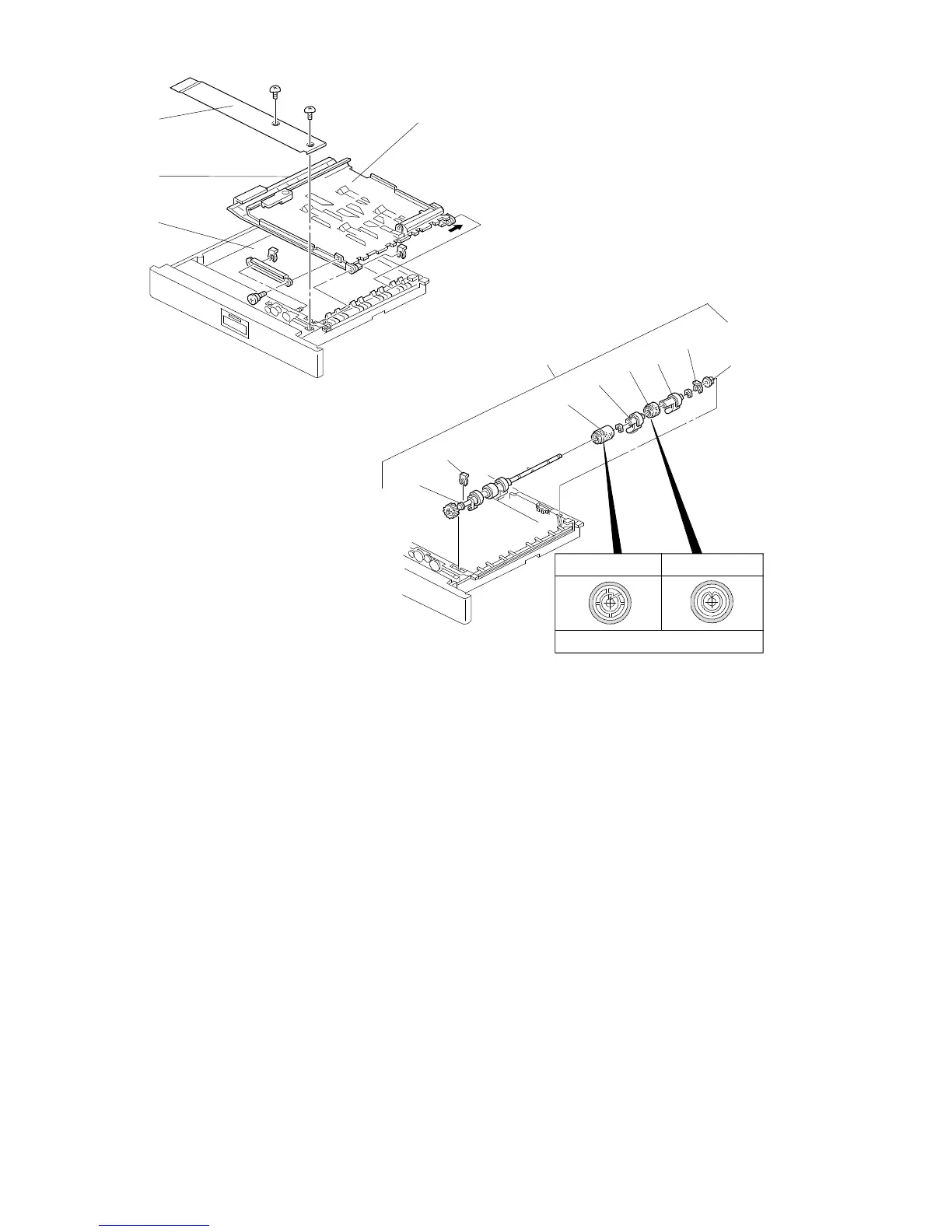
9.2 DUPLEX FEED ROLLER REPLACEMENT
1. Pull out the duplex unit.
2. Remove the link bracket [A] (1 screw, 1 clip).
3. Remove the upper guide plate [B] and the lower guide plate [C] (1 clip).
4. Remove the inner cover [D] (2 screws).
5. Remove two clips [E].
6. Move the bushings [F] inward and remove the duplex feed roller assembly [G].
7. Remove the bushing [F], the paper flattener [H] (1 E-ring), the stack roller [I],
the paper flattener [J], and the duplex feed roller [K].
NOTE: When installing the stack roller and the duplex feed roller, make sure that
they are inserted in the correct orientation as shown.
[B]
[D]
[C]
[A]
[F]
[E]
[K]
[J]
[E]
[F]
[I]
Feed Roller
Stack Rolle
r
See from the front side.
FT5535/4527/4522 5-48 FSM













 To Next Page