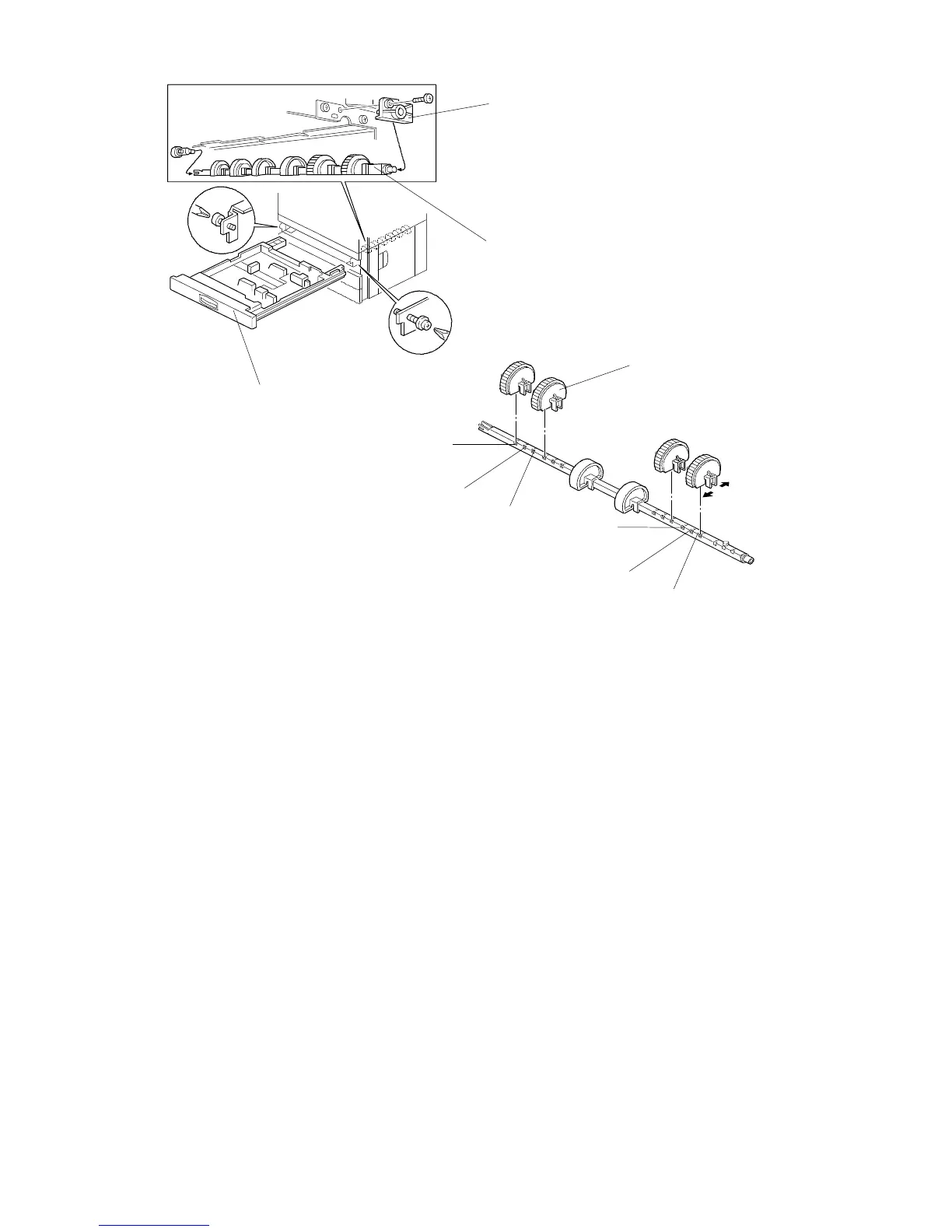
5.4 FEED ROLLER REPLACEMENT
1. Remove the paper feed tray [A] (2 screws).
2. Remove the stopper bracket [B] (1 screw).
3. Remove the feed roller assembly [C].
4. Remove the feed roller [D].
NOTE: • When installing the feed roller assembly, the flat side of the roller
should be facing down.
• The two rollers without rubber should be at the center position of
the shaft.
• The normal roller position is [a].
• There are two extra roller positions: for A size paper/LT size
paper [b] and B size paper [c]. When paper jam and non-feed
errors occur, change the feed roller position.
• After reinstalling the paper tray, perform the side-to
side-registration adjustment (see Removal and Adjustment in the
manual for the copier).
[A]
[B]
[C]
[D]
[a]
[b]
[c]
[c]
[b]
[a]
FSM 9-13 FT5535/4527/4522













 To Next Page