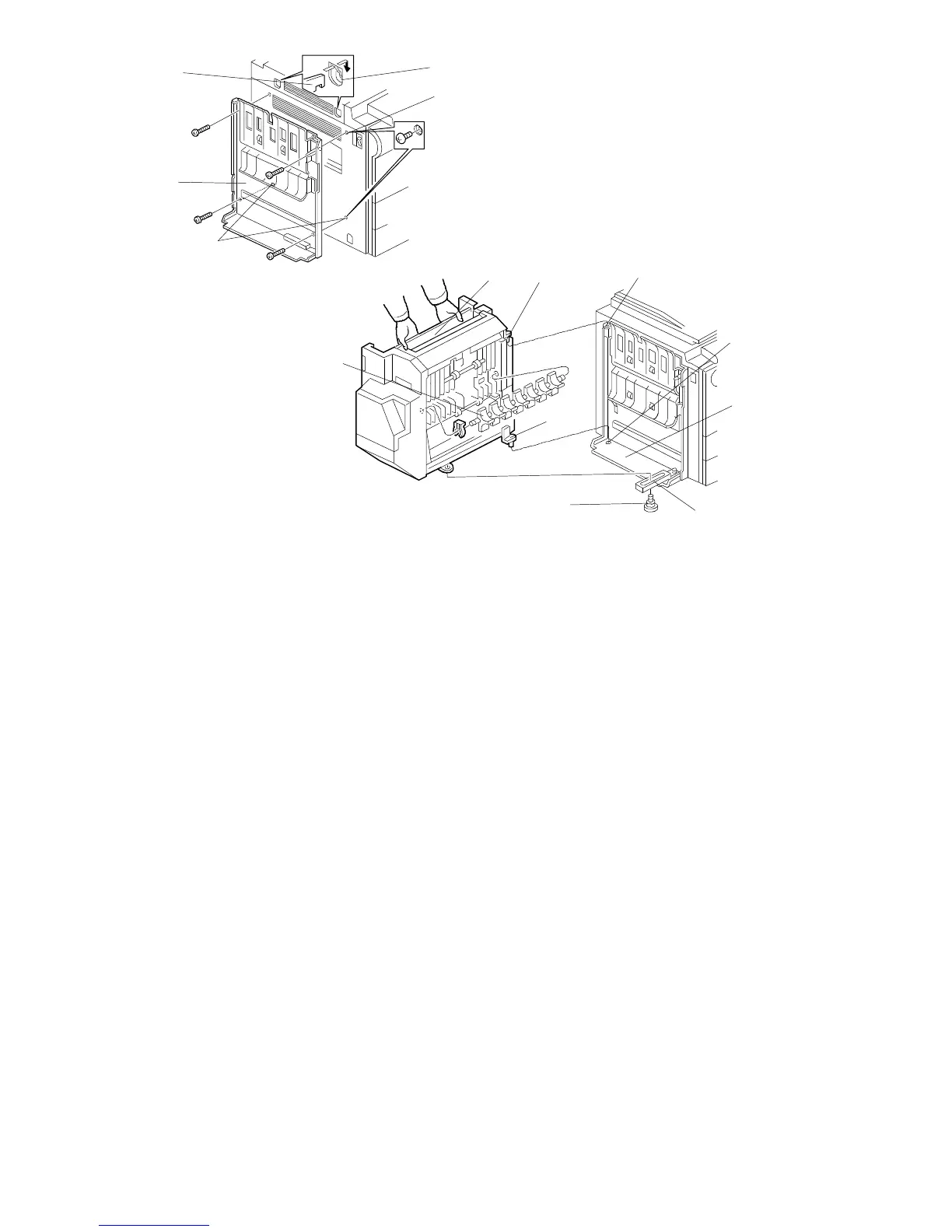
6. Remove the M4 x 8 round head screws from the left cover of the copier
(A153/A155/A156 copiers: 2 screws [A], A157/A159/A160/A161/A162
copiers: 3 screws [A] and [B]).
7. Mount the sorter stapler mounting frame [C] on the copier as shown
(4 – M4 x 14 screws).
NOTE: When hooking the sorter stapler mounting frame on the left side of
the copier, make sure that the positioning hooks [D] on the frame are
properly inserted in the positioning holes [E] in the copier.
8. Remove the junction gate [F] (1 snap ring) before installing the sorter stapler.
This prevents the junction gate from damaging the guide plate of the sorter
stapler mounting frame.
9. Install the sorter stapler [G] on the sorter stapler mounting frame (2 hinge
pins at the rear).
NOTE: First, lift the sorter stapler onto the support plate [H], opening the
sorter stapler about 30 degrees. Then, insert the upper stud [I] into
the upper hinge hole [J]. Finally, insert the lower stud [K] into the
lower hinge hole [L].
10. Remount the junction gate [F] (1 snap ring).
11. Connect the link lever [M] to the sorter stapler using the stepped screw [N],
then close the sorter stapler.
[D]
[E]
[B]
[C]
[A]
[G]
[M]
[N]
[F]
[H]
[L]
[I]
[K]
FSM 10-11 FT5535/4527/4522













 To Next Page