
 To Next Page
M
Michael LarsonAug 19, 2025
What to do if my RIDGID Measuring Instruments Scout will not turn on?
- NNathaniel AdamsAug 19, 2025
If your RIDGID Measuring Instruments Scout won't turn on, the first step is to check that the batteries are charged.

What to do if my RIDGID Measuring Instruments Scout will not turn on?
If your RIDGID Measuring Instruments Scout won't turn on, the first step is to check that the batteries are charged.
Why is the depth appearing inaccurate on my RIDGID Measuring Instruments?
If the depth appears inaccurate on your RIDGID Measuring Instruments, verify that the correct mode and frequency are set.
What to do if RIDGID Measuring Instruments Scout locks up during use?
If your RIDGID Measuring Instruments Scout locks up during use, turn the unit off, and then back on.
What to do if my RIDGID Measuring Instruments Scout will not pick up the signal?
If the RIDGID Measuring Instruments Scout isn't picking up a signal, ensure you point the Scout at either lead to confirm you have a complete circuit.
What to do if RIDGID Measuring Instruments unit acts erratic, won’t power down?
If your RIDGID Measuring Instruments unit is acting erratically and won’t power down, remove the batteries.
Why does the depth appear inaccurate on my RIDGID Measuring Instruments?
If the depth appears inaccurate on your RIDGID Measuring Instruments, check the locate mode. For example, if you are locating a line in 512Hz, ensure you are not in Sonde Mode.
What to do if my RIDGID Measuring Instruments scout locks up during use?
If your RIDGID Measuring Instruments scout locks up during use, turn the unit off, and then turn it back on.
What to do if RIDGID Measuring Instruments scout will not pick up the signal?
If your RIDGID Measuring Instruments scout will not pick up the signal, try to determine the source of any noise and eliminate it.
What to do if my RIDGID Scout unit acts erratic, and won’t power down?
If your RIDGID Measuring Instruments unit acts erratically and won’t power down, ensure that the transmitter is well connected and grounded.
Why is there no sound on my RIDGID Scout?
If there is no sound on your RIDGID Measuring Instruments, adjust the sound level in the sound menu.
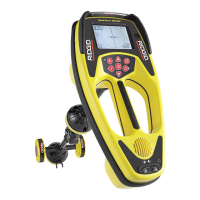
Details the multi-directional antenna system and Micro Map view.
Explains how the Scout senses electromagnetic fields from lines and sondes.
Highlights advantages over conventional locators, including signal clarity.
Describes the graphical display for tracing underground lines and pinpointing sondes.
Instructions for accessing the battery compartment and inserting batteries.
Details typical operation time and factors affecting battery life.
Step-by-step guide to find sonde by maximizing signal strength.
 General
| Brand | RIDGID |
|---|---|
| Model | Scout |
| Category | Measuring Instruments |
| Language | English |