34
COMMISSIONING
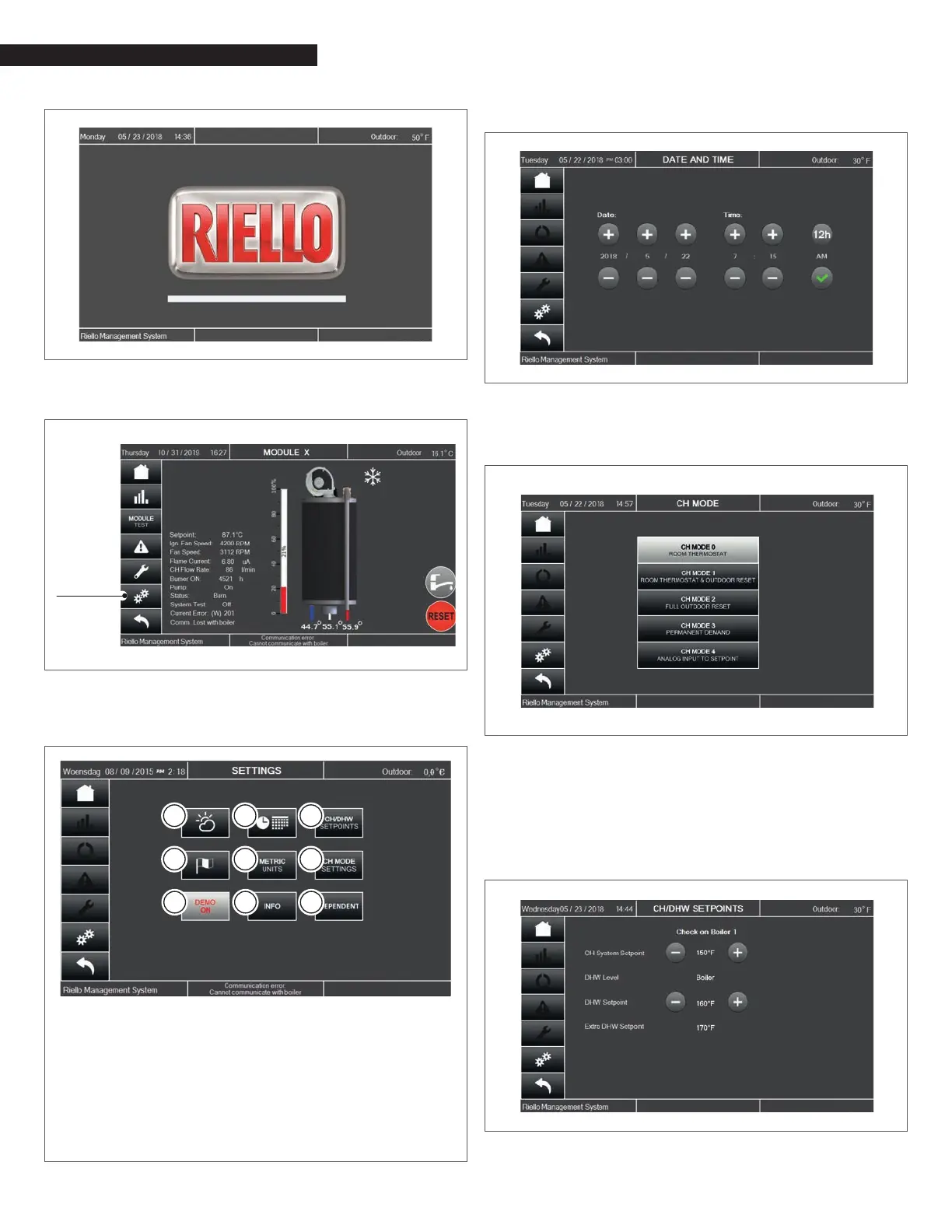
Fig. 26
Touchscreen Control Panel Stand-by screen
By touching the logo, the Module screen will appear:
Settings
Fig. 27
Module Screen
− Pushing the Settings button, the Settings screen will ap-
pear:
1 Reset curve
2 Date & Time
3 CH/DHW setpoint change
4 Language
5 Units conversion
6 CH mode selection
7 Software demo
8 Software data
9 Dependent conguration (do not touch)
1 2 3
4 5 6
7 8 9
Fig. 28
Settings screen
− Date and Time can be adjusted through the screen below:
Fig. 29
Date & Time screen
− After the Date&Time setting, CH modes can be selected ac-
cessing the CH MODE settings screen below:
Fig. 30
Mode Screen
Five CH modes are available, but only four are mentioned in the
following text:
− CH Mode 0 - Room Thermostat (Enable/Disable): when
the room thermostat closes, the system switches ON. Tem-
perature Setpoint is manually set on the CH/DHW Setpoints
screen (through the Settings screen).
Fig. 31
CH/DHW Setpoints



 To Next Page