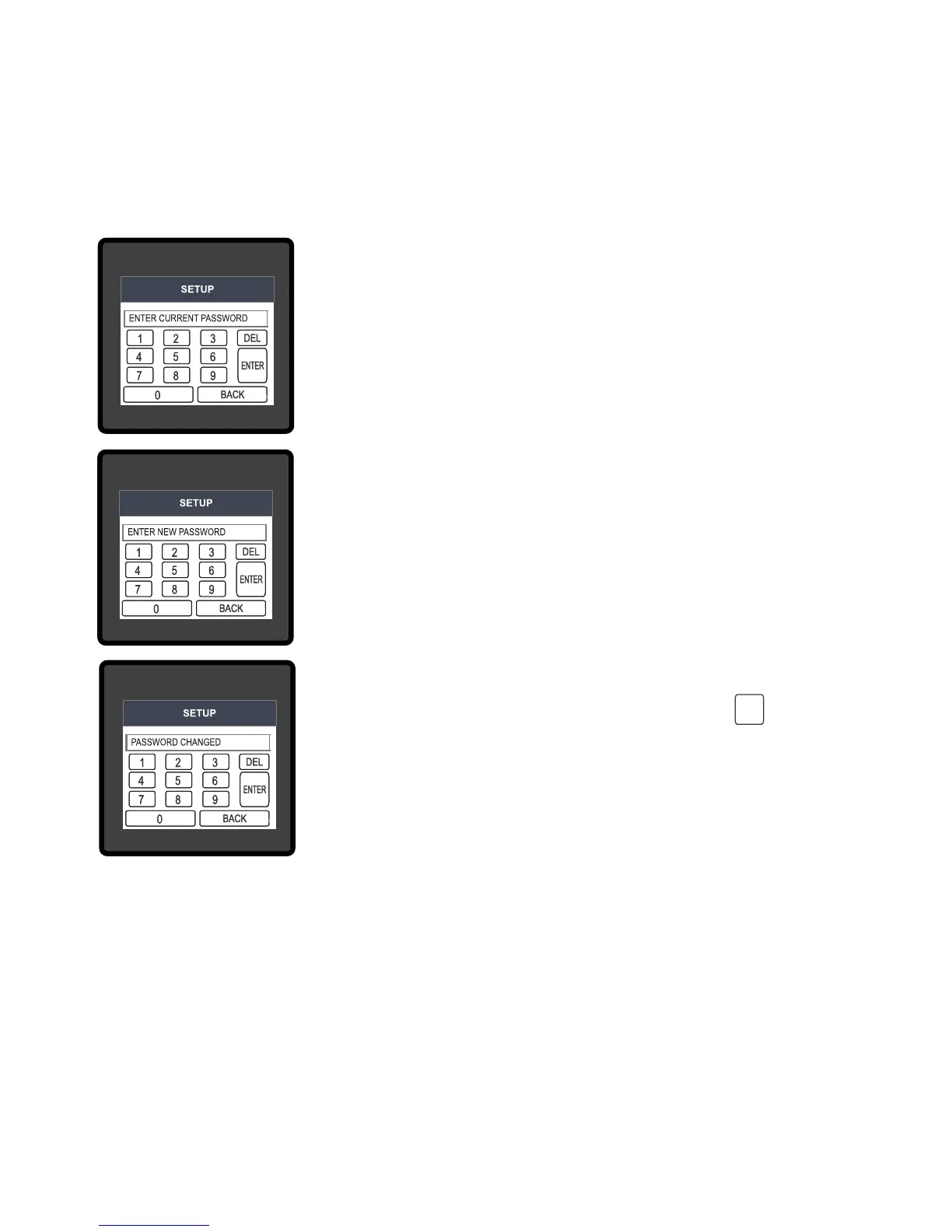
Change Password Option is the second last option in list of “SETUP”
submenu, so can be accessed by a simple touch on “ Change
Password” button.
In this screen user rst needs to enter the current password.
3.1.1 Change Password
& now user can enter the new 4 digit password.
After input of correct password,“PASSWORD ACCEPTED”is displayed
After entering new password user needs to touch “ key” to
After conrming “PASSWORD CHANGED” is displayed on screen,
which ensures successful changing of the password.
New Password conrmed.
conrm.
3.2 Menu selection.
After entering in the SUBMENU 6 - SETUP, user will be asked to enter password & after input of
correct password list of following parameters will be displayed on screen :-
3.2.1 SYSTEM PARAMETERS
3.2.2 COMMUNICATION PARAMETERS
ENTER
10


 To Next Page