V1.1 2018-10-9
www.risinghf.com
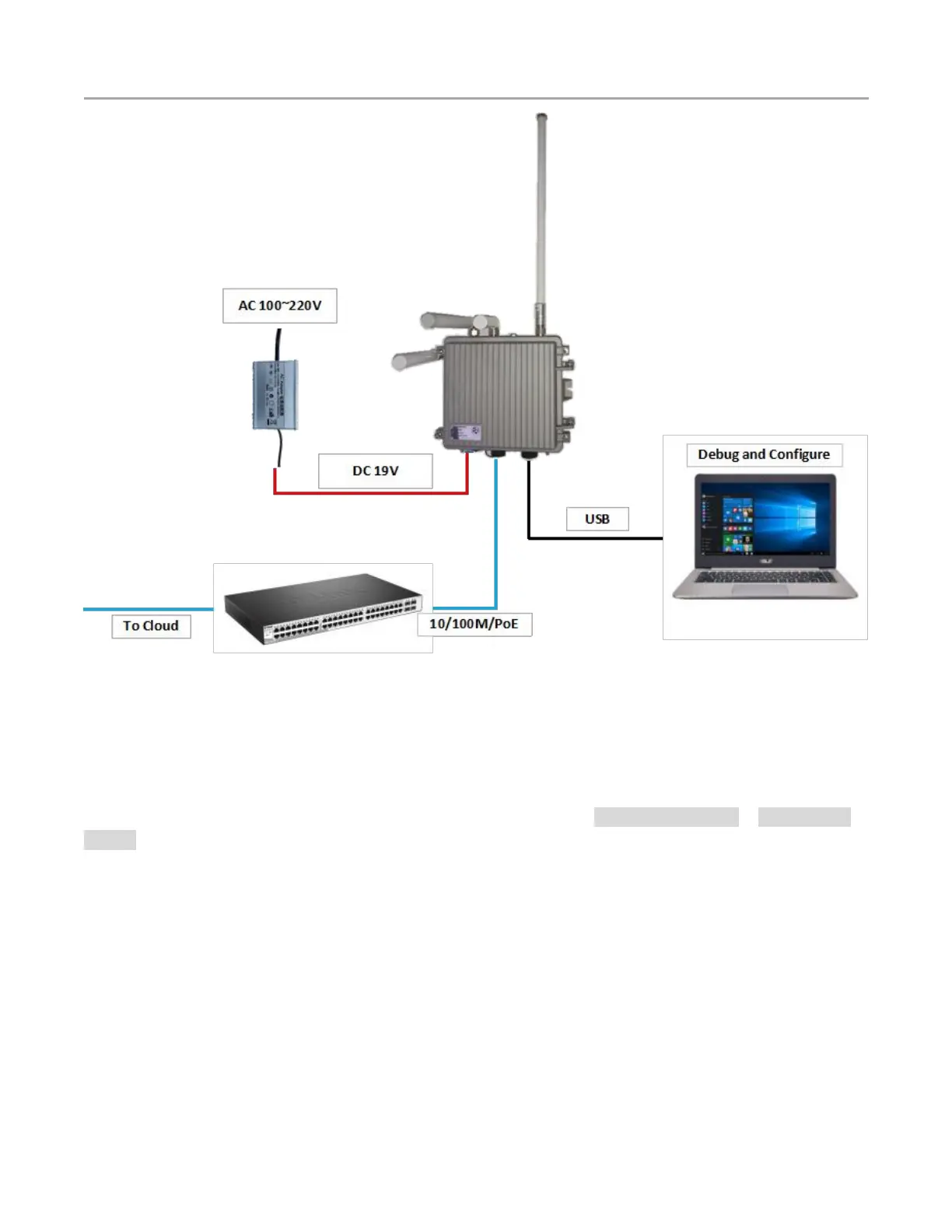
Figure 2-2 Set up your gateway
RHF2S208 could be powered by both AC/DC adapter and PoE injector. An high reliability industrial
IP67 AC to DC adapter is configured for each gateway when it comes out from the factory. Specially, a
3.2Ah LiFePo4 battery is integrated for RHF2S208Bxx. All the source could be injected into the
gateway, which could be switched automatically based on the logic the AC/DC adapter > PoE injector >
battery.
RHF2S208 support serveral kinds of way for networking backhaul. Please uncover the enclosure and
install the sim card if you want to use the cellular network. Or a cable is needed to be connected to a
router to use the 10/100m ethernet. And you can set the priority of the two selection on the web-based
utility.
2.2.3 Debug and Configure
Several debug interface could be used:
1) Connect the gateway to your PC with USB to UART interface
3) Wireless access via WiFi


 To Next Page