72
4
Click [Details], select [Standard], [Draft] or [Data
compression], and click [OK].
[Standard]
Print in 300x300 dpi.
[Draft]
Print with less ink.
[Data compression]
Make data smaller and increase the network communication
speed.
5
After input is nished, click [OK].
Complete other settings as needed.
6
Click [OK] (or [Print]) in the print image.
Saving Frequently Used Settings
Frequently used settings information can be saved and
recalled later as needed. This eliminates the need to
complete the settings each time.
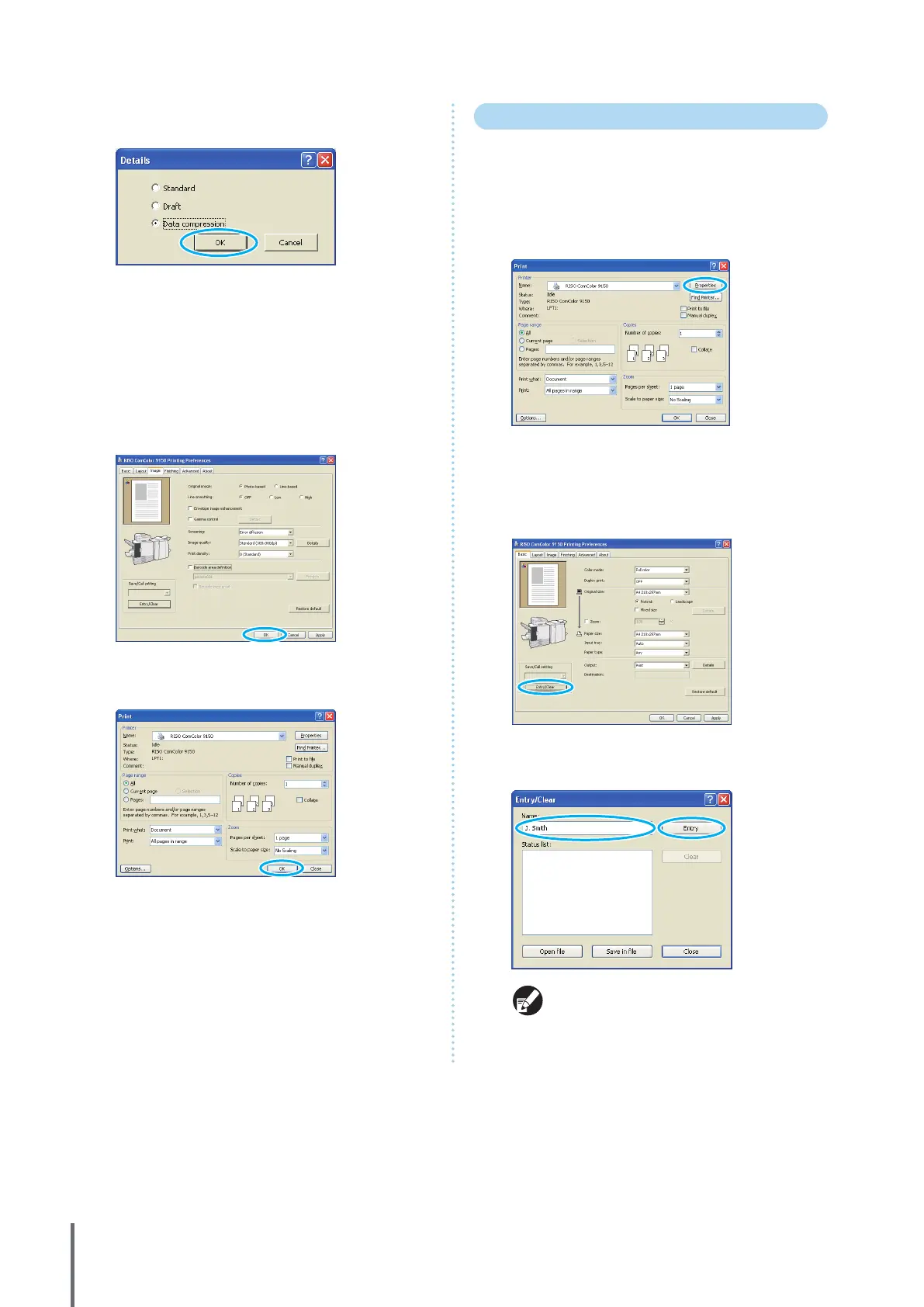
1
Click [Properties] (or [Preferences]) in the printing
dialog box of the source application.
2
Complete the print settings on each tab.
3
Click [Entry/Clear].
4
Enter a name in [Name] and click [Entry].
• To access settings you have registered, select the
desired settings in the [Save/Call setting] pull-
down menu.
• To cancel settings that you have recalled, click
[Restore default].
ComColor Series Basic Guide 06


 To Next Page
 Loading...






