EasyManua.ls Logo

Riva RTC series - Cable Connection Procedures

Riva RTC series
30 pages
Print Icon
To Next Page IconTo Next Page
To Previous Page IconTo Previous Page
Loading...
RTC Series RTC Installation Guide
01A.04 27
To connect cables
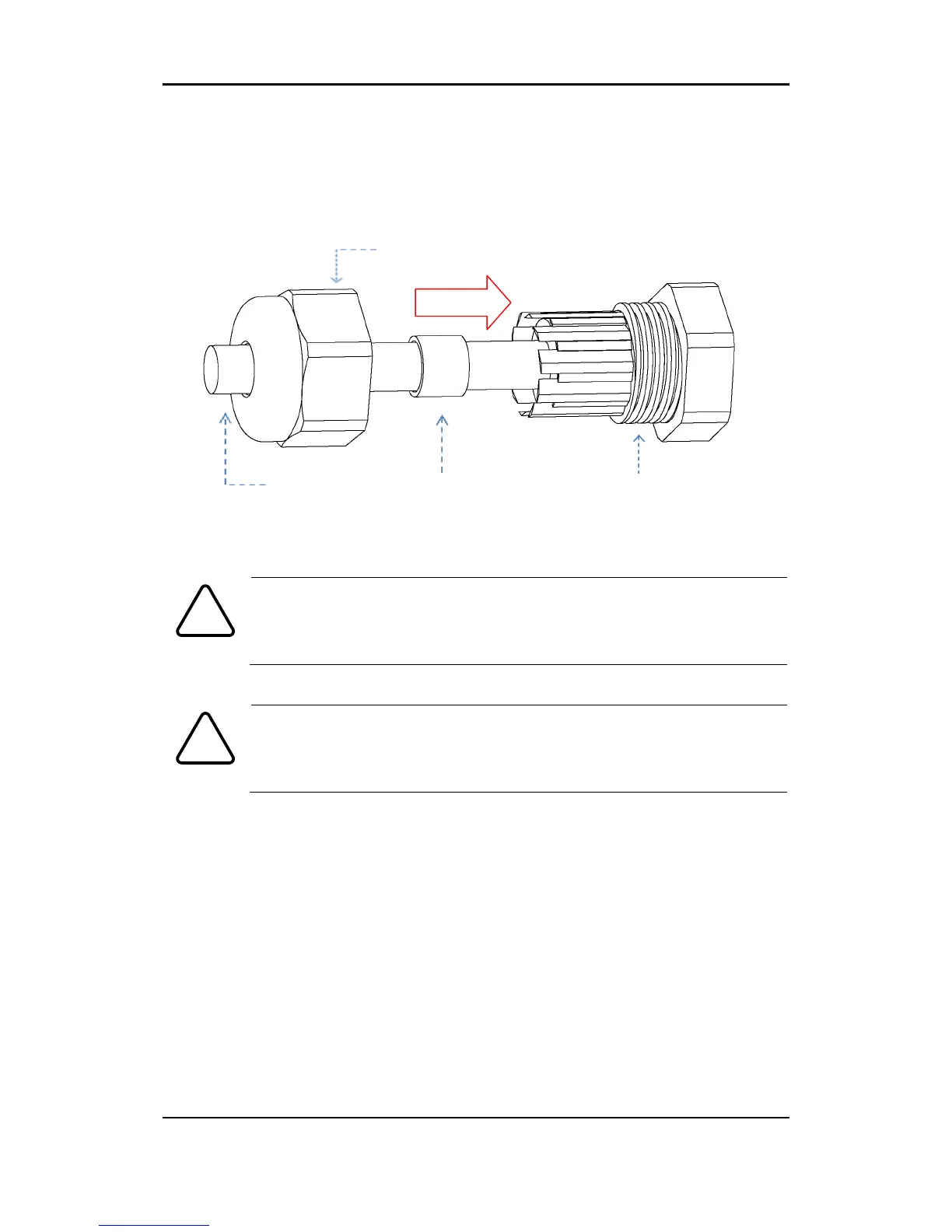
The bottom of the housing has two cable glands for cables. Use control cable to
connect with the cable gland (Refer to the below figure)
Be advised to connect the surveillance camera with designated
power voltage. Connecting the camera directly to 120V/220V cable
will damage the device.
Make sure theres no empty space when capping the cable gland.
Using a rubber packing ring to remove any empty the space between
the cap and inner cable gland will most likely prevent water pervading
into the housings internal parts.
Caution
!
Caution
!
Control Cable
Rubber Packing Ring
Cable Gland
Cap

Related product manuals