03
INTRODUCTION
C.Takng Out/Installng the Battery
ê If the meter fals, please refer to User's LCD meter manual.
ê WARNING! PLEASE POWER OFF WHEN PARKING IN ORDER TO PREVENT ACCIDENTS.
ê THE REAR TYPE MOVES THE MOMENT THE SYSTEM STARTS. IN ORDER TO PREVENT AN
UNCONTROLLED START (EXPECIALLY IN THE RAINY OR SNOWY DAYS), WE SUGGEST TO WEAR A
HELMET.
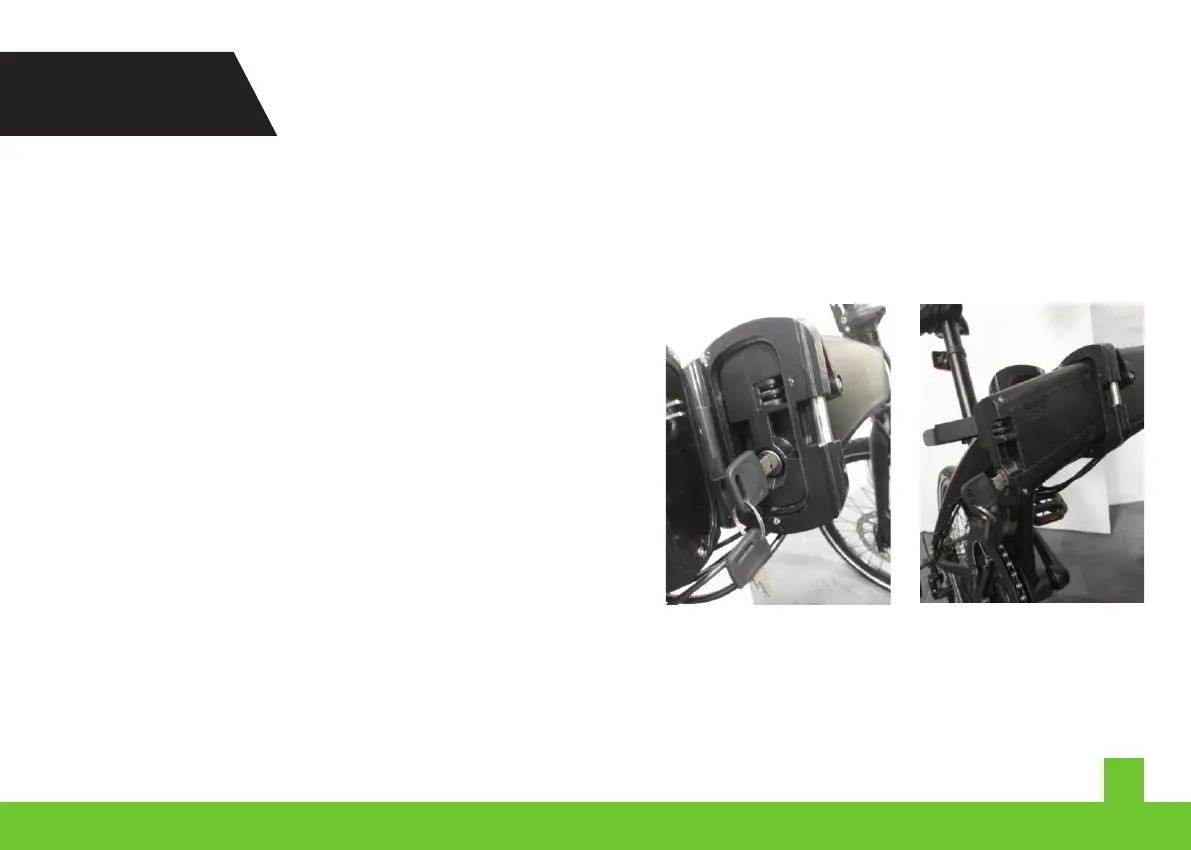
1. Turn the key clockwse, unlockng the battery pack
ê Keep the battery away from mosture, and keep good ventlaton. Do not cover anythng on battery whle chargng,
because t wll generate a sgnficant amount of heat. We suggest that you have one person to montor durng the
chargng.
ê When the red ndcator lght of the charger s flckerng, t ndcates the battery s not chargng. Please unplug
mmedately and contact the dstrbutor.
2. Remove the battery
ê WARNING! You are suggested to rde safely and quetly
ê WARNING! PLEASE KEEP THE SAFETY OF THE BATTERY PACK.
1.Unpack/install the battery pack
MX25


 To Next Page