5
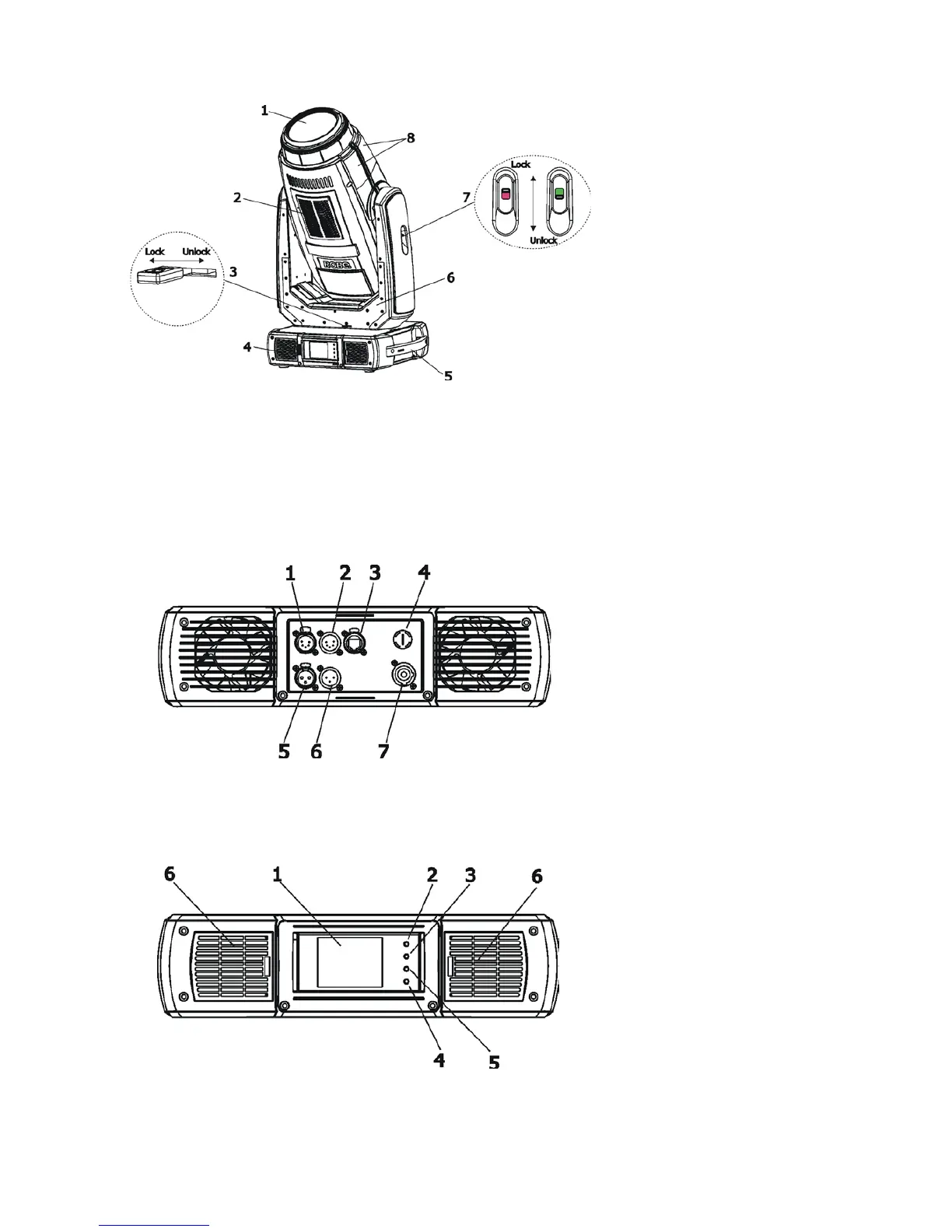
3. Fixture exterior view
Front panel of the base:
1 - Touch screen
2 - ESCAPE button
3 - NEXT button
4 - PREVIOUS button
5 - ENTER/DISPLAY ON button
6 - Dust lters
The head should be locked for transportation - the tilt lock (7) and the pan lock (3) have to be in the locked
positions. To unlock the head, move these latches to unlock positions before operating the xture.
1 - Front lens
2 - Air vents + lter
3 - Pan lock
4 - Air vents + lter
5 - Handle
6 - Yoke
7 - Tilt lock
8 - Head covers
The ENTER/DISPLAY ON button also serves for switching the display on when the xture is disconnected
from the mains.
Rear panel of the base:
1 - DMX output (5-pin XLR)
2 - DMX input (5-pin XLR)
3 - Ethernet input (RJ45)
4 - Fuse holder
5 - DMX output (3-pin XLR)
6 - DMX input (3-pin XLR)
7 - Power input (Neutrik
PowerCon)



 To Next Page