EasyManua.ls Logo

Robe 575 AT - User Manual

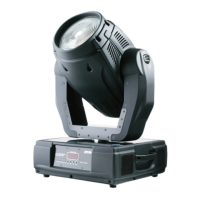
Robe 575 AT
33 pages
Print Icon
To Next Page IconTo Next Page
Loading...
1
Version 2.0
Question and Answer IconNeed help?

Do you have a question about the Robe 575 AT and is the answer not in the manual?

Summary

1. Safety Instructions

General Safety Precautions

Essential safety warnings regarding electrical shock, moisture, and handling the device.

2. Operating Determinations

Device Usage Guidelines

Instructions for proper operation, including lamp and lens handling and environmental conditions.

3. Device Description and Components

Component Identification

Overview of the fixture's parts, including front, rear, and base panels.

4. Installation

Fitting the Lamp

Step-by-step guide for installing and replacing the fixture's lamp.

Installation Safety

Critical safety warnings and precautions to follow during installation.

4.2 Lamp Adjustment

Adjusting Lamp Position

Procedure for fine-tuning the lamp's position for optimal light performance.

4.3 Inserting;Exchanging Colours

Colour Module Replacement

Instructions for changing the dichroic colour filters within the fixture.

4.4 Mains Connection

Electrical Connection Guidelines

Information on connecting the fixture to the mains power supply safely.

4.5 Power Supply Settings

Changing Voltage and Frequency

Guide on adjusting power supply settings for different regions and frequencies.

4.6 Lens Replacement

Front and Zoom Lens Procedures

Steps for changing the front and zoom lenses for different beam effects.

Lens Handling Precautions

Warnings about handling the heavy front lens and ensuring secure installation.

4.7 Rigging the Fixture

Rigging Safety and Precautions

Comprehensive safety guidelines and warnings for safely rigging the lighting fixture.

Rigging Methods

Omega Holder Fixation

Specific instructions for mounting the fixture using omega holders and safety ropes.

Installation Safety Approvals

Requirement for expert approval of installations and side-by-side mounting considerations.

4.8 DMX-512 Connectivity

DMX Wiring and Connectors

Details on DMX input/output connectors and cable types for connecting fixtures.

DMX Chain Configurations

Instructions for building serial DMX chains and master/slave configurations.

5. DMX Protocol Specification

Channel Functions and Values

Defines DMX channels, their values, and corresponding fixture functions for control.

DMX Protocol Details

Colour Wheel and Macros

Specifies DMX control for colour wheel positioning, macros, and CMY colour mixing.

DMX Protocol Functions

Effects, Dimming, and Notes

Details DMX control for effects, dimmer, shutter, strobe, and relevant operational notes.

6. Controller Mode

DMX Addressing and Setup

How to set the DMX address and configure master/slave operation.

Remotely Controllable Functions

Overview of functions controllable via DMX, including lamp, colour, and effects.

7. Stand-Alone Mode

Master;Slave Operation

Explanation of how fixtures operate synchronously without a controller in master/slave mode.

8. Control Menu Map

Menu Navigation Diagram

A visual representation of the fixture's control menu structure and options.

Control Menu Functions

Menu Options and Behavior

Details on various menu items for controlling fixture behavior and settings.

Special Functions and Calibration

Lamp Adjustment and Effects Calibration

Procedures for fine-tuning lamp settings and calibrating fixture effects.

9. Control Menu Operations

Fixture Address and Slave Control

Setting the DMX address and controlling slave fixtures from the master panel.

Fixture Information Readout

Accessing operational data like power-on time, lamp time, and lamp strikes.

Fixture Information Details

Temperatures, DMX Values, and Software Version

Reading fixture temperatures, current DMX values, and software processor versions.

9.4 Personality Settings

Movement and Lamp Behavior

Adjusting pan/tilt reverse, DMX presets, and lamp behavior modes.

Display and Feedback Settings

Configuring display settings, blackout during movement, and pan/tilt feedback.

Personality and Manual Modes

Fan Speed, Movement Modes, and Init Positions

Setting fan speed, pan/tilt movement characteristics, and initial effect positions.

Lamp Control and Manual Operation

Instructions for switching the lamp on/off and operating the fixture manually.

Test and Stand-Alone Programs

Test Sequences and Auto Playback

Running built-in test sequences and configuring automatic stand-alone playback.

Program Selection and Editing

Selecting, playing, and editing stand-alone programs for the fixture.

Reset and Special Functions

Reset Function and Lamp Adjustment

Resetting effects to default positions and performing fine lamp adjustments.

Effect Calibration Procedures

Detailed procedures for calibrating fixture effects via control board or external controller.

Software Update and Calibration Protocol

DMX Calibration Details

Protocol for calibrating effects using DMX commands.

Fixture Software Updating Procedure

Steps for updating the fixture's software using a PC and serial link.

11. Error and Information Messages

Troubleshooting Error Codes

List and explanations of error messages for diagnosing fixture issues.

12. Technical Specifications

Fixture Specifications Overview

Summary of key technical details including power, lamp, optics, and effects.

Fixture Dimensions and Performance

Pan;Tilt, Rigging, and Environmental Specs

Details on pan/tilt ranges, rigging methods, temperature limits, and minimum distances.

13. Maintenance and Cleaning

Cleaning Procedures and Safety

Guidelines for routine cleaning of lenses, fans, and interior parts, with safety warnings.

Maintenance Details

Cleaning Schedule and Fuse Replacement

Recommended cleaning frequencies for components and procedure for replacing the fuse.

Summary

1. Safety Instructions

General Safety Precautions

Essential safety warnings regarding electrical shock, moisture, and handling the device.

2. Operating Determinations

Device Usage Guidelines

Instructions for proper operation, including lamp and lens handling and environmental conditions.

3. Device Description and Components

Component Identification

Overview of the fixture's parts, including front, rear, and base panels.

4. Installation

Fitting the Lamp

Step-by-step guide for installing and replacing the fixture's lamp.

Installation Safety

Critical safety warnings and precautions to follow during installation.

4.2 Lamp Adjustment

Adjusting Lamp Position

Procedure for fine-tuning the lamp's position for optimal light performance.

4.3 Inserting;Exchanging Colours

Colour Module Replacement

Instructions for changing the dichroic colour filters within the fixture.

4.4 Mains Connection

Electrical Connection Guidelines

Information on connecting the fixture to the mains power supply safely.

4.5 Power Supply Settings

Changing Voltage and Frequency

Guide on adjusting power supply settings for different regions and frequencies.

4.6 Lens Replacement

Front and Zoom Lens Procedures

Steps for changing the front and zoom lenses for different beam effects.

Lens Handling Precautions

Warnings about handling the heavy front lens and ensuring secure installation.

4.7 Rigging the Fixture

Rigging Safety and Precautions

Comprehensive safety guidelines and warnings for safely rigging the lighting fixture.

Rigging Methods

Omega Holder Fixation

Specific instructions for mounting the fixture using omega holders and safety ropes.

Installation Safety Approvals

Requirement for expert approval of installations and side-by-side mounting considerations.

4.8 DMX-512 Connectivity

DMX Wiring and Connectors

Details on DMX input/output connectors and cable types for connecting fixtures.

DMX Chain Configurations

Instructions for building serial DMX chains and master/slave configurations.

5. DMX Protocol Specification

Channel Functions and Values

Defines DMX channels, their values, and corresponding fixture functions for control.

DMX Protocol Details

Colour Wheel and Macros

Specifies DMX control for colour wheel positioning, macros, and CMY colour mixing.

DMX Protocol Functions

Effects, Dimming, and Notes

Details DMX control for effects, dimmer, shutter, strobe, and relevant operational notes.

6. Controller Mode

DMX Addressing and Setup

How to set the DMX address and configure master/slave operation.

Remotely Controllable Functions

Overview of functions controllable via DMX, including lamp, colour, and effects.

7. Stand-Alone Mode

Master;Slave Operation

Explanation of how fixtures operate synchronously without a controller in master/slave mode.

8. Control Menu Map

Menu Navigation Diagram

A visual representation of the fixture's control menu structure and options.

Control Menu Functions

Menu Options and Behavior

Details on various menu items for controlling fixture behavior and settings.

Special Functions and Calibration

Lamp Adjustment and Effects Calibration

Procedures for fine-tuning lamp settings and calibrating fixture effects.

9. Control Menu Operations

Fixture Address and Slave Control

Setting the DMX address and controlling slave fixtures from the master panel.

Fixture Information Readout

Accessing operational data like power-on time, lamp time, and lamp strikes.

Fixture Information Details

Temperatures, DMX Values, and Software Version

Reading fixture temperatures, current DMX values, and software processor versions.

9.4 Personality Settings

Movement and Lamp Behavior

Adjusting pan/tilt reverse, DMX presets, and lamp behavior modes.

Display and Feedback Settings

Configuring display settings, blackout during movement, and pan/tilt feedback.

Personality and Manual Modes

Fan Speed, Movement Modes, and Init Positions

Setting fan speed, pan/tilt movement characteristics, and initial effect positions.

Lamp Control and Manual Operation

Instructions for switching the lamp on/off and operating the fixture manually.

Test and Stand-Alone Programs

Test Sequences and Auto Playback

Running built-in test sequences and configuring automatic stand-alone playback.

Program Selection and Editing

Selecting, playing, and editing stand-alone programs for the fixture.

Reset and Special Functions

Reset Function and Lamp Adjustment

Resetting effects to default positions and performing fine lamp adjustments.

Effect Calibration Procedures

Detailed procedures for calibrating fixture effects via control board or external controller.

Software Update and Calibration Protocol

DMX Calibration Details

Protocol for calibrating effects using DMX commands.

Fixture Software Updating Procedure

Steps for updating the fixture's software using a PC and serial link.

11. Error and Information Messages

Troubleshooting Error Codes

List and explanations of error messages for diagnosing fixture issues.

12. Technical Specifications

Fixture Specifications Overview

Summary of key technical details including power, lamp, optics, and effects.

Fixture Dimensions and Performance

Pan;Tilt, Rigging, and Environmental Specs

Details on pan/tilt ranges, rigging methods, temperature limits, and minimum distances.

13. Maintenance and Cleaning

Cleaning Procedures and Safety

Guidelines for routine cleaning of lenses, fans, and interior parts, with safety warnings.

Maintenance Details

Cleaning Schedule and Fuse Replacement

Recommended cleaning frequencies for components and procedure for replacing the fuse.

Robe 575 AT Specifications

General IconGeneral
TypeMoving Head
FocusMotorized
Pan Range530°
Tilt Range280°
Power Consumption800 W
Lamp Type575 W discharge
Color Temperature6000K
ColorsCyan, Magenta, Yellow
Gobo Wheelrotating
Prism3-facet prism
Control ProtocolDMX512
DMX Channels16
EffectsStrobe, Dimmer
Weight32 kg

Related product manuals