13
3.7 Ethernet connection
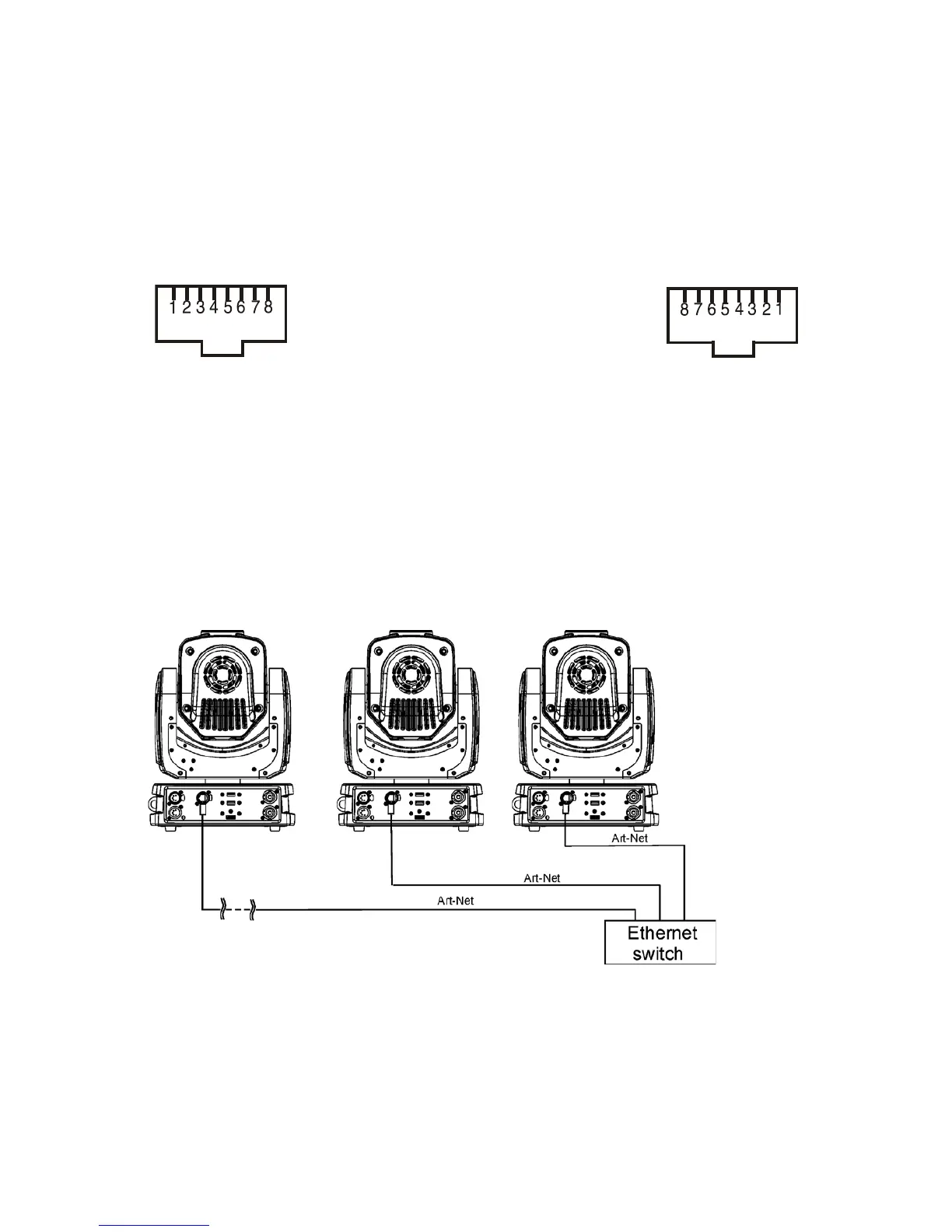
The xtures on a data link are connected to the Ethernet with ArtNet communication protocol.The control soft-
ware running on your PC (or light console) has to support Art-Net protocol.
Art-Net communication protocol is a 10 Base T Ethernet protocol based on the TCP/IP.Its purpose is to allow
transfer of large amounts of DMX 512 data over a wide area using standard network technology.
IP address is the Internet protocol address.The IP uniquely identies any node (xture) on a network.
The Universe is a single DMX 512 frame of 512 channels.
The Robin MiniMe is equipped with 8-pin RJ- 45 socket for Ethernet input.Use a network cable category 5 (with
four “twisted” wire pairs) and standard RJ-45 plugs in order to connect the xture to the network.
RJ-45 socket (front view): RJ-45 plug (front view):
1- TD+ 5- Not connected
2- TD- 6- RX-
3- RX+ 7- Not connected
4- Not connected 8- Not connected
Patch cables that connect xtures to the hubs or LAN sockets are wired 1:1,that is,pins with the same numbers
are connected together:
1-1 2-2 3-3 4-4 5-5 6-6 7-7 8-8
If only the xture and the computer are to be interconnected,no hubs or other active components are needed.
A cross-cable has to be used:
1-3 2-6 3-1 4-8 5-7 6-2 7-5 8-4
Connect the Ethernet inputs of all xtures with the Ethernet network.
The option “ArtNet" has to be selected from the menu “Mode” at the xture (DMXA 001-->Mode-->ArtNet).
Set IP address, NetMask and the Universe.
(DMX address=144) (DMX address=25) (DMX address=1)
IP addres=002.168.002.006 IP addres=002.168.002.003 IP addres=002.168.002.002
Universe=1 Universe=1 Universe=1
An advised PC setting: IP address: 002.xxx.xxx.xxx or 010.xxx.xxx.xxx (Different from xture IP addresses)
NET mask: 255.0.0.0














 To Next Page