12
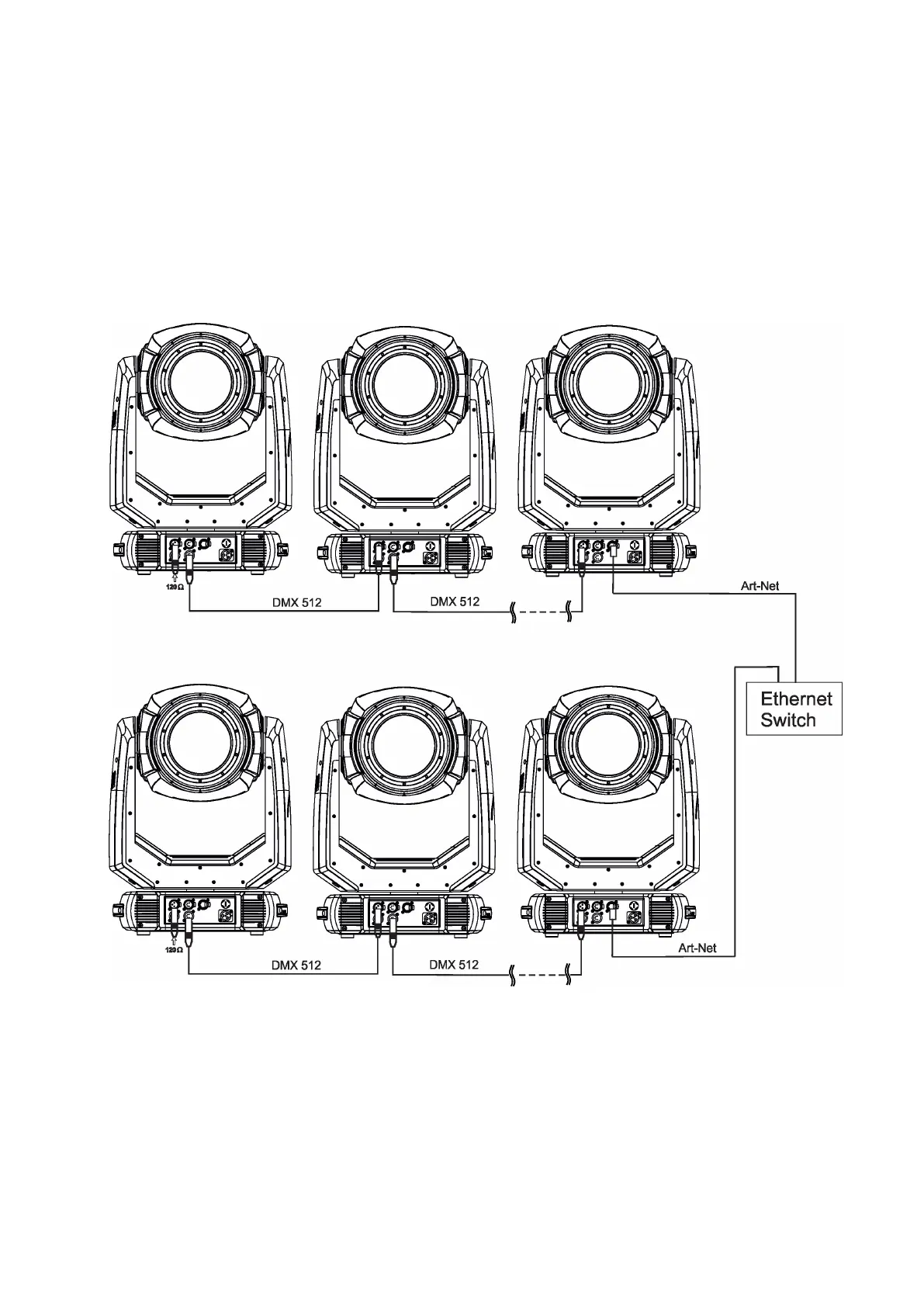
Ethernet / DMX operation
Option “ Artnet" (gMaI or gMA2 or sACN) has to be selected from “Ethernet Mode” menu at rst xture.
Option “Ethernet To DMX” has to be selected from the “Ethernet Mode” menu at the rst xture (connected to
the Ethernet) in the xture chain, next xtures have standard DMX setting.
Connect the Ethernet input of the rst xture in the data chain with the network. Connect the DMX output of this
xture with the input of the next xture until all xtures are connected to the DMX chain.
Caution: At the last xture, the DMX chain has to be terminated with a terminator. Solder a 120 Ω resistor
between Signal (–) and Signal (+) into a XLR-plug and connect it in the DMX-output of the last xture.
Example:
DMX address=1 DMX address=48 DMX address=144
IP addres=002.168.002.002
Universe=0
DMX address=1 DMX address=48 DMX address=144
IP addres=002.168.002.003
Universe=1



 To Next Page