7
4.3 Installing the top hat
Disconnect the xture from mains before installing the top hat.
1. Disconnect the xture from mains.
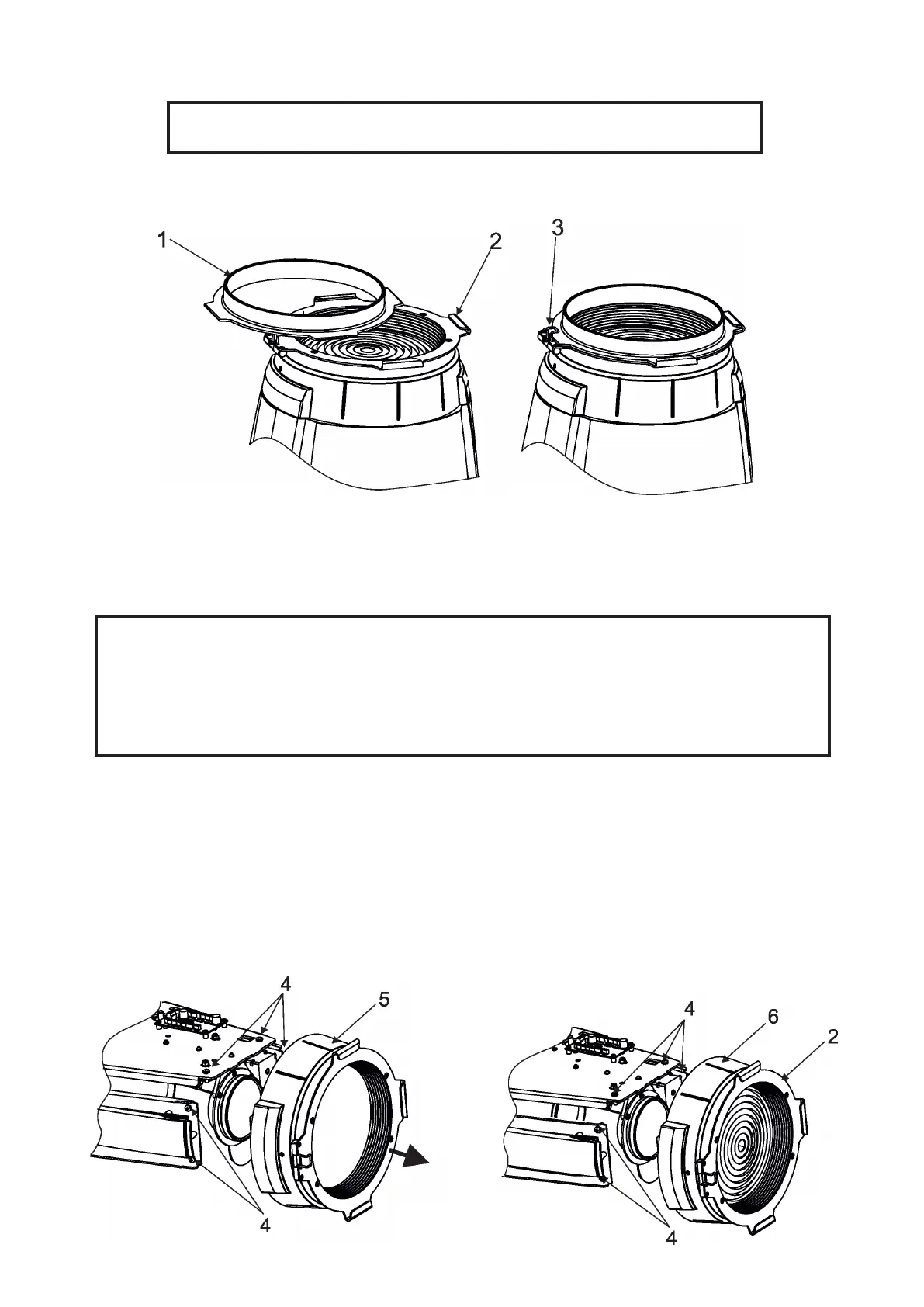
2. Insert the top hat (1) to the gel frame adaptor (2) and secure it by means of the spring lock (3).
4.4 Installing the module of Fresnel lens (module of PC lens)
Install the front lens with the device unplug from mains.
The front lens is heavy!
Secure the head in a horizontal position by means of the pan/tilt locks before
lens replacing.
CAUTION! Risk group 2, RG-2 (for PC lens only)
1. Disconnect the xture from mains and allow it to cool.
2. Remove both head covers.
3. Secure the xture head in a horizontal position by means of the pan/tilt locks.
4. Unscrew two screws (4) on each side of the xture head and two screws (4) on the top side of
the head and remove the lens module (5), e.g. PC lens module.
Be careful, the lens module is heavy!
5. Place the new lens module (6), e.g. Fresnel lens module, on the head and fasten it by means of
the six screws (4). Check that all screws are fully tightened before placing the head covers back
on the head.
6. Insert the top hat to the gel frame adaptor (2) if needed.
7. Set the correct type of the front lens in the menu "Special Functions"--> "Front Lens".



 To Next Page