Deleting all fi les
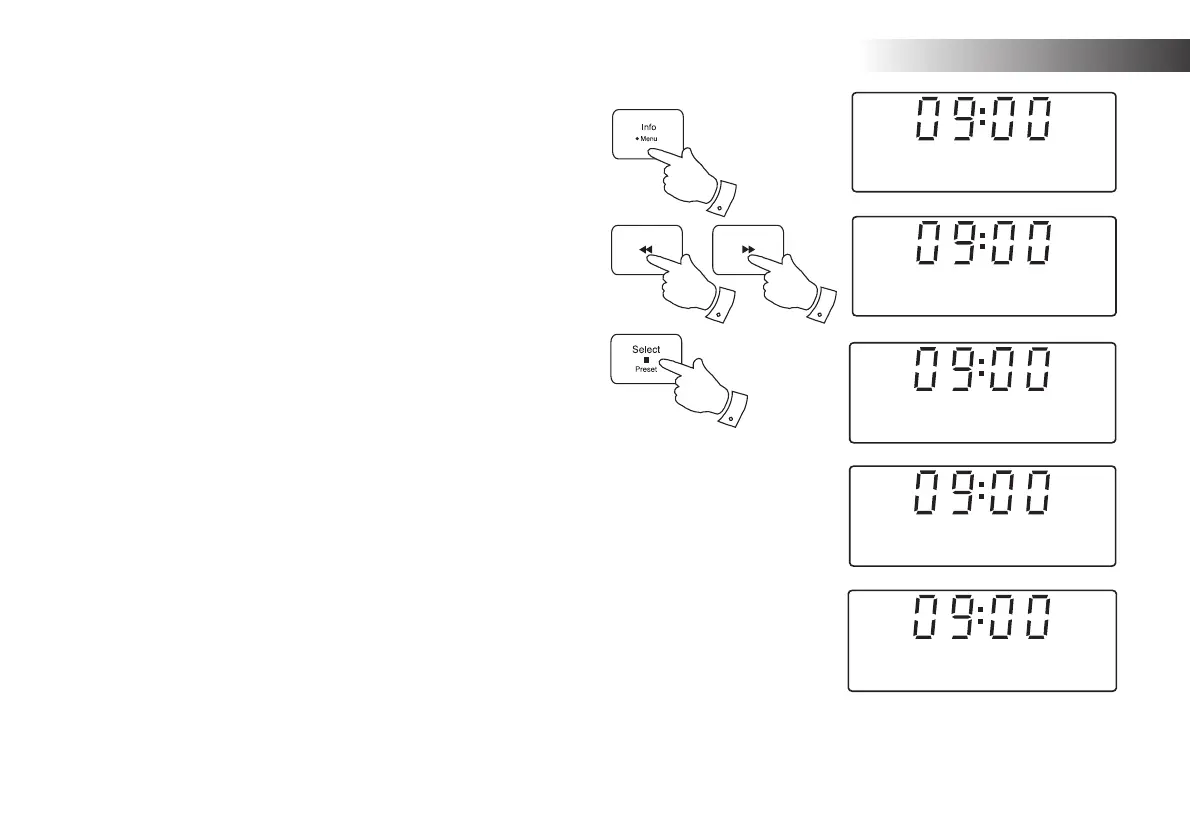
1. With the sound system in USB or SD mode, and with the media
inserted, press and hold the Menu button.
2. Press the Tuning Up or Down buttons until the display shows
"Delete / Format".
3. Press the Select button to enter the Delete / Format menu. The display
will show "Delete" as the default option.
4. Press one of the Tuning Up or Down buttons so that "Format" is
displayed.
5. In order to delete all of the fi les and folders on the media, press the
Select button once more. The display will show "Cancel" as the default
option.
6. If you do not wish to delete all of the fi les on the media, press the
Select button with "Cancel" displayed.
Alternatively, to delete all of the fi les press one of the Tuning Up or
Down buttons to display "OK" and then press the Select button.
The display will show "Formatting..." while all of the fi les and folders
on the card are deleted. The operation will generally only take a few
seconds. When completed, the display will show "No fi le".
Note: Although the process of deleting all of the fi les is described here
as formatting, it is not formatting in the strict sense. Rather it is a “Delete
All Media Files” option.
Once a device has been formatted, it is not possible to recover the
previous contents.
2
2
3-6
1
Delete/Format
<
>
SD
Format
<
>
SD
Delete or Format
Cancel
<
>
SD
Format Device
OK
<
>
SD
Format Device
SD
Formatting...
44
SD / USB


 To Next Page