45
Alarms
Your sound system has two alarms which can each be set to wake you to
DAB, FM radio, CD, USB, SD card or buzzer alarm. The alarms may be
set while the unit is in standby mode or while playing.
Note: If no buttons are pressed for several seconds, your sound system
will exit the alarm setup. To exit the alarm setup at any time press and
release the Menu button as needed.
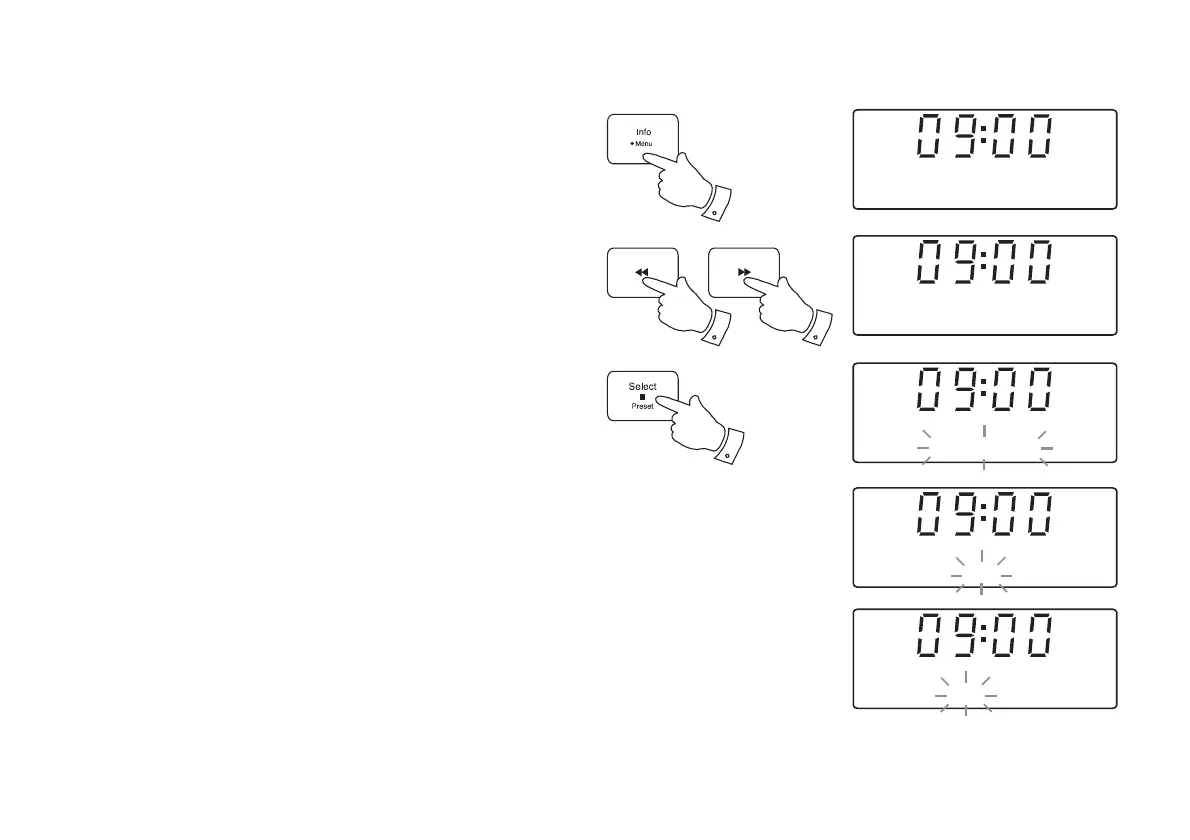
1. Before setting an alarm ensure that the clock time is set (see page 50).
Press and hold the Menu button.
2. Press the Tuning Up or Down buttons until 'Set alarm' shows on the
display. Press and release the Select button to enter the alarm setup
menu.
3. Press the Tuning Up or Down buttons to display the required alarm,
1 or 2. Press and release the Select button 'Alarm Setting' will show
on the display.
4. Press and release the Select button to choose alarm setting. 'Alarm:
On/Off' will show on the upper line of the text display.
5. Press the Tuning Up or Down buttons to choose whether to set the
alarm to On or Off. If Off is selected, the unit will exit the alarm menu.
6. With 'On' selected on the display, press and release the Select button.
'Alarm: Time' will show on the upper line of the text display and the
Alarm hour digits will fl ash.
1
2-6
2-5
2-5
Alarm 1
<
>
Alarm 1
<
>
Setting
Alarm 1: On/Off
<
>
On
Alarm 1: Time
<
>
07:00
Set alarm
<
>


 To Next Page