11
Manual tuning - DAB
Manual tuning allows you to tune directly to the various DAB Band III
channels. UK DAB stations are located in the range 11B to 12D.
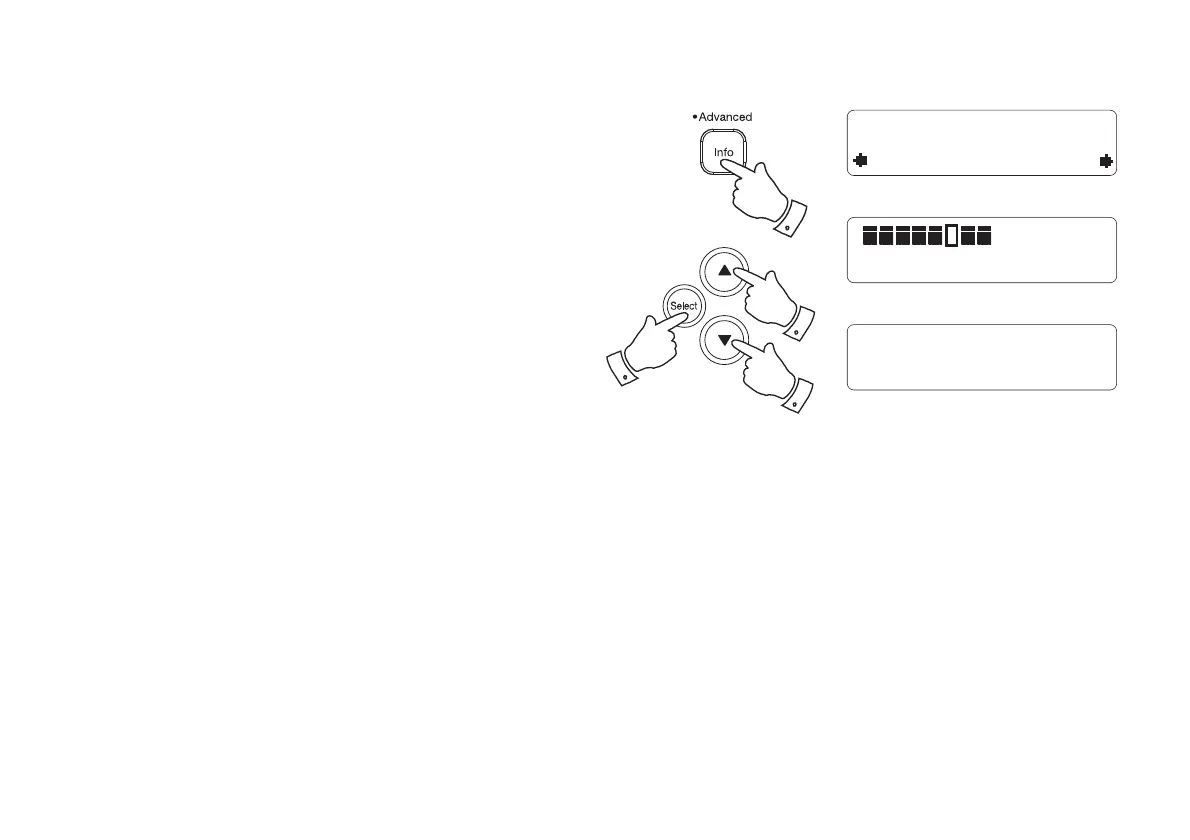
1. Press and hold the Info button until the Advanced DAB menu is
displayed and then release the Info button.
2. Press and release the Tuning Up or Down buttons until 'Manual Tune'
shows on the display and then press and release the Select button
to enter the manual tune menu.
3. As an alternative to steps 1 and 2, you can simply press and hold the
Select button to enter the manual tune menu.
4. Press and release the Tuning Up or Down buttons to select the
required DAB channel.
5. Press and release the Select button to select the required DAB
channel. The clear unfi lled rectangle indicates the minimum signal
level required for satisfactory reception. The signal strength bar will
go up and down showing the changing signal strength as you adjust
the telescopic aerial or your radio.
6. When a DAB signal is found, the display will show the name of the
DAB multiplex. Any new radio stations found will be added to the list
stored in the radio.
7. Press and release the Select button to return to normal tuning after
a few seconds.
Manual Tune
12B 225.648MHz
12B 225.648MHz
BBC Radio 1
Now Tuning...
1
2,4
2-7
2,4



 To Next Page