21
System reset
If your radio fails to operate correctly, or some digits on the display are
missing or incomplete carry out the following procedure.
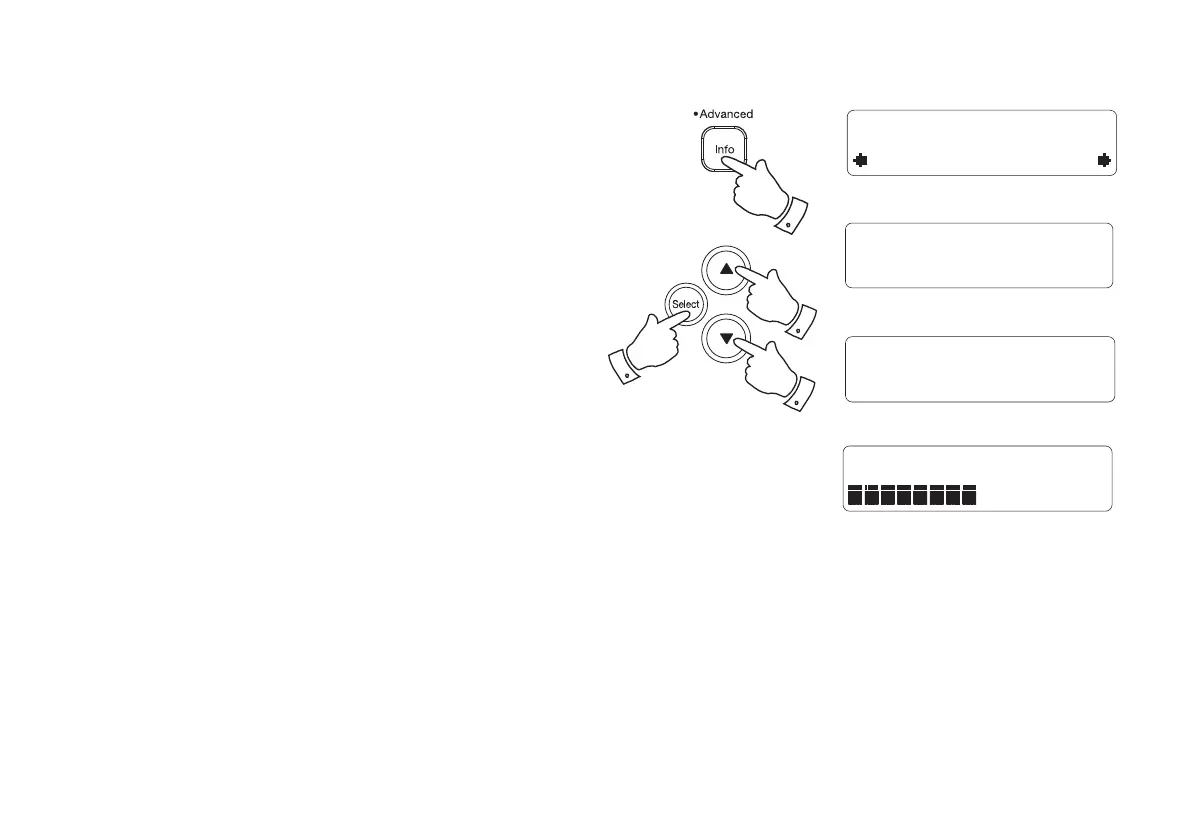
1. Press and hold the Info button until the Advanced DAB or FM menu
shows on the display and then release the Info button.
2. Press and release the Tuning Up or Down buttons until the display
shows 'Factory Reset', then press the Select button. 'Press SELECT
to confi rm reset...' will show on the display.
3. If you wish to perform the reset operation, press the Select button
one more time. A full reset of your radio will be performed. All presets
and station lists will be erased.
4. After a system reset a scan of the DAB band will be performed.
In case of malfunction due to electrostatic discharge, reset the product
(reconnection of power source may be required) to resume normal
operation.
DAB
Factory Reset
Press SELECT to
confirm reset...
Welcome to
Digital Radio
Welcome to DAB28
1
2
2,3
2



 To Next Page