29
File navigation
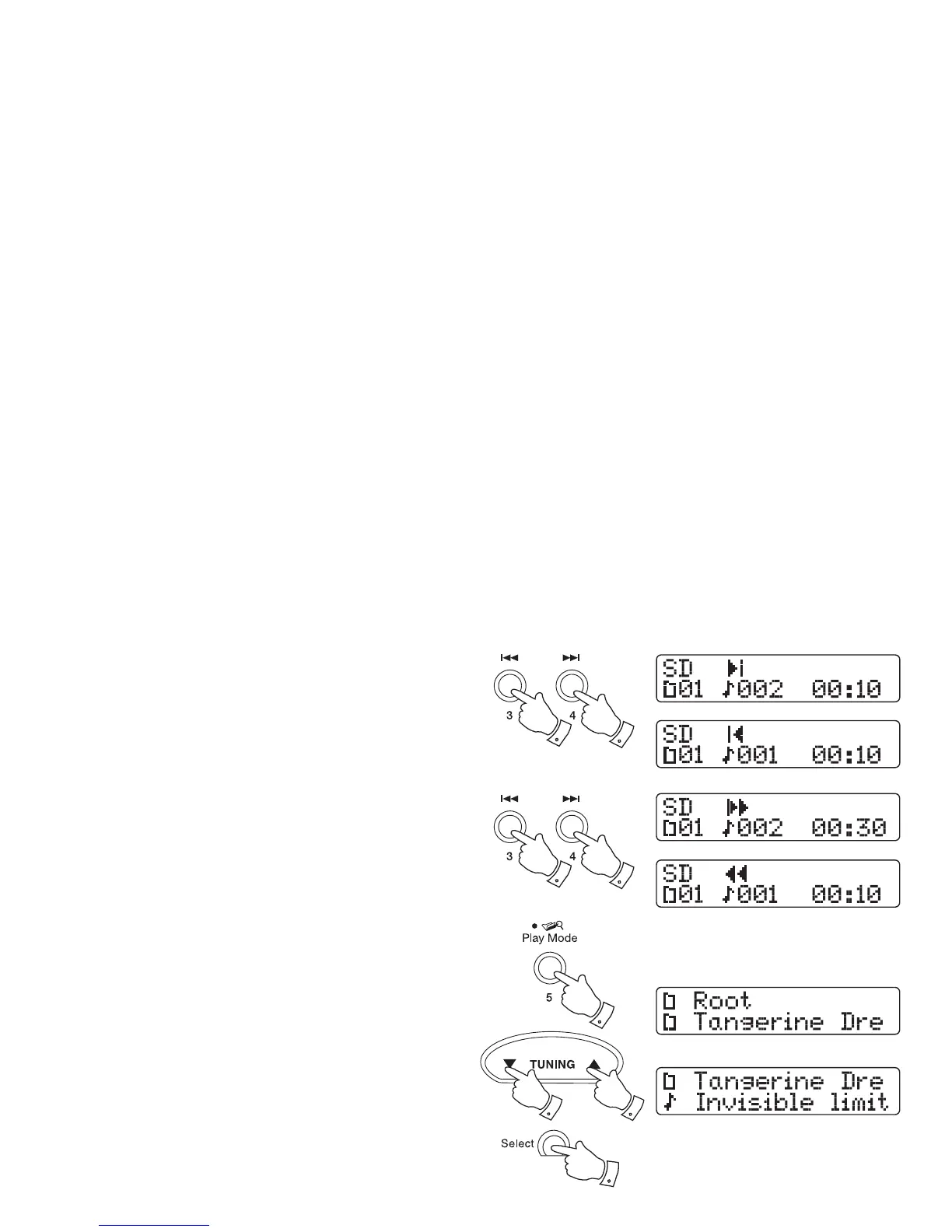
1. While the SD card is playing, press either the Fast-forward or Rewind
buttons to change to the desired fi le. The fi le number will be updated
in the display. If there is more than one folder, when all fi les in the
current folder have been played the next folder will be played.
Search function
1. While the SD card is playing, press and hold the Fast-forward or
Rewind buttons. Release the button when the desired part of the
current fi le is reached.
Folder navigation
You may choose to organise your music fi les using folders for artist and
album selection. See page 44 for folder and fi le name information.
1. Press and hold the Play / Mode button to access the folders on your
SD/SDHC card. The top line shows the current folder and the lower
line shows the folders/or fi les contained within this folder. Your folders/
or fi les will be in numeric-alpha order.
Pressing the Play / Mode button if you are in a sub folder will take
you to the folder at a higher level.
2. Press the Tuning Up or Down buttons to navigate through the folder/
or fi le list.
3. To enter a lower level folder press the Select button.
When the fi le you want to play is displayed, press the Select button
to play your chosen fi le.
11
3
1
2
2
11













 To Next Page