EasyManua.ls Logo

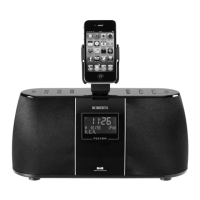
Roberts robi - User Manual

Roberts robi
32 pages
Print Icon
To Next Page IconTo Next Page
Loading...
iPod DAB / FM RDS Digital Radio
and Remote Control
Please read this manual before use
from ROBERTS
Question and Answer IconNeed help?

Do you have a question about the Roberts robi and is the answer not in the manual?

Summary

Controls

Power;Play-Pause;Mute Button

Controls power, playback, and radio mute functions.

Operating Your Radio - DAB

Finding New DAB Stations

Procedure to scan for and add new DAB radio stations.

Operating Your Radio - FM

Manual Tuning - FM

Allows manual adjustment of FM frequencies by 100kHz steps.

Favourite Stations - DAB and FM

iPod Remote Control Operation

Connecting to Your iPod

Troubleshooting

robi will not turn on

Check iPod battery, robi connection, and ensure audio files are stored on iPod.

No audio

Ensure headphones are plugged into robi, check volume, and un-mute if needed.

No; Poor Radio Reception

Check headphone/iPod leads are unravelled. Consider turning off mobile phones.

iPod becomes unresponsive

Try resetting your iPod or consult iPod documentation.

Factory Reset

Caution

Summary

Controls

Power;Play-Pause;Mute Button

Controls power, playback, and radio mute functions.

Operating Your Radio - DAB

Finding New DAB Stations

Procedure to scan for and add new DAB radio stations.

Operating Your Radio - FM

Manual Tuning - FM

Allows manual adjustment of FM frequencies by 100kHz steps.

Favourite Stations - DAB and FM

iPod Remote Control Operation

Connecting to Your iPod

Troubleshooting

robi will not turn on

Check iPod battery, robi connection, and ensure audio files are stored on iPod.

No audio

Ensure headphones are plugged into robi, check volume, and un-mute if needed.

No; Poor Radio Reception

Check headphone/iPod leads are unravelled. Consider turning off mobile phones.

iPod becomes unresponsive

Try resetting your iPod or consult iPod documentation.

Factory Reset

Caution

Roberts robi Specifications

General IconGeneral
DAB+Yes
FMYes
FM Frequency Range87.5-108 MHz
Headphone Jack3.5mm
Presets20
DisplayLCD
Headphone Socket3.5mm
Power SourceMains/Battery
Battery Type4 x AA

Related product manuals