64
DAB Radio
Station order setup
Your radio has 3 station order settings from which you can choose. The
station order settings are, alphanumeric, ensemble and valid.
Note: The default station order on your radio is alphanumeric.
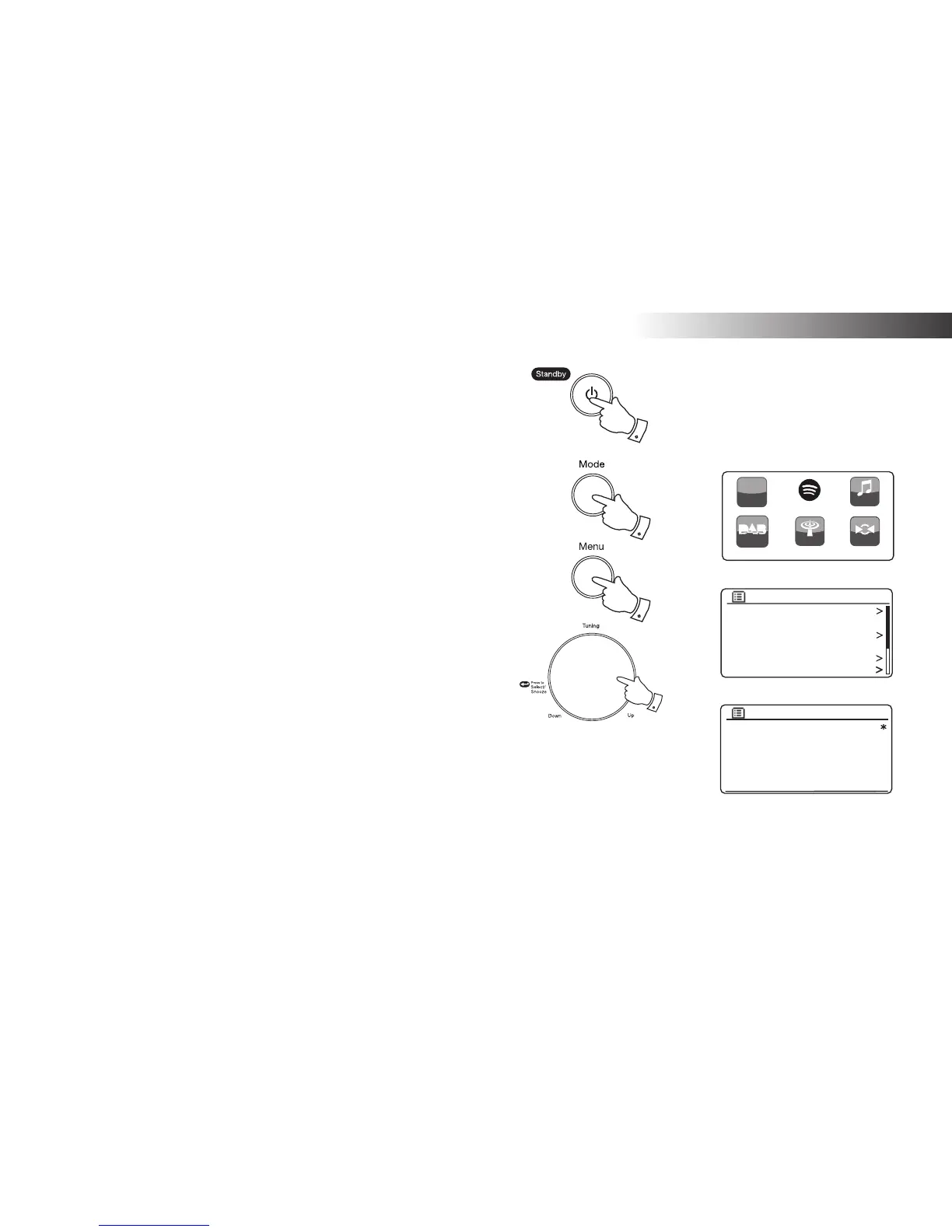
1. Press the On/Standby button to switch on your radio.
2. Press the Mode button as needed to select DAB Radio mode.
3. Press the Menu button to enter the DAB menu list.
4. Rotate the Tuning/Select control until 'Station order' is highlighted.
Press the Tuning/Select control to enter the station order adjustment
mode.
5. Rotate the Tuning/Select control to choose between 'Alphanumeric',
'Ensemble' and 'Valid'.
'Alphanumeric' - sorts the station list alpha-numerically 0...9 A...Z.
'Ensemble' - organises the station list by DAB multiplex.
'Valid' - shows only those stations for which a signal can be found.
The current setting is indicated by an asterisk.
6. Press the Tuning/Select control to select the required station order.
7. Press the Menu button as needed to return to the DAB menu or to
the stations list.
Station list
Scan
Manual tune
Prune invalid
DRC
Station order
DAB
Alphanumeric
Ensemble
Valid
Station order
DAB Radio
My Music
FM Radio
DAB radio
h
tt
p:/
/
Inter net
Radio
AUX
3,7
4-6
2
1














 To Next Page