17
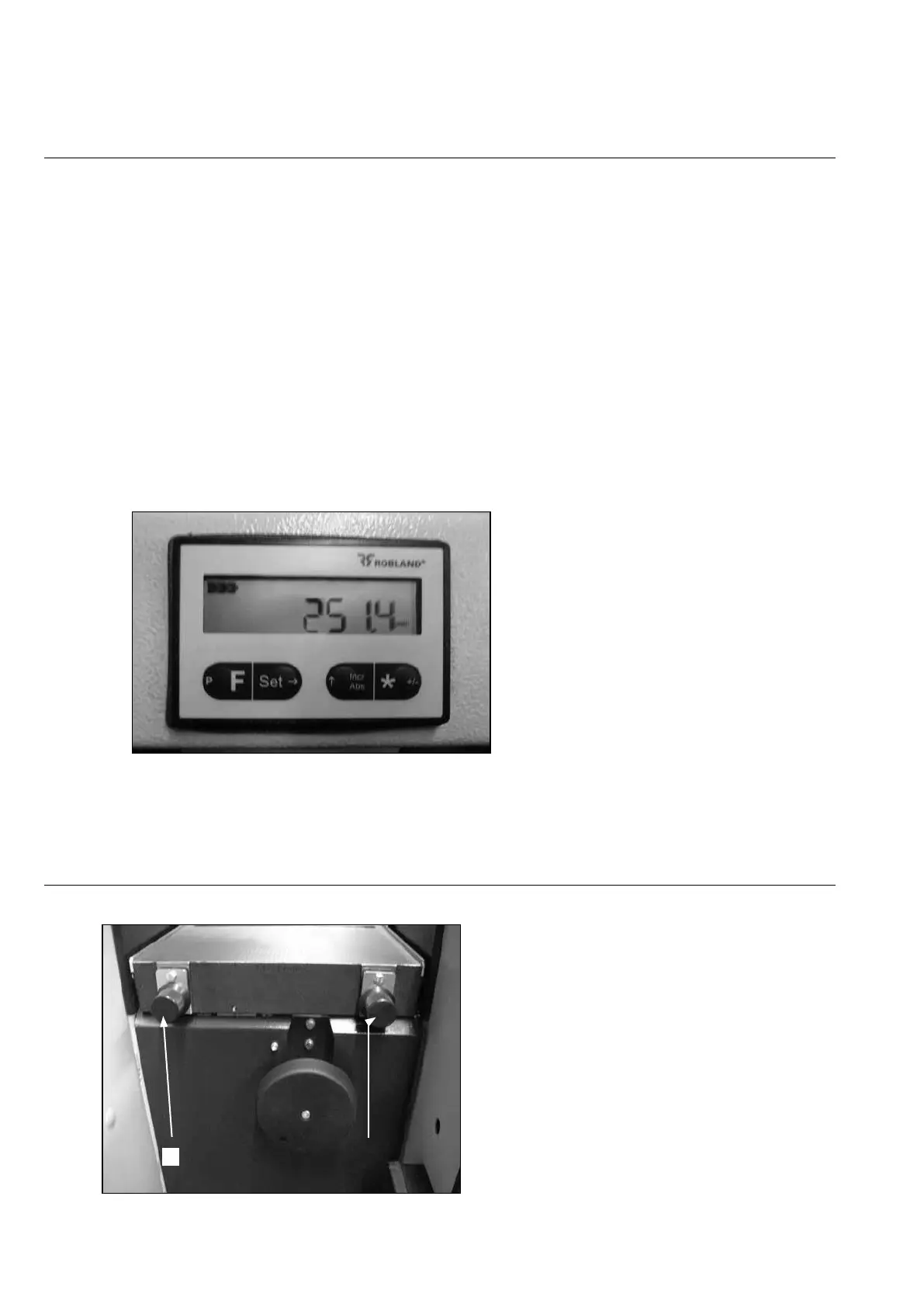
Calibrating of the digital read out (Fig.13)
It is highly reommmended that each time the planer knives are changed, the digital read out is
calibrated, this to avoid measurement errors.
Calibration is done as follows:
Set the thicknesser table at random height and thickness a sample; now measure exactly the
thickness of the sample.
Now the digital reat out has to be set at the same measure, and this can be achieved by
simustaneously the buttons F and SET in order to errase the stored values and set the reader at
0. Now push both buttons F and Incr/Abs. Now the reader begins to count up at 3 progressive
speed rates.
-
rate 1: at 1 Hz for 10 sec.
-
rate 2: at 10 Hz for 10 sec.
-
rate 3: at 1000 for as long the two buttons F and Inc/Abs are held.
Shortly before the desired value is reached, release the 2 buttons and press the same 2 buttons
again so as to approach the desired value with the slowest rate of 1 Hz.
Now the full stroke of the 250 mm of the thicknesser is calibrated.
Fig.13
Option friction reduction rollers on the
thicknesser bed (Fig.14)
The rollers are easy adjustable by turning the serrated knobs as indicated on the picture (1).
Fig.14


 To Next Page