12
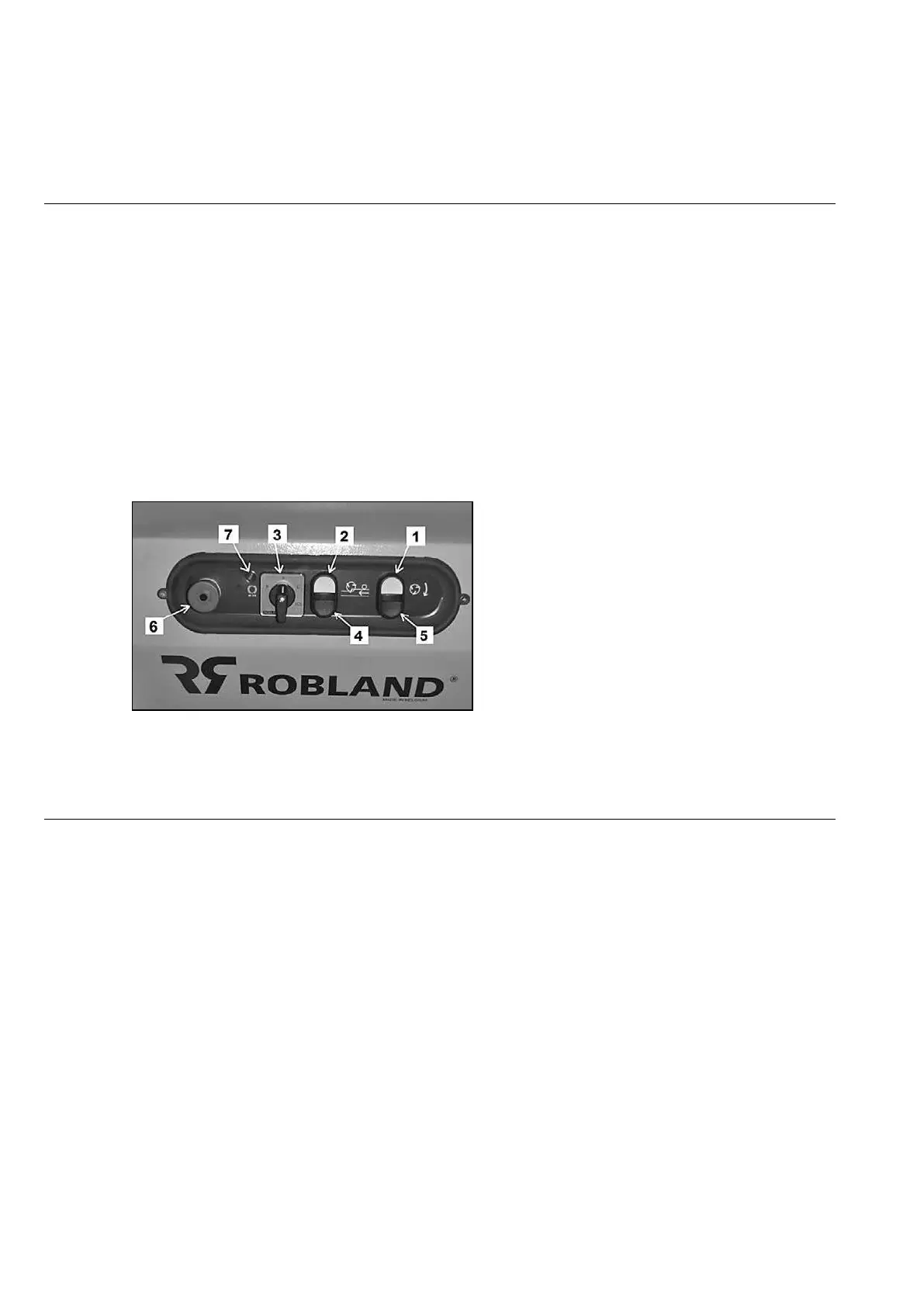
Starting up the machine SD410 (Fig 2)
Turn the main switch Q1 (1) to position “ 1” in order to put the machine under tension.
The motor for the planer arbor can be started by pressing the start button. (1) The engine starts
automatically in “star - triangle”.
By pressing the start button (2) the feeding motor starts.
In the comfort pack, the feeding speeds can be selected by a switch (3) with a choice between two
speeds (pos L = 6m/min - pos H = 12m/min), neutral position and brake release. Brake release is
indicated by a warning light (7). Make sure the brake release switch is set at position “0” and the
warning light is not lit in order to be able to start up the machine.
To stop the feeding motor, press the stop button (5).
All engines are switched off when the stop button or emergency button (6) are
pressed. There is an emergency stop button on the infeed side of the machine.
It is not possible to start the machine with opened planer table and the guard in planing position the
machine. The guard must be put in thicknessing position before the machine can be started.
Fig.2
Aspiration (Fig 3)
For your health and that of your employees, it is recommended to connect to an exhaust system to
the machine.
The machine is equipped with a suction port of 120 mm diameter.
The flow rate must be at least 20 m/sec measured at the machine. The total air flow must be at
least 1500 m³/h.


 To Next Page