22
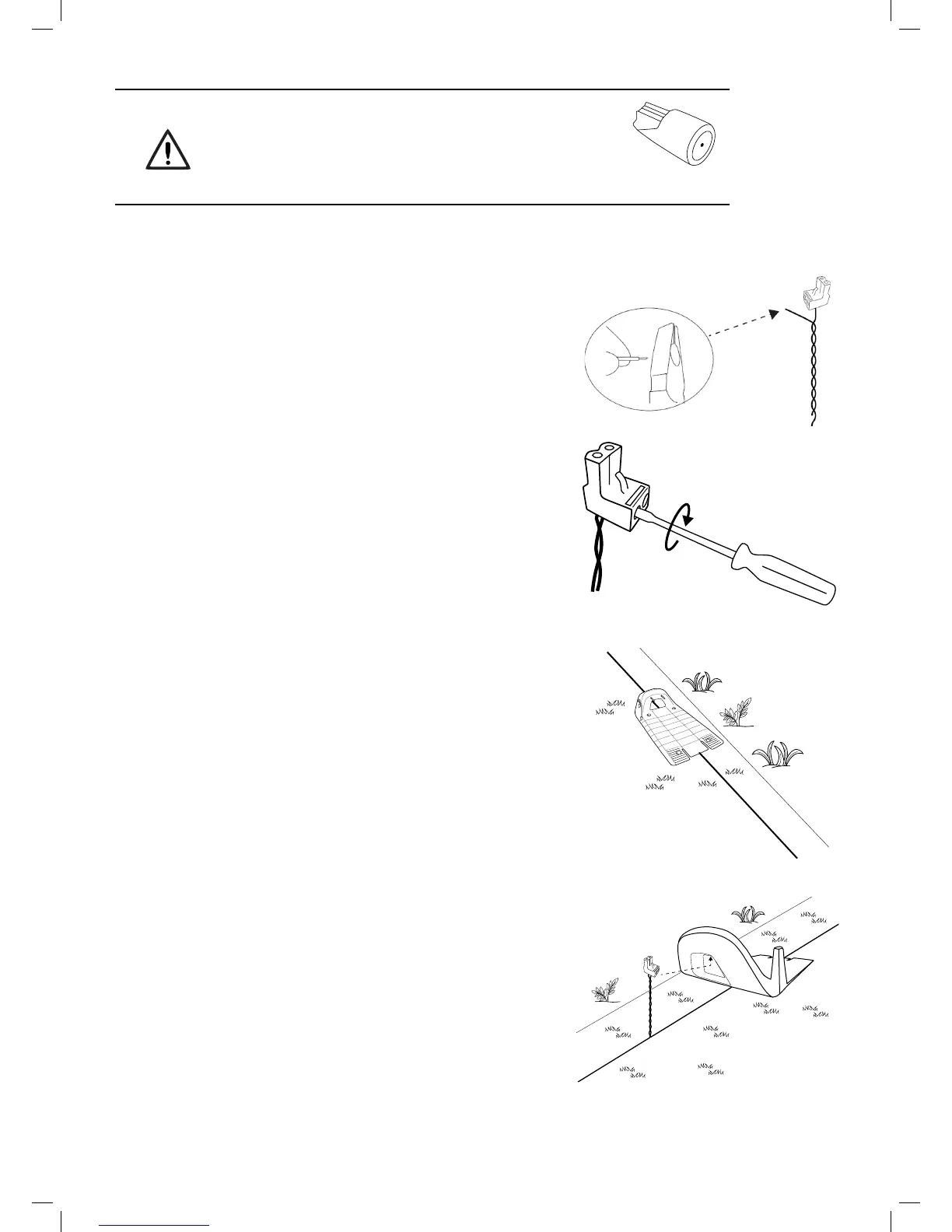
Use only the wire connectors supplied with Robomow.
Neither Twisted cables, nor a screw terminal insulated
with insulation tape are a satisfactory splice.
Soil moisture will cause the conductors to oxidize, which
will later cause a broken circuit.
4.5 Back at the Base Station – Completing the Perimeter Wire Setup
Once the Perimeter Wire loop is completed and pegged to the
ground, complete the setup by attaching the beginning and the
end of the Perimeter Wire to the Base Station Head.
o Peg the two Perimeter Wires down to the ground using the
same peg leaving enough loose wire.
o Trim the end without the connector to make both of equal
length and twist the two wires.
o Strip back 5 mm (1/4 inches) of insulation from the wire end.
o Insert the end of the wire without the connector into the hole
of the connector. Use a small at screwdriver to tighten and
secure this wire into the connector.
4.6 Placement and connection of the Base Station
o Place the Base Station on the Perimeter Wire as shown
in the gure to the right.
o Align the center of the Base Station on the wire.
o Attach the Perimeter Wire connector to the Base Station
Head.



 To Next Page