55
Scroll to select
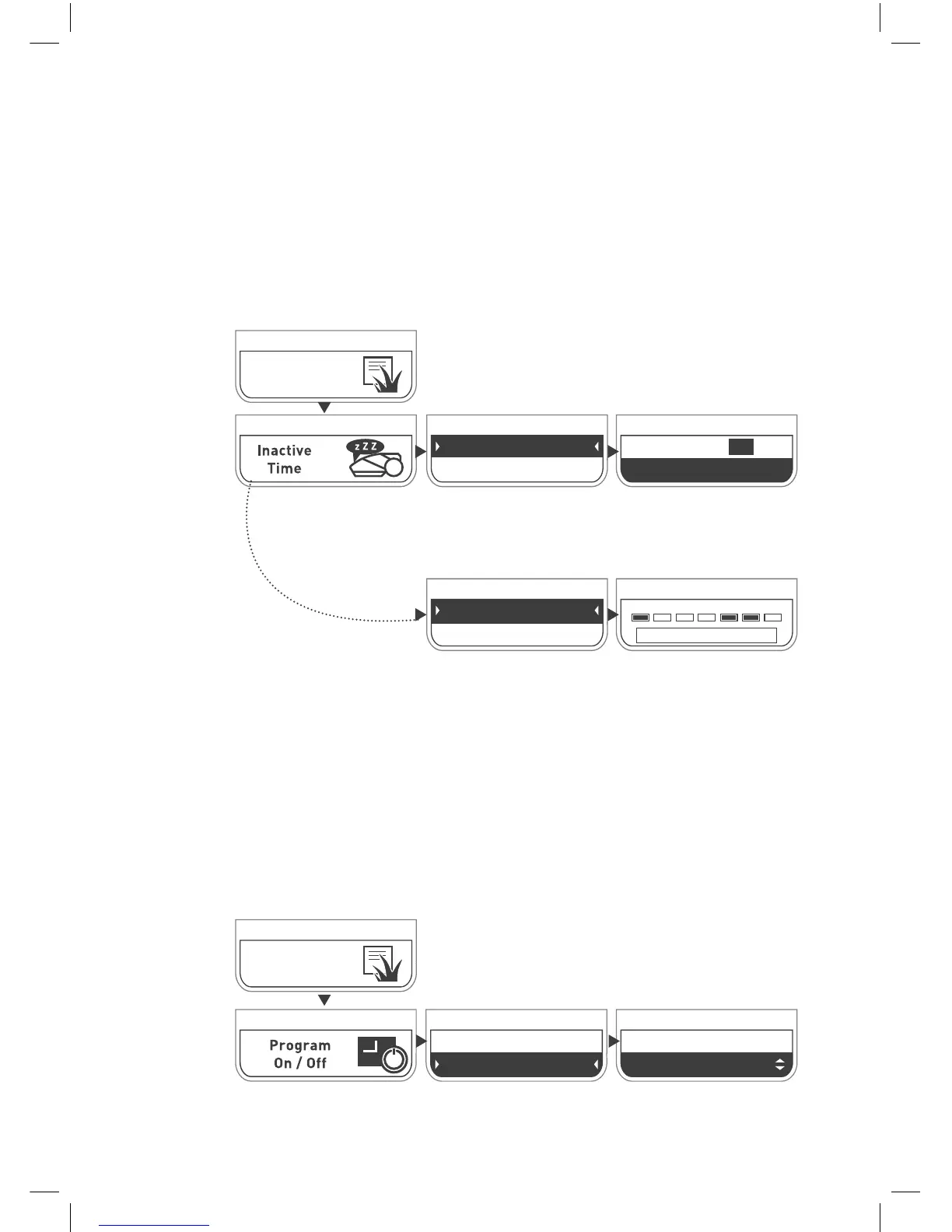
“Program On/Off ”
from the Lawn Option Menu.
Press Go
.
To set specific “mowing free” days and hours:
Press Go to select “Days”
Scroll to select day(s).
Press Go to toggle between active and
inactive. A black box means the day is
Inactive.
Scroll to select “
All Zones
”/ ”
By Zone
”. If “By Zone” is
selected, scroll to select zone. Press
Go
.
Scroll using the arrows to select
“Inactive
Time” from the Lawn Option menu.
Scroll to select between 1st or 2nd
time slot and press Go. You can
configure up to 2 time slots.
Scroll to toggle the inactive window
On/Off. Press Go. Set the start and end
times for this time slot. Scroll to select
OK. Press Go.
Lawn
Options
Scroll and press
Go
to
select On/Off.
Lawn
Options
The Program On/Off menu allows pausing automatic operation
in a particular zone of your lawn.
When Program is set to Off in a particular zone, the mower will
skip the operation in that zone, but will continue to mow the
edge of the entire lawn anyway.
Pause automatic operation for a specific zone
Days
Hours
Mo Tu We Th Fr Sa Su
OK
Hours 1 - On
Hours 2 - Off
Hours 1 - ON
23:00 - 06:00 OK
Program
On
All Zones
By Zone



 To Next Page