REGISTRATION of the device
- Enter the service password 6161 or enter User = A, Psw = 0002 in TECNOPLAT 3000
- Move to the R-connect page
ECOPLAT PLUS BASE - NEW -
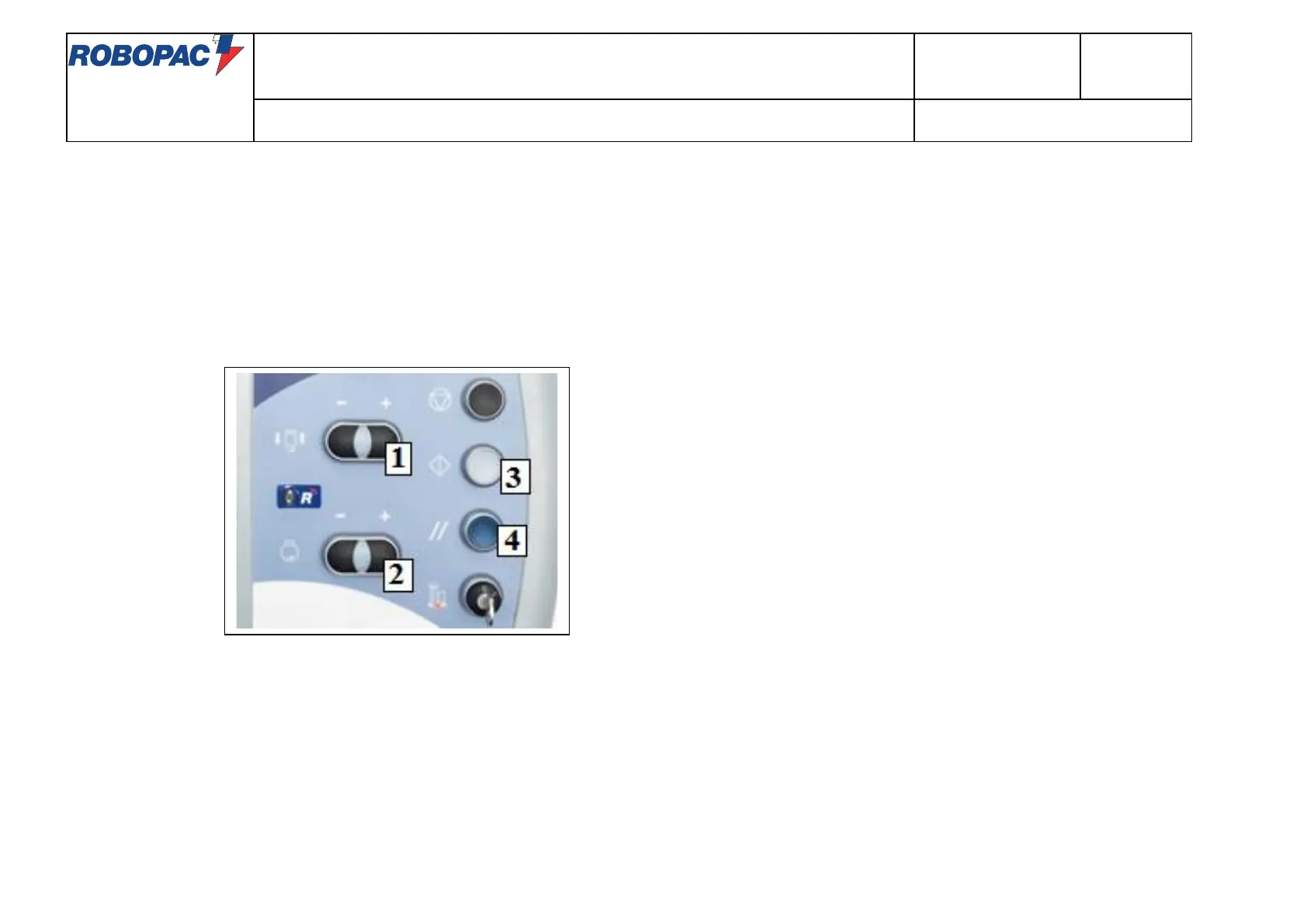
To activate R-Connect turn on the machine and wait for it to go to the "RESET" status
(lighting of the "RESET" button lamp – light [4]).
Simultaneously press the "ROTATION SPEED +" [2 +] , "ROTATION SPEED -" [2 - ] and the "RESET" button [4].
The lamp of the "START" button starts flashing slowly - light [3].
Pressing the "START" button [3] starts the activation procedure. During this phase, the "RESET" button [4] will flash quickly until it becomes steady when
the procedure is complete. By pressing the "RESET" button [4] the machine will go to the "STOP" state.
Pressing "STOP" the procedure is canceled and the PLC moves to the "RESET" status.



 To Next Page