Application
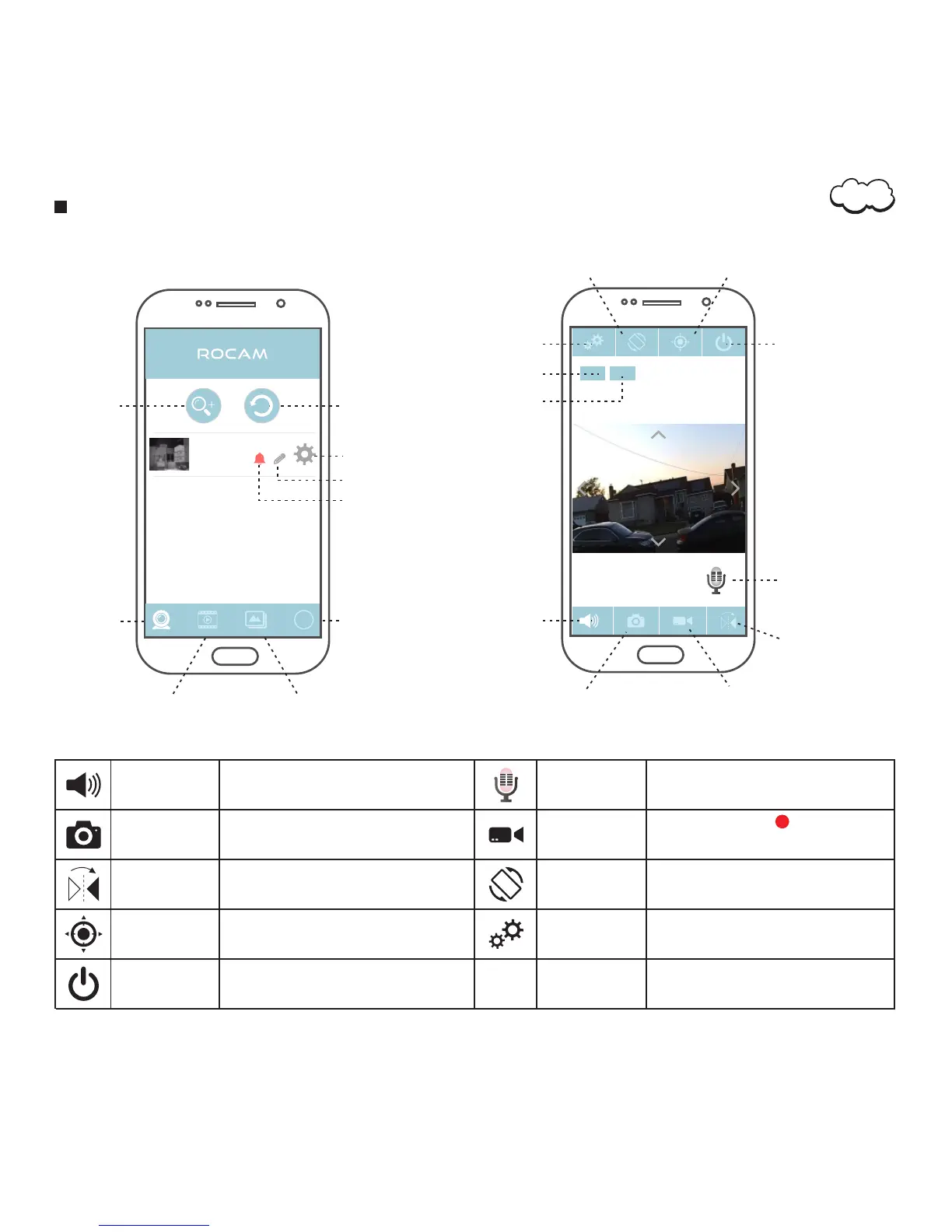
Standard Definition
Add
Refresh
Home
Video
Image
More
Setting
IP Camera
On line
AA AA- 160 067-W YHU R
Edit
Notifications
HE LP
20 16-0 4-2 8 22: 04: 42
Li ve vie w
Full HD
Li ve vie w
SD
Setting
Preset Position
Stop Monitoring
Two-Way Audio
Take Image
Record Video
Image Rotation
Microphone
View Direction
High Definition
Tap to enable the microphone in order
to hear which in front of the camera
Capture snapshot from recent
monitor views
Recrod Video
View Direction
Tap to adjust the view direction,‘ to Flip
Horizontally’ get Left/Right picture,‘Flip
Vertically’to get Portrait or Upside Down images
Image Rotation
Tap to switch full/partial screen mode
Microphone
Keep pressing to talk with who in
front of the camera
Setting
Tap to access the monitor's setting menu
Stop monitoring
Two-Way Audio
Take Image
Preset Position
Tap to set preset position or call preset
position
Stop monitoring and return to
Home page
Tap to start record , appears during
the recording
the recording, tap again to end
05


 To Next Page