10
Need help? Call 800-620-2790
RF-TVMP40 TV Wall Mount
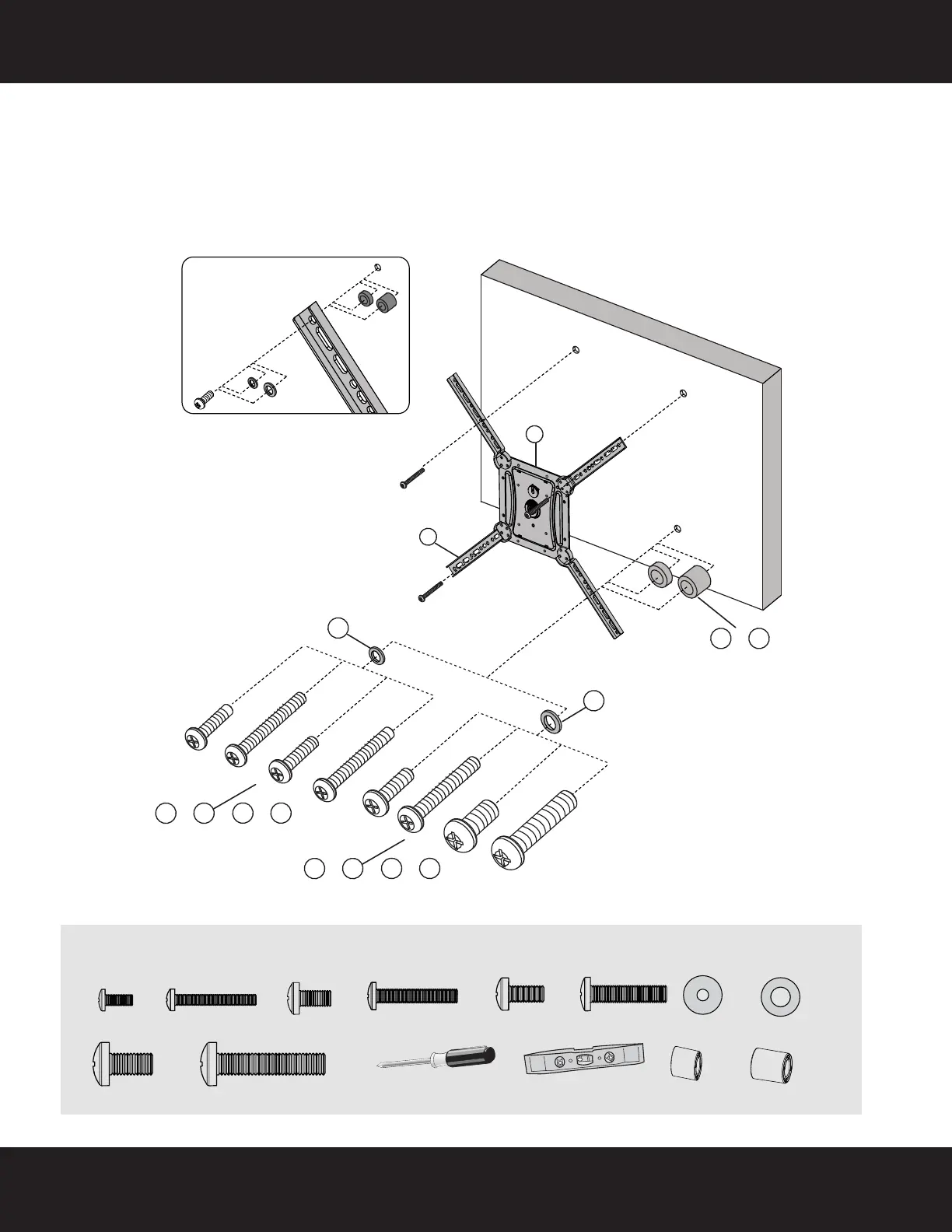
STEP 4: Option 2 - Attaching the monitor plate with adapters to the TV (continued)
3 Align the adapters (F) with the screw holes on the back of your TV.
4 Install screws (M-A, M-B, M-C, M-D, M-E, M-F, M-G, or M-H) securely into the four holes in the back of the
TV, using washers (M-K or M-L) and spacers (M-I or M-J) as necessary. Do not over-tighten.
Note: The bracket assembly should be level on the back of the TV.
5 Continue to “STEP 5 - Determine wall-mount location” on page 11.
You’ll need
UP
M-A M-B M-C
M-I M-J
M-D
M-E M-F M-G M-H
M-K
M-L
C
F
M-A (4)
M-B (4)
Phillips screwdriver
or
or
M-C (4)
Level
or
M-D (4)
or
M-E (4)
or
M-F (4)
M-G (4)
or
M-H (4)
or
M-K (4)
M-L (4)
or
M-I (4)
M-J (4)
RF-TVMP40_13-0238_MAN_V1_ENG.fm Page 10 Monday, April 15, 2013 1:26 PM







 To Next Page