
 Need help?
Do you have a question about the RocketFish RF-HTMT15 and is the answer not in the manual?
Warning against using the product for unspecified purposes.
Caution regarding property damage/personal injury from incorrect installation.
Specifies maximum TV weight and wall support requirements.
Warning about small parts posing a choking hazard to children.
Compatibility with TV screen sizes and maximum weight.
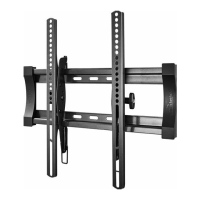
Details on slim profile, tilt adjustment, and VESA compatibility.
Supported wall types for installation.
Key tools needed for assembly and installation.
Lists wall plate, TV brackets, and template.
Various screws, washers, and spacers for TV attachment.
Lag bolts and washers for securing the wall plate.
Identifying TV back types for installation planning.
Specific guidance for TVs with gaps between brackets and the back.
Guidance on selecting appropriate screws and washers for TV attachment.
Instructions for using spacers based on TV back type.
Critical safety precautions for hardware selection and use.
Detailed steps for attaching brackets to TVs with a flat back.
Detailed steps for attaching brackets to TVs with non-flat backs.
Guidance on measuring and marking the wall for optimal mounting height.
Detailed steps for mounting the wall plate on a wood stud wall.
Steps for drilling pilot holes in wood studs for lag bolts.
Detailed steps for mounting the wall plate on concrete walls.
Specifications for concrete wall thickness and block size.
Steps for drilling pilot holes in concrete walls for anchors.
Caution regarding drilling into mortar between concrete blocks.
Steps for inserting anchors and attaching the wall plate.
Warning against over-tightening lag bolts in concrete.
Procedure for securely attaching the TV to the mounted wall plate.
Advice to get help when mounting heavy TVs.
Adjusting tilt tension, TV angle, and ensuring the mount is level.
Steps to unlock and detach the TV from the wall mount.
Details on what the warranty covers and how to obtain service.
List of conditions and damages not covered by the warranty.
 General
| Model | RF-HTMT15 |
|---|---|
| VESA Compatibility | 200x200mm to 400x400mm |
| Material | Steel |
| Color | Black |
| Brand | RocketFish |
| Compatible TV Sizes | Up to 55 inches |
| Maximum TV Size | 55 inches |
| Tilt Range | 5 degrees up, 15 degrees down |
| Mount Type | Wall |
| Compatible Screen Size | Up to 55 inches |






 To Next Page