EasyManua.ls Logo

RocketFish Rocketboost RF-RBWS01 - User Manual

RocketFish Rocketboost RF-RBWS01
35 pages
Print Icon
To Next Page IconTo Next Page
Loading...
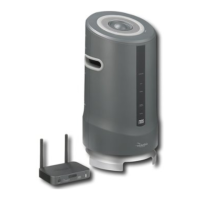
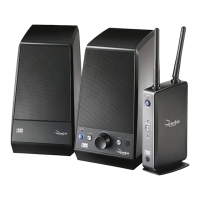
Rocketboost™ Wireless Speaker
System
RF-RBWS01
User Guide
RF-RBWSO1_11-0202_MAN_V1.fm Page 1 Monday, May 2, 2011 11:46 AM

Other manuals for RocketFish Rocketboost RF-RBWS01

Questions and Answers

  • J
    Jacob GarciaAug 6, 2025
    How to fix sound interference with RocketFish Rocketboost RF-RBWS01 Speakers?
    • L
      Lisa WardAug 6, 2025
      If you are experiencing sound interference with your RocketFish speakers, it might be due to other devices. Try turning off devices like cordless phones, microwaves, and wireless routers one at a time to see if any of them are causing the interference. If a cordless phone or wireless router is the culprit, try changing the channel it uses.
  • M
    Michael RomeroAug 11, 2025
    Why can't I turn the volume up or down on my RocketFish Rocketboost RF-RBWS01 Speakers?
    • E
      efarmerAug 11, 2025
      If you're unable to adjust the volume on your RocketFish speakers, consider the following: * Ensure the power indicators on the Rocketboost wireless sender and receiver devices are lit solidly. If the indicators are blinking, see 'Establishing communication' on page 21. * Check the volume level of the wireless speaker or audio sources connected to the wireless sender. * Make sure the wireless sender or wireless receiver devices are not muted. The Receive Mode indicator (marked Rx) light blinks when the device is muted. * The battery in your remote may be dead. Try replacing it with a new battery.
  • B
    Brian SanchezAug 15, 2025
    How to play audio from a computer on RocketFish Rocketboost RF-RBWS01 Speakers?
    • P
      proweAug 15, 2025
      To play audio from a computer on your RocketFish speakers, ensure that the USB cable is correctly connected to the wireless sender/receiver and your computer. Also, make sure that you have selected the USB jack as the audio input source by pressing the USB-In button on the remote control.
  • S
    Stephen BallardAug 19, 2025
    What to do if my Rocketboost remote will not control the volume on RocketFish Speakers?
    • D
      Dustin YoderAug 19, 2025
      If your Rocketboost remote isn't controlling the volume, first make sure you have removed the insulation sheet in the battery tray of the Rocketboost remote. If that doesn't work, the battery in your remote may be dead, so try replacing it with a new battery.
  • S
    Spencer LiAug 25, 2025
    Why is the sound/audio really quiet coming out of my RocketFish wireless speakers?
    • D
      Donna PettyAug 25, 2025
      If the sound from your RocketFish wireless speakers is too quiet, make sure your source devices (like your A/V receiver or iPod) have their volume turned up to at least 50% of their maximum volume level. This can help maximize the overall volume level of the system.
  • S
    Scott BennettOct 28, 2025
    Why is there no sound coming from my RocketFish Rocketboost RF-RBWS01?
    • I
      isabella70Oct 28, 2025
      If you are not getting any sound from your RocketFish speakers, here are a few things to check: * Ensure the power indicators on both the wireless sender and receiver are solid, not blinking. * Verify the volume level on the wireless speaker and any audio sources connected to the wireless sender. * Confirm all audio cables are correctly connected. * Make sure the audio source connected to your wireless sender is turned on. * Check that neither the wireless sender nor the receiver is muted (Rx light blinks when muted). * If using USB audio from a computer, ensure the computer's volume is up and not muted. * Remove the insulation sheet from the Rocketboost remote's battery tray. * Ensure source devices (A/V receiver, iPod, etc.) have their volume at least 50%. * Try replac...
  • J
    James EricksonNov 1, 2025
    What to do if there is no communication between Rocketboost sender and receiver devices for RocketFish Speakers?
    • D
      Darlene LewisNov 1, 2025
      If your Rocketboost sender and receiver devices aren't communicating, try these steps: * Check that the power indicators on both devices are lit solidly. If they're blinking, consult the 'Establishing communication' section. * Ensure only one Rocketboost device has the Hub switch enabled (it will have a green power indicator). * Check the volume level of the wireless speaker or audio sources connected to the wireless sender. * Make sure all audio cables are correctly connected. * Verify the audio source connected to your wireless sender is on. * Ensure neither the wireless sender nor receiver is muted (Rx light blinks when muted). * If using computer USB audio, check that your computer's volume is turned up and not muted. * Remove the insulation sheet from the Rocketboost ...

Summary

Important Safety Instructions

General Safety Precautions

Provides essential safety guidelines for using the audio system.

Electrical Safety Warnings

Details critical warnings related to electrical connections and usage.

System Setup and Installation

Initial Setup Procedures

Steps for unpacking and preparing the wireless sender/receiver for use.

Connecting Power Adapters

Instructions for connecting the AC adapter to the wireless speaker.

Connecting Audio Sources

Guide to connecting audio sources to the wireless sender/receiver.

Establishing Network Communication

Explains the requirement for a hub device to create a network.

Joining Devices to the Network

Steps to connect the sender/receiver and speaker to a network.

System Operation and Usage

Listening to Music

How to play audio through the wireless speaker system.

Maintenance and Troubleshooting

Troubleshooting: No Communication

Solutions for issues where sender and receiver devices do not communicate.

Troubleshooting: No Sound

Steps to resolve problems related to no audio output.

Troubleshooting: Sound Interference

Methods to identify and fix sources of sound interference.

Troubleshooting: Computer Audio Playback

Resolving issues when playing audio from a computer.

RocketFish Rocketboost RF-RBWS01 Specifications

General IconGeneral
BrandRocketFish
ModelRocketboost RF-RBWS01
CategorySpeakers
LanguageEnglish

Related product manuals