EasyManua.ls Logo

Rogerblack Cross Trainer - Computer Operation

Rogerblack Cross Trainer
24 pages
Print Icon
To Next Page IconTo Next Page
To Previous Page IconTo Previous Page
Loading...
Specification
Function
Auto Scan
Every 4 Seconds
Speed
0.0 99.9Km/h
Distance
0.0 999.9Mile or Km (According to inside setting )
Time
0:00 99:59 (Minute: Second )
Calories
0.0 999.9 Kcal
Odometer
0.0 999.9 Km or Mile (According to inside setting )
RPM
Circles/Min
Pulse
40 240 BPM
Sensor
No Contact magnetic type
Battery type
2 x SIZE AA
Operation Temperature
0 - +40
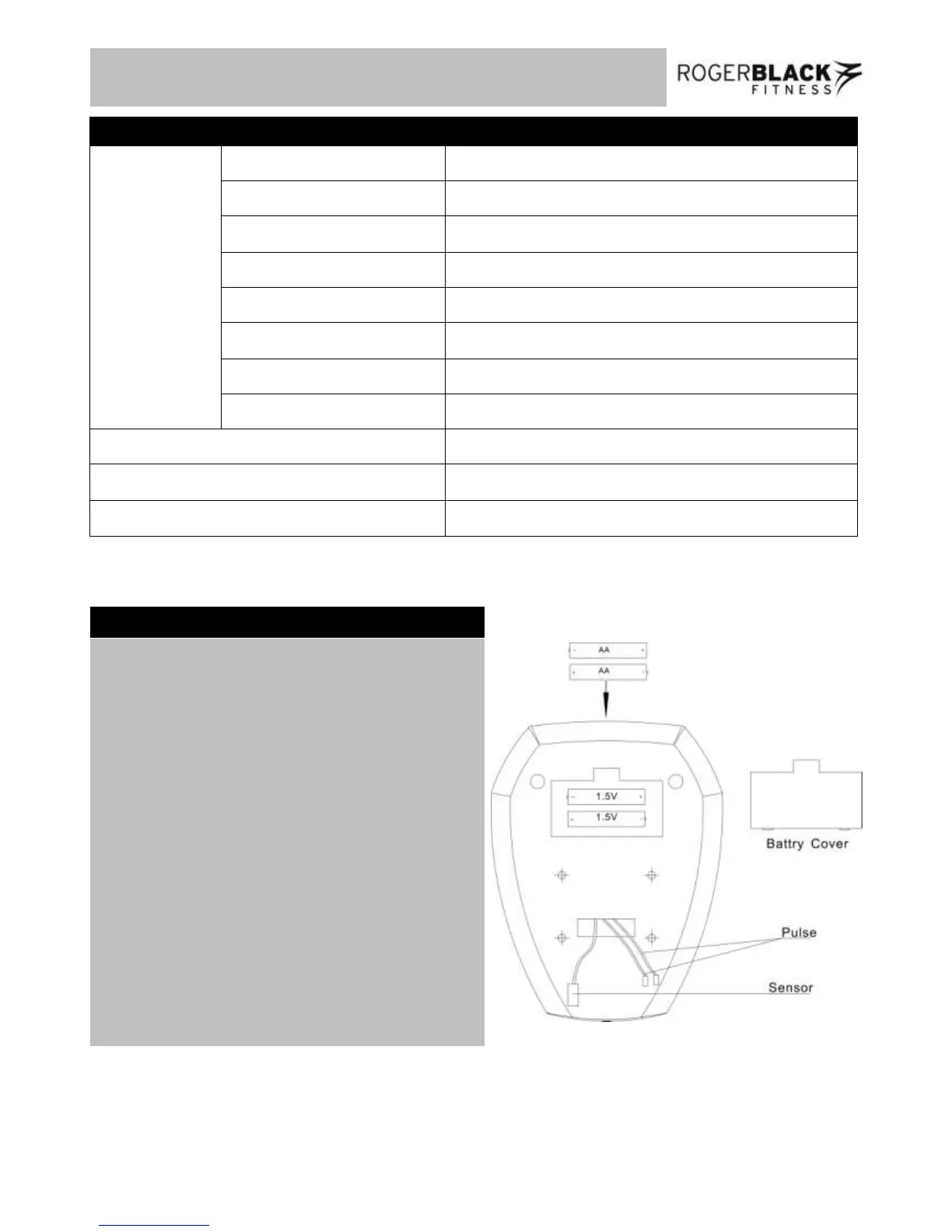
Replacement of the batteries
1. Remove the battery cover on the back of the
computer.
2. Replace two 1.5V (AA) batteries.
3. Make sure the batteries are installed correctly
and the polarities are correct.
4. If the display is not clear or only partial
segments appeared, remove the batteries and
wait for 15 seconds before re-installing them.
5. The battery life is approx. 10 months under
normal usage.
6. When the batteries are removed, all the
functional values will reset to zero.

14
Computer Operation
Specification

Related product manuals