READING ER PROBES
21
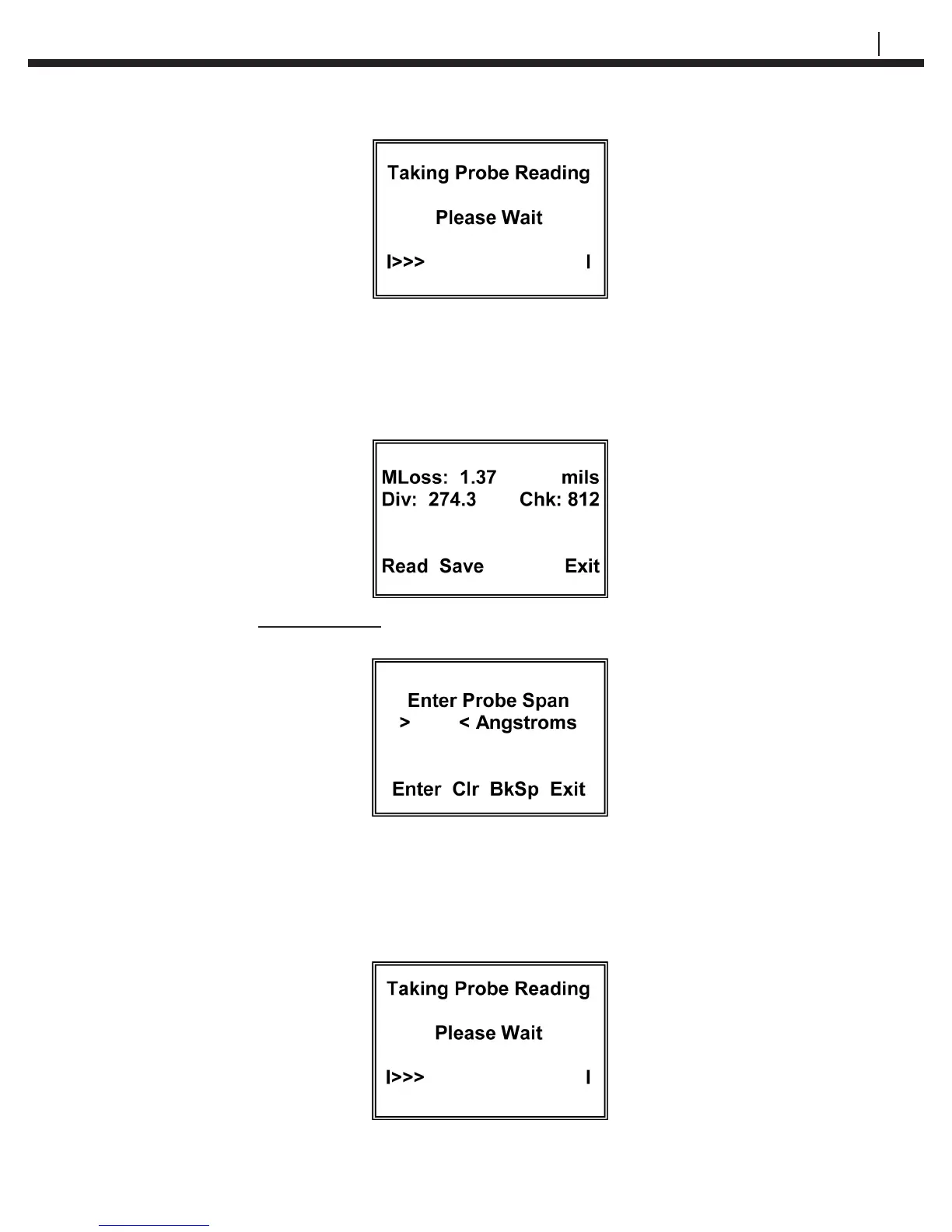
A series of > symbols will accumulate from left to right across the screen to indicate the
progression of the measurement function. At the conclusion of the measurement function
(approximately 30 seconds) the CheckMate™ will display the probe Metal Loss (MLoss:)
in the engineering units originally selected, the in divisions (Div:) and the current check
reading (Chk:) in divisions. A typical display is shown below:
If a TF5 or TF50 high sensitivity atmospheric ER probe has been selected, the Check-
Mate™ will go to a special Enter Probe Span display:
Using the numeric portion of the keypad, enter the probe span in Angstroms (Ǻ). The
packaging for the TF5 and TF50 ER provides the specic span for the probe. Alterna-
tively, the nominal span can be used without appreciable error. Pressing Enter (F1) will
cause the CheckMate™ to automatically go to the measure mode and the Taking Probe
Reading – Please Wait display will appear:


 To Next Page