4.4. Wire DC-in Power Source
Warning Only trained and qualied personnel are allowed to install
or replace this equipment.
Follow the instructions below for connecting the computer to a DC-input power
source.
1. Before wiring, make sure the power source is disconnected.
2. Find the terminal block in the accessory box.
3. Use the wire-stripping tool to strip a short insulation segment from the
output wires of the DC power source.
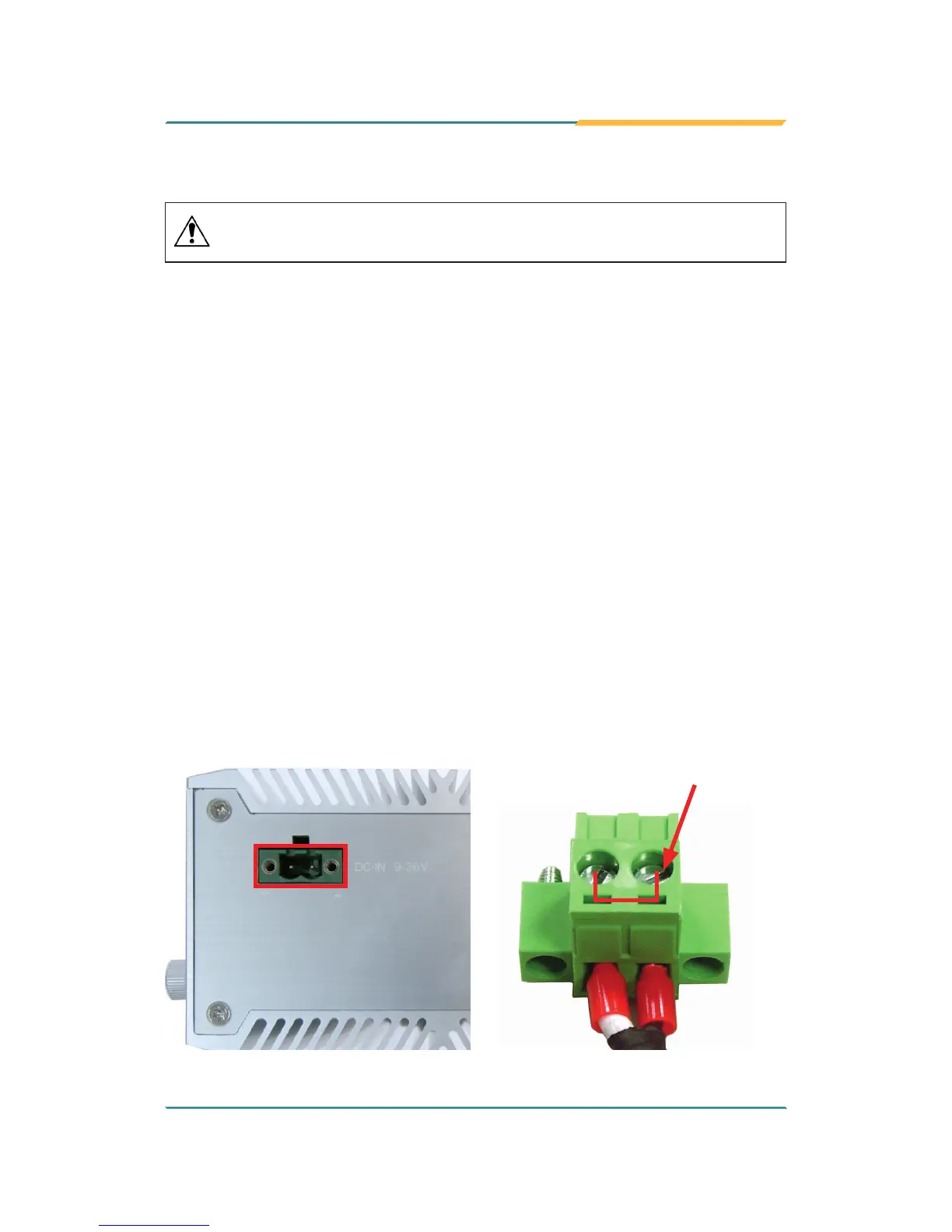
4. Identify the positive and negative feed positions for the terminal block
connection. See the symbols printed on the rear panel indicating the
polarities and DC-input power range in voltage.
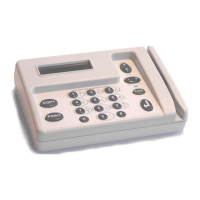
5. Insert the exposed wires into the terminal block plugs. Only wires with
insulation should extend from the terminal block plugs. Note that the
polarities between the wires and the terminal block plugs must be positive
to positive and negative to negative.
6. Use a slotted screwdriver to tighten the captive screws. Plug the terminal
block rmly, which wired, into the receptacle on the rear panel.
+ -
receptacle
+ -
DC-IN
terminal block
captive screw


 To Next Page