61
More Functions
7
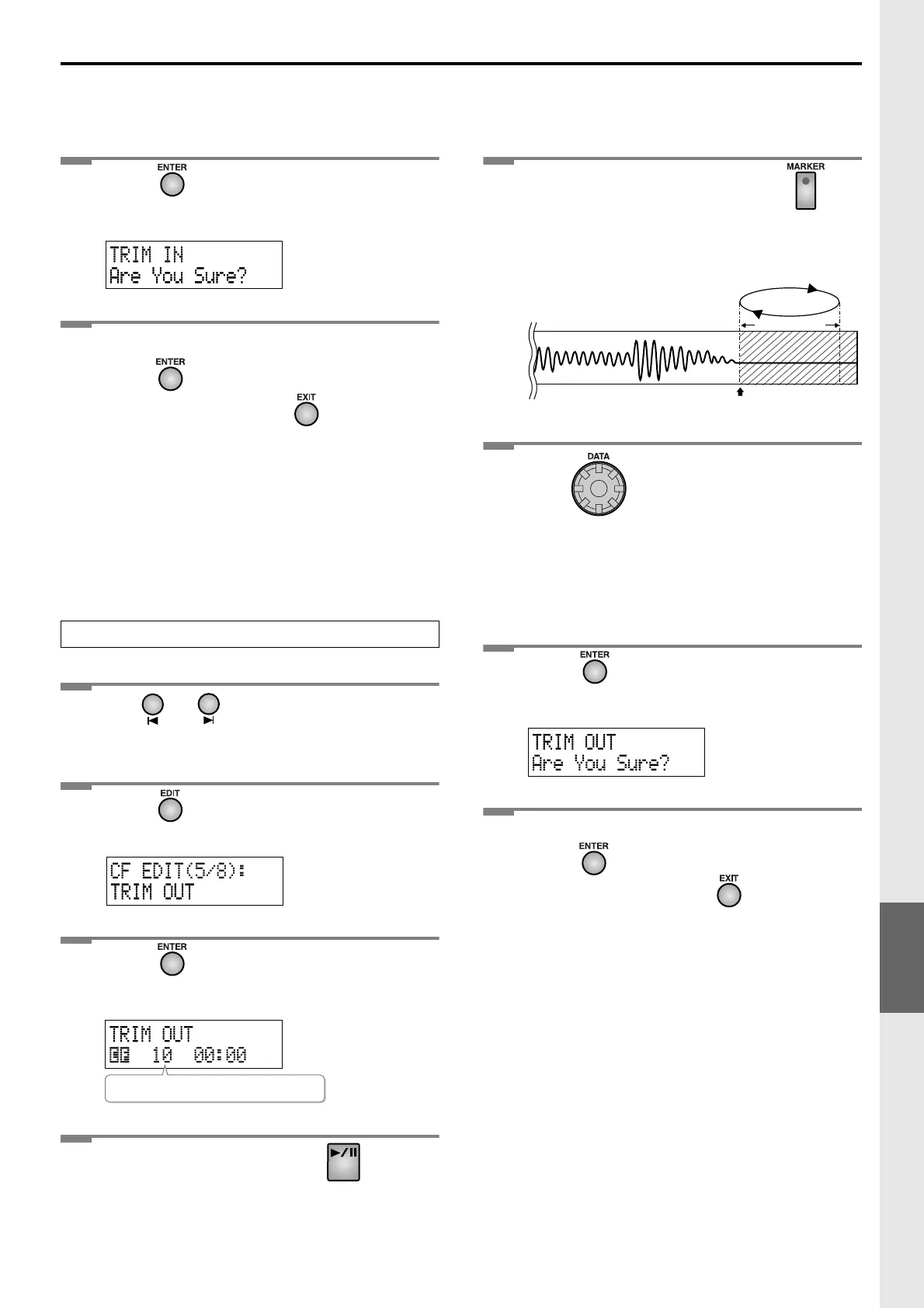
Press .
The message “Are You Sure?” appears.
8
To execute the Trim In operation,
press .
(If you decide to cancel, press .)
The Trim In operation will be carried out. Once it’s
complete, you’re returned to the original readout.
1
Use or to select the track you
want to edit.
2
Press until “TRIM OUT” appears in
the display.
3
Press .
The trim out editing screen appears.
4
On the CF card side, press .
The track begins playing.
5
At the desired End Point, press on
the CF card side.
Four seconds of sound following the End Point will
play repeatedly.
6
Turn to precisely adjust the End
Point.
• Turn [DATA] clockwise/counterclockwise to move
the End Point forward or backward in small steps.
• Slowly turn [DATA] to adjust the End Point so that
you don’t hear the end of the sound.
7
Press .
The message “Are You Sure?” appears.
8
To execute the Trim Out operation,
press .
(If you decide to cancel, press .)
The Trim Out operation will be executed. When it has
been completed, you’re returned to the original
readout.
Trimming Silence from the End of a Track
Number of the track you’re editing
End Point
Four seconds
Plays repeatedly
Editing a CF Card (continued)




 To Next Page