

EasyManua.ls Logo

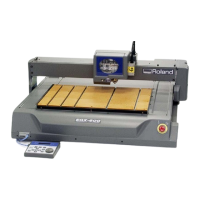
Roland EGX-600 - User Manual

Roland EGX-600
149 pages
Print Icon
To Next Page IconTo Next Page
Loading...
Users Manual
Thank you very much for purchasing the product.
To ensure correct and safe usage with a full understanding of this product's performance, please be sure to read through this
manual completely and store it in a safe location.
Unauthorized copying or transferral, in whole or in part, of this manual is prohibited.
The contents of this operation manual and the specifications of this product are subject to change without notice.
The operation manual and the product have been prepared and tested as much as possible. If you find any misprint or error,
please inform us.
Roland DG Corp. assumes no responsibility for any direct or indirect loss or damage which may occur through use of this
product, regardless of any failure to perform on the part of this product.
Roland DG Corp. assumes no responsibility for any direct or indirect loss or damage which may occur with respect to any
article made using this product.

Table of Contents

Other manuals for Roland EGX-600

Question and Answer IconNeed help?

Do you have a question about the Roland EGX-600 and is the answer not in the manual?

Roland EGX-600 Specifications

General IconGeneral
BrandRoland
ModelEGX-600
CategoryPrinter
LanguageEnglish

Summary

Users Manual Introduction and Safety

Key Safety Instructions Before Use

Highlights critical safety notes for correct and safe usage of the product.

General Safety Rules for Operation

Work Area, Electrical, and Personal Safety

Covers safety guidelines for the work area, electrical precautions, and personal conduct.

Ensuring Safe Use: Warnings and Symbols

Understanding Warning;Caution Notices and Symbols

Explains the meaning of WARNING/CAUTION notices and safety symbols.

Safe Operation: Electrical and Handling Precautions

Electrical Safety: Cord and Outlet Handling

Details safe practices for power cords, plugs, and outlets to prevent shock.

Safe Operation: Tool and Machine Handling

Safe Tool and Workpiece Handling

Advises on safe practices like not inserting hands, avoiding blade tips, and securing tools.

Included Items and Package Contents

Machine Installation and Setup

Connecting Cables and Power

Cable Connection Procedures

Guides on connecting operation panel, power, printer, or serial cables.

Basic Machine Operation

Emergency Stop Procedures

Performing and Cancelling an Emergency Stop

Explains how to activate and deactivate the emergency stop function for safety.

Powering the Machine On and Off

Machine Power On and Off Procedures

Step-by-step guide to safely turn on and off the machine.

Spindle Head Movement Control

Basic Spindle Head Movement Control

Explains how to move the spindle head along X, Y, and Z axes using the control panel.

Spindle Rotation Control

Starting, Stopping, and Adjusting Spindle Speed

Details how to control spindle rotation and adjust its speed.

Preparations for Cutting Operations

Selecting Cutter Installation Methods

Choosing Tool Types and Installation Methods

Details different cutter types and their suitability with or without a nose unit.

Cutter Installation Method 1: With Nose Unit

Cutter Installation Method 2: Without Nose Unit

Cutter Installation Method 3: Diamond Scraper

Cutter Installation Method 4: Using End Mill

Loading Workpieces for Cutting

Setting Cutting Reference Points

Setting the Home Position (Origin Point)

Explains how to set the machine's home position as the X/Y origin for cutting.

Performing Cutting with a Computer

Computer Cutting: Initial Procedures

Setting Cutting Parameters Before Computer Output

Emphasizes setting cutting parameters like depth and speed before sending commands from a computer.

Configuring Cutting Parameters

Machine-Based Parameter Settings

Setting Spindle Speed and Feed Rates

Guides on adjusting spindle speed and setting feed rates via machine menus.

Setting Cutting Depth and Amount

Setting Cutting-in Depth and Cut-out Amount

Explains how to set cutting-in depth and cut-out amount relative to the Z0 position.

Using Memory Cards for Data Transfer

Saving Cutting Data from Software

Teaching Feature: Sequence Creation Basics

Step 1: Define Operation Mode and Origin Points

Guides on deciding the desired movement and setting X, Y, Z origin points.

Teaching Feature: Creating a Sequence

Step 2: Create the Sequence Commands

Details entering commands like MOVE-LIMIT, SP OFF, and MOVE-ZM to build a sequence.

Teaching Feature: Saving and Executing Sequences

Step 3 & 4: Save and Execute Sequence

Explains how to save the sequence and then select and run it to verify operation.

Editing Sequences: Correcting and Inserting Steps

Correcting and Inserting Steps in Sequences

Details how to revise existing steps and insert new steps into a sequence.

Editing Sequences: Deleting Steps

Revising and Saving Sequences

Teaching Feature Coordinate Systems

Registering I Level and R Level

Teaching Feature Command Reference: Movement Commands

Teaching Feature Command Reference: Z-Axis Movement

Teaching Feature Command Reference: Simultaneous Movement

Teaching Feature Command Reference: Cutting Movement

Teaching Feature Command Reference: Z-Axis Cutting

Teaching Feature Command Reference: Simultaneous Cutting

Teaching Feature Command Reference: Arc Movement

Teaching Feature Command Reference: Spindle and Wait Commands

Teaching Feature Command Reference: Control and Jump Commands

Teaching Feature Command Reference: Conditional and Subroutine Commands

Teaching Feature Command Reference: Sequence Management

Coordinate Systems and Origin Points Details

Machine Maintenance Procedures

Daily Cleaning and Care Instructions

Spindle and Z-Axis Maintenance

Troubleshooting Machine Operation

Machine Fails to Start or Respond

Addresses issues where the machine won't power on or buttons have no effect.

Troubleshooting Engraving Quality Issues

Uneven Cutting-in Depth

Provides solutions for non-uniform cutting depth when using or not using the nose unit.

Troubleshooting Operation and Spindle Sound

Abnormal Cutting or Spindle Rotation Issues

Addresses abnormal cutting depth and spindle rotation problems.

Responding to Error Messages: Command Issues

Command Not Recognized and Parameter Errors

Explains errors related to unrecognized commands, wrong parameter counts, or exceeding values.

Responding to Error Messages: Card and Data Issues

Memory Card Access and Data Errors

Addresses errors like Verify Card, Data Error, Memory Write Error, and Card Access Error.
Machine Specifications: Main Unit

Related product manuals







