The Roland TAIKO-1 is an electronic taiko percussion instrument designed for both performance and practice, offering a versatile and portable solution for drummers. This owner's manual provides comprehensive instructions for assembly, basic operation, advanced functionalities, and maintenance, ensuring users can maximize their experience with the TAIKO-1.
Function Description
The TAIKO-1 is an electronic percussion instrument that simulates the sounds and feel of traditional taiko drums. It features two 14-inch pads, each capable of producing distinct head and rim sounds, collectively known as a "kit." The instrument comes with 50 preset kits and over 100 additional instruments, allowing for a wide range of sonic possibilities. Users can also import up to 500 custom samples (WAV files) to expand their sound palette, with a total sound length of 24 minutes in mono or 12 minutes in stereo.
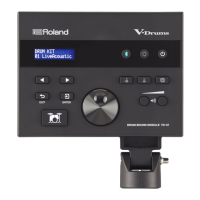
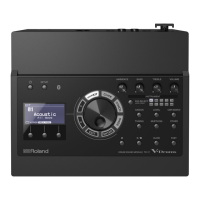
The sound module, which is the brain of the TAIKO-1, processes the input from the pads and outputs the selected sounds. It includes a graphic LCD display (128 x 64 dots) that shows various information during operation, such as kit number, trigger strength, and menu settings. The module features dedicated buttons for navigation, volume control, and function selection, making it intuitive to operate.
One of the key features of the TAIKO-1 is its "ji-uchi" function, which provides a basic rhythm or base beat for songs, similar to a metronome. This is crucial for practicing rhythmic accuracy and improving performance skills. The instrument also includes a metronome function with adjustable tempo, beat, rhythm type, and sound, further aiding in practice.
For connectivity, the TAIKO-1 offers a variety of jacks:
- OUTPUT jack (mono): For connecting to amplified speakers or mixers.
- PHONES jack: For connecting headphones, allowing for private practice.
- MIX IN jack: For connecting external audio devices, enabling users to play along with songs from other sources.
- TRIGGER INPUT connectors: For connecting the trigger cables from the pads to the sound module.
- FOOT SW jack: For connecting an optional footswitch (BOSS FS-5U, FS-6, FS-7) to control various functions like kit switching or set list navigation.
- EXP PEDAL jacks: For connecting optional expression pedals (EV-5, BOSS EV-30) to control parameters such as overall volume, pitch, or ji-uchi tempo.
- USB MEMORY Port: For connecting a USB flash drive, likely for importing samples or saving/loading data.
- USB COMPUTER jack (MIDI): For connecting to a computer via a USB Micro B cable, enabling MIDI communication.
- DC IN jack: For connecting the included AC adaptor.
The TAIKO-1 also boasts Bluetooth® functionality (Ver 4.2), supporting A2DP (Audio) and GATT (MIDI over Bluetooth Low Energy) profiles. This allows users to wirelessly connect their mobile devices to the TAIKO-1 to play music through the instrument, making it easy to practice along with favorite tracks.
Usage Features
The TAIKO-1 is designed for ease of use, from assembly to advanced performance.
Assembly: The manual provides clear, step-by-step instructions for assembling the TAIKO-1. This involves attaching the rods to the pads, securing the sound module with rubber rings, and connecting the trigger cables. The process is straightforward, and the manual emphasizes precautions like spreading a blanket to prevent scratches and handling rubber rings carefully.
Power Supply: The TAIKO-1 can be powered by the included AC adaptor or eight AA Ni-MH batteries, offering flexibility for both studio and portable use. The manual advises against using alkaline or carbon-zinc batteries and provides instructions for battery installation and monitoring battery life.
Basic Operation:
- Turning On/Off: The instrument is turned on by pressing the [] button and off by long-pressing it. Users are advised to adjust the volume of connected devices before powering on/off to prevent sudden sounds.
- Volume Adjustment: The [][] buttons control the overall volume.
- Sound Selection (Kits): Users can easily switch between the 50 preset kits using the [-] [+] buttons from the top screen.
- Navigation: The [▲] [▼] buttons move the cursor through menu items, and the F1/F2 buttons (context-sensitive) select functions or switch between tabs.
- Value Adjustment: The [-] [+] buttons are used to modify values highlighted by the cursor. A "TOMOE boost" function allows for ultra-high-speed value changes when the [6] (tomoe) button is held down while pressing [+] [-].
- Output Mode Setting: The output can be optimized for headphones or speakers via the "Output Setting" menu, ensuring the best sound quality for the chosen output device.
Performance and Practice:
- Playing Along with Songs: Music from external devices can be played through the TAIKO-1 via the MIX IN jack or wirelessly via Bluetooth®, allowing drummers to practice along with their favorite tracks.
- Lesson Function: This feature includes:
- Ji-uchi: Provides a basic rhythm with adjustable volume, track pattern, tempo, and velocity, helping users develop rhythmic accuracy.
- Metronome: Offers a standard metronome with customizable tempo, beat, rhythm type, and sound.
- Practice: A unique mode that alternates between "Sounding" (click heard) and "Quiet" (no click) measures, challenging users to maintain tempo independently. It also provides an accuracy percentage after the quiet region.
- Recording (Rec): Users can record their performances and play them back repeatedly. The recording function includes a loop option for continuous playback.
Customization:
- Active Pad: The TAIKO-1 allows users to enable or disable individual pads, which can be useful if only one pad is desired for play, preventing unintended sounds from the lower surface.
- Global Settings: The "Others" menu provides access to various global settings, including output jack settings, pedal jack assignments, MIDI settings, master equalizer, master compressor, LCD contrast and backlight, and Auto Off function. The Auto Off function can be set to turn off the unit after 4 hours or 10 minutes of inactivity, or it can be disengaged entirely.
Maintenance Features
The manual emphasizes several aspects of maintenance to ensure the longevity and optimal performance of the TAIKO-1.
General Handling:
- Protection during Assembly: Users are advised to spread a blanket or similar material to prevent scratches to the TAIKO-1 or the floor during assembly.
- Care when Turning Over: When turning the unit over, care must be taken to protect buttons and knobs from damage. The unit should be handled gently to avoid dropping it.
- Avoiding Excessive Force: Do not strike any location other than the surface or rim of the pad (e.g., rods or sound module) to prevent malfunctions and faulty operation. Also, avoid striking the projection of the rim, as this can damage the bachi (sticks) and cause malfunctions.
- Connection Cables: Use only the specified expression pedal and avoid connection cables with built-in resistors to prevent malfunction or damage.
- External Memory Devices: Follow precautions when handling USB flash drives, such as not removing them during read/write operations and discharging static electricity before handling.
Consumable Parts:
- Head and Rim: The rubber components of the head and rim are consumable parts that will degrade over time. If the head tears or sags even after tension adjustment, or if the rim is damaged, it should be replaced. Users are warned not to insert hands or fingers into the gap between the frame and the head when replacing the head to prevent injury.
- Pad Surface: The rubber portion of the striking surface is treated with a preservative. White stains or marks from product testing may appear, but these do not affect performance. Continuous playing may cause discoloration of the pad, which also does not affect its function.
Data Management:
- Backup: Users are strongly advised to regularly back up any data stored on the TAIKO-1, as data can be lost due to equipment failure or incorrect operation. Roland assumes no liability for lost data.
- Saving Settings: Unsaved data will be lost when the power turns off. Users should save any desired settings before powering down.
Cleaning: While not explicitly detailed, general electronic device cleaning practices (e.g., wiping with a soft, dry cloth) would apply to the TAIKO-1's sound module and pads.
Disassembly: The manual provides instructions for disassembling the TAIKO-1, which involves detaching the sound module, loosening bolts, and pulling out the rods. This is useful for transport or storage.
Factory Reset: The "Factory Reset" function allows users to return all settings to their factory-set condition. However, this operation will erase all saved settings, so users should be aware of the implications before proceeding.
Regulatory Compliance: The manual includes "IMPORTANT NOTES" and "USING THE UNIT SAFELY" leaflets, which contain crucial information regarding safe operation, intellectual property rights, and disposal regulations. Users are encouraged to read these documents carefully and keep them for immediate reference. It also warns against disassembling, modifying, or removing certification labels, as these actions may be subject to legal penalties.
Overall, the Roland TAIKO-1 is a robust and feature-rich electronic taiko percussion instrument, designed to meet the needs of both aspiring and experienced drummers with its authentic sounds, versatile practice tools, and user-friendly interface.

 Need help?
 General

 To Next Page